




What Are BOGO Deals?
WooCommerce does not support “Buy One Get One” natively. The Classic Monks Enable BOGO (Buy One Get One) Deals feature adds it as a coupon discount type. You configure which products are the “buy” side, which are the “get” side, and how much of the “get” price is discounted. The deal is then evaluated automatically during cart and checkout calculation.
Common patterns include:
- Buy 1 T-Shirt, Get 1 Free (same product, 100% off the second)
- Buy 2 Books, Get 1 at 50% Off
- Buy Any Electronics, Get Accessories 25% Off (cross-category)
- Buy $100 of Clothing, Get Shoes Free (category-based)
Why You Need It
BOGO promotions are a proven retail lever:
- Increase average order value. Customers add more items to reach the “get” threshold.
- Move inventory. BOGO on slow-moving stock clears units faster than an equivalent percentage discount.
- Raise perceived value. “Buy 1 Get 1” reads as a stronger deal than “50% off” to many shoppers.
- Reduce margins less per unit. Because the customer still pays for the “buy” product, the per-sale cost is often better than a blanket percentage cut.
How to Create BOGO Deals in WooCommerce
Step 1: Enable the Feature
- Open Classic Monks in your WordPress admin sidebar.
- Open the WooCommerce tab.
- Open the Coupons subtab.
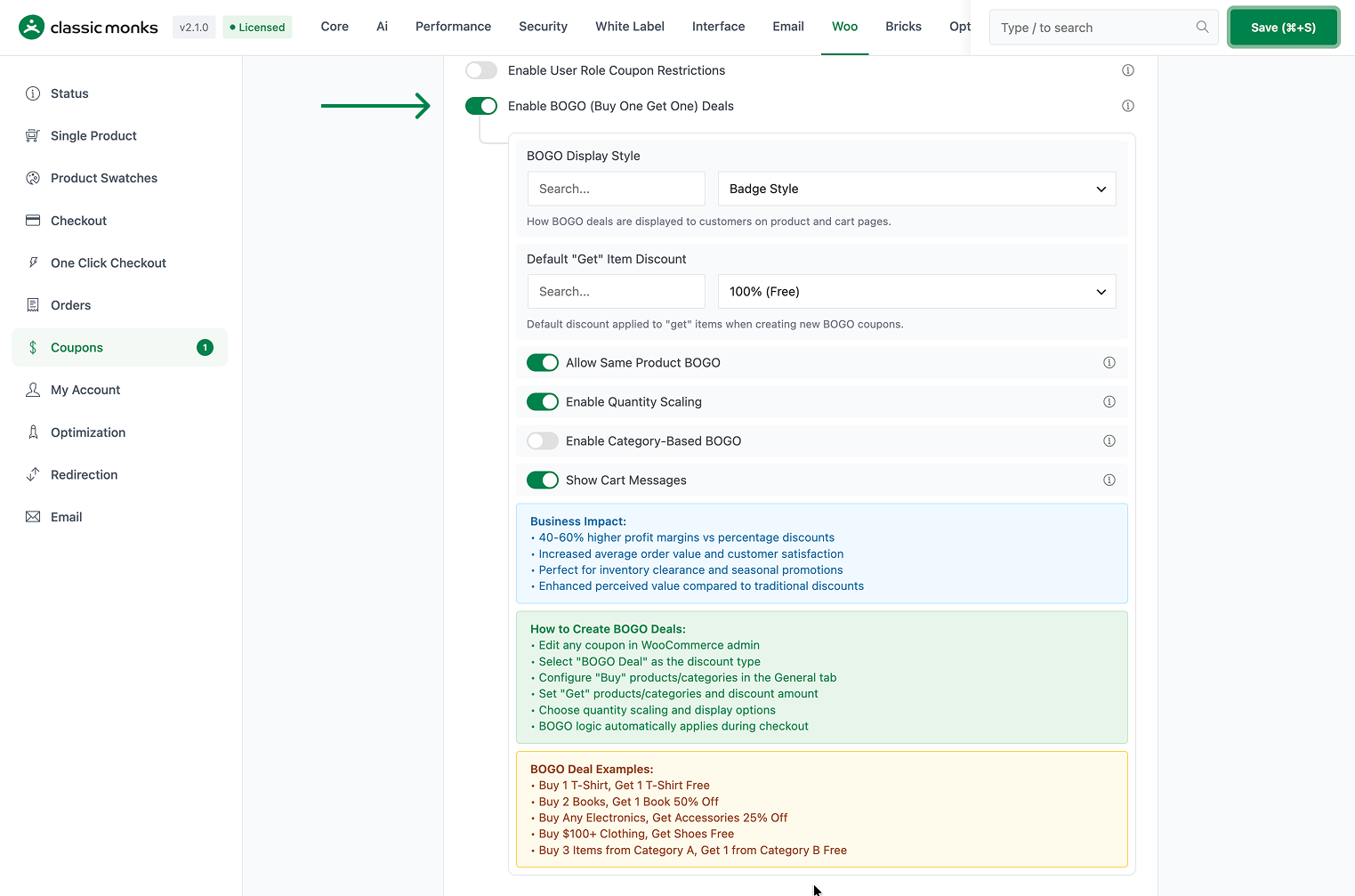
- Toggle on Enable BOGO (Buy One Get One) Deals. The nested options expand below the toggle.
Step 2: Configure the Display Style
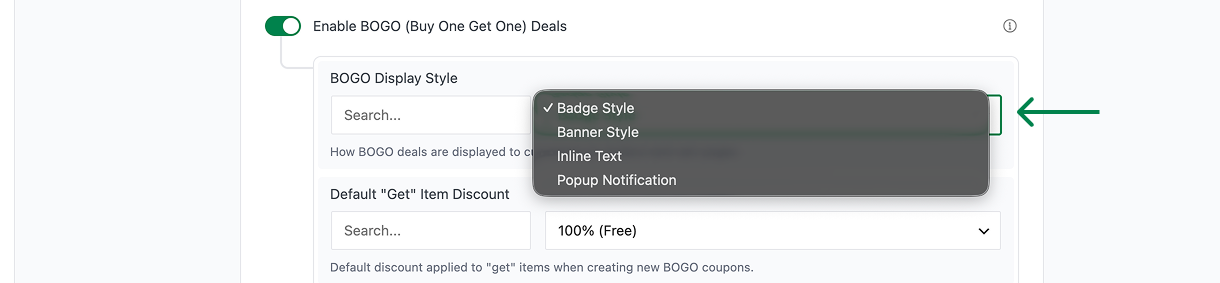
- BOGO Display Style controls how the offer appears on product and cart pages:
- Badge Style (default) shows a badge on the product.
- Banner Style shows a banner.
- Inline Text shows inline offer text.
- Popup Notification shows a popup.
Step 3: Set the Default “Get” Discount
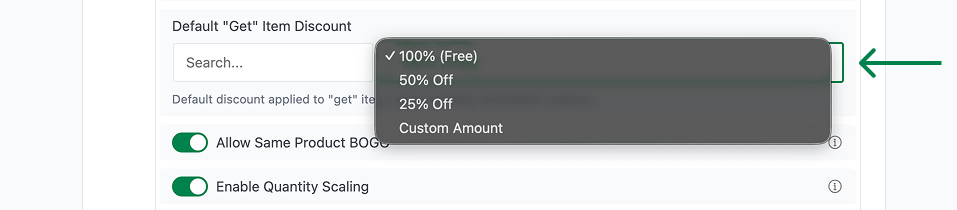
- Default “Get” Item Discount sets the discount applied to the “get” items when you create a new BOGO coupon:
- 100% (Free) (default)
- 50% Off
- 25% Off
- Custom Amount (enter a percentage in Custom Discount Amount (%), default 75, range 1-100)
Step 4: Configure BOGO Behavior Toggles
- Allow Same Product BOGO (On by default) permits the “buy” and “get” to be the same product (for example, Buy 2 shirts, Get 1 free).
- Enable Quantity Scaling (On by default) allows scaled deals like Buy 2 Get 2 or Buy 3 Get 3 based on quantity multiples.
- Enable Category-Based BOGO (Off by default) allows the “buy” and “get” sides to come from different product categories (for example, Buy any shirt, Get any pants 50% off).
- Show Cart Messages (On by default) displays messages in the cart when a BOGO deal applies or becomes available.

Step 5: Create a BOGO Coupon
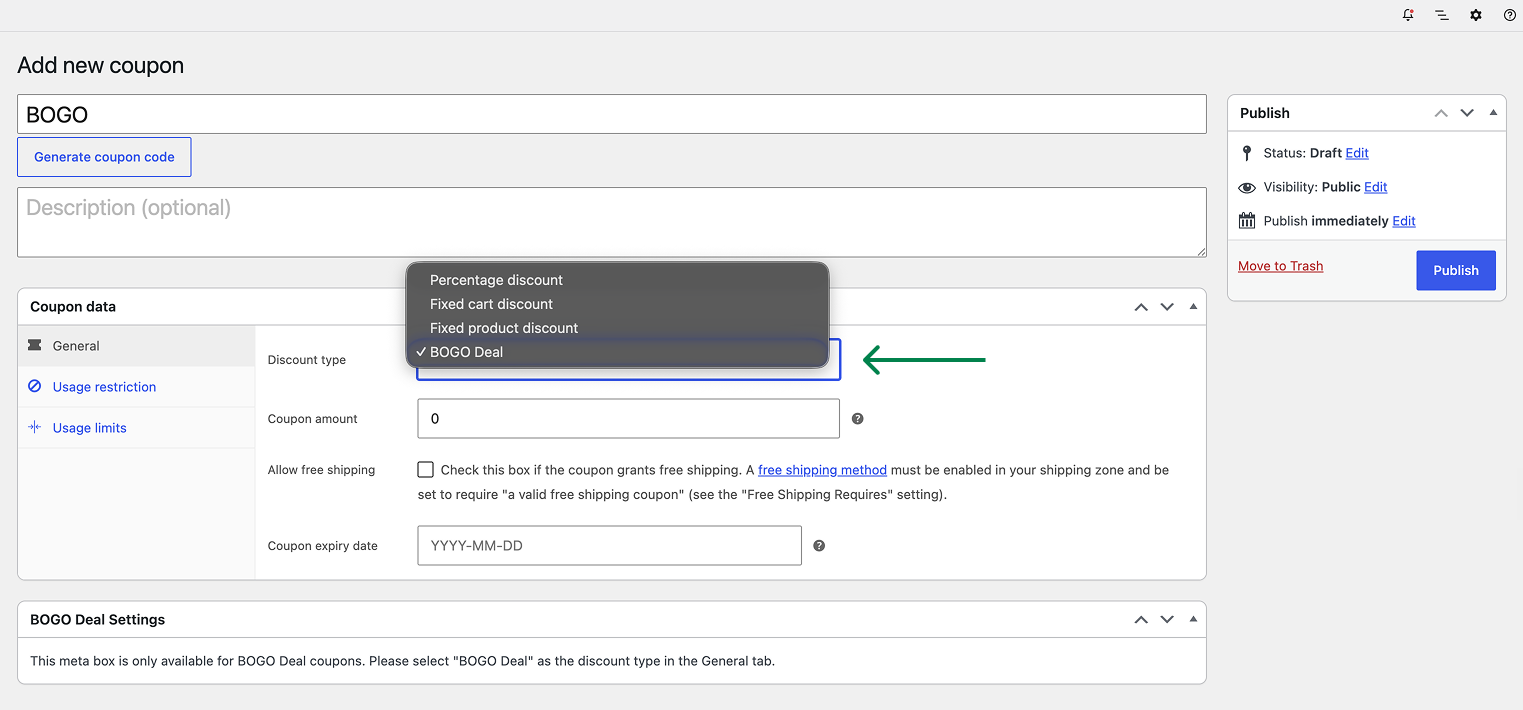
- Go to WooCommerce > Coupons and click Add coupon.
- Set the Discount type to BOGO Deal.
- In the General tab, set the “Buy” products or categories.
- Set the “Get” products or categories and the discount amount.
- Choose quantity scaling and display options.
- Publish the coupon.
Step 6: Save Changes and Test
Click Save Changes in the Classic Monks settings. Add the qualifying “buy” items to the cart and confirm the “get” discount applies automatically at the configured rate.
Configuration Options
| Option | Behavior | Default |
|---|---|---|
| Enable BOGO (Buy One Get One) Deals | Master toggle for the feature. | Off |
| BOGO Display Style | Badge, Banner, Inline Text, or Popup Notification. | Badge Style |
| Default “Get” Item Discount | 100% (Free), 50%, 25%, or Custom Amount. | 100% (Free) |
| Custom Discount Amount (%) | Custom “get” discount, only shown when the default is Custom. | 75 |
| Allow Same Product BOGO | Let “buy” and “get” be the same product. | On |
| Enable Quantity Scaling | Support scaled deals based on quantity multiples. | On |
| Enable Category-Based BOGO | Allow cross-category “buy”/”get” matching. | Off |
| Show Cart Messages | Display cart messages about BOGO availability and application. | On |
Per-coupon, the BOGO Discount type and the “Buy”/”Get” product or category configuration define the actual deal.
What Gets Affected
- Coupon types: a new BOGO Deal discount type is registered
- Cart calculation: BOGO deals are evaluated and applied automatically at checkout
- Product pages: badges, banners, inline text, or popups show the offer (per display style)
- Cart messages: texts explain when a deal applies or how to qualify
What Does NOT Get Affected
- Other coupon types: percentage, fixed, and free-shipping coupons behave as before
- Standard Add to Cart and product data: BOGO discounts are added at calculation, not baked into prices
- Coupons that allow stacking: BOGO may combine with other coupons where your stacking rules allow it
- Manual code entry: BOGO coupons still work when applied as a code, in addition to auto application
Advanced Options (Developers)
The feature registers its hooks in functions/woocommerce/coupons/bogo-deals.php:
add_filter( 'woocommerce_coupon_discount_types', 'cm_add_bogo_discount_type' );
add_filter( 'woocommerce_coupon_get_discount_amount', 'cm_bogo_coupon_discount_amount', 10, 5 );
add_action( 'woocommerce_cart_loaded_from_session', 'cm_validate_bogo_coupons', 20 );

add_action( 'add_meta_boxes', 'cm_add_bogo_coupon_meta_box' );
add_action( 'save_post', 'cm_save_bogo_coupon_meta_box' );woocommerce_coupon_discount_typesregisters the BOGO Deal discount type.woocommerce_coupon_get_discount_amountcalculates the BOGO discount for the cart.woocommerce_cart_loaded_from_session(priority 20) validates BOGO coupons when the cart loads.woocommerce_before_cart_contentsdisplays BOGO cart messages andwoocommerce_before_single_product_summary(priority 15) shows the product badge.wp_enqueue_scriptsloads the frontend assets for the chosen display style.
Common Use Cases
Same-product BOGO (Buy 1 Get 1 Free). Tie the offer to a specific product so customers who buy one get a second free. Keep Allow Same Product BOGO on and set the “get” discount to 100%.
Quantity-scaled bundles (Buy 3 Get 1). With Enable Quantity Scaling on, the deal scales naturally so larger quantities unlock the free or discounted item, driving bigger basket sizes.
Cross-category accessories. Use Enable Category-Based BOGO to make any item in one category trigger a discount on items in another (for example, buy any camera, get a memory card 50% off).
Inventory clearance. Run a BOGO on overstocked items so shoppers clear stock by pairing two units. The banner or badge display surface communicates the offer without re-pricing anything.
Tiered value offers. Set a custom “get” discount (for example, 75%) so the secondary item is substantially cheaper but not fully free, preserving margin while still rewarding a larger order.

Add your first comment to this post