




What Does the Feature Do?
WooCommerce registers a set of widgets for the cart, product lists, filters, reviews, and related content. The Disable All WooCommerce Widgets feature unregisters these built-in widgets, so they no longer appear in the widget admin or render in your sidebars.
When enabled, the built-in WooCommerce widgets are removed as a group. The store and its widgets’ data are unaffected; the widgets just stop being available.
Why You Need It
The default store widgets may not fit every layout:
- A design may not use product filter, cart, or review widgets
- Removing unneeded widgets keeps the widget selection focused
- It reduces the number of widget blocks available in page builders
- Sites that rely on custom sidebars keep only the widgets they use
How to Disable All WooCommerce Widgets
Step 1: Enable the Feature
- In WordPress admin, open Classic Monks > WooCommerce.
- Open the Optimization settings area.
- Toggle on Disable All WooCommerce Widgets.
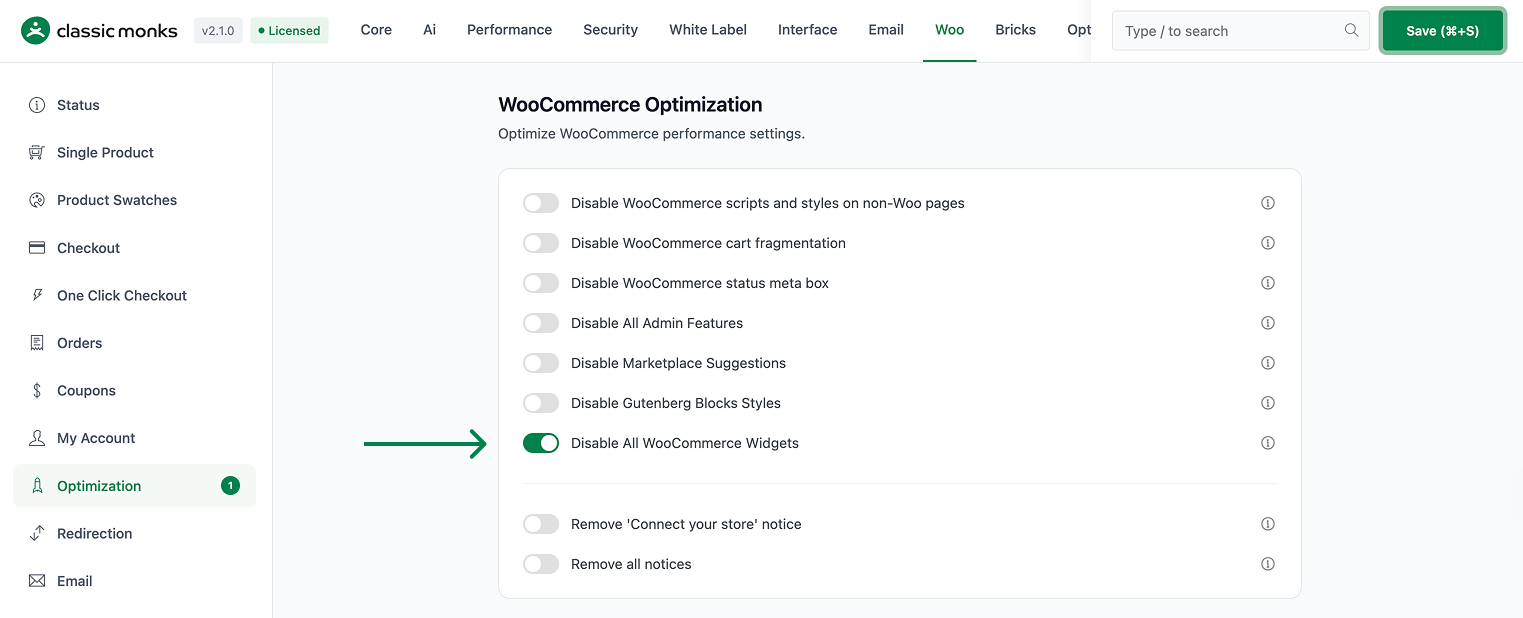
Step 2: Save and Test
Click Save Changes. Open Appearance > Widgets and confirm the WooCommerce widgets no longer appear among the available widgets.
Configuration Options
| Option | Default |
|---|---|
| Disable All WooCommerce Widgets | Off |
There are no nested options. The feature is a single on/off control.
What Gets Affected
- WooCommerce’s built-in widgets: unregistered from the widget system
- The widget admin: the disabled widgets no longer appear
- Widget areas that used them: those widgets stop rendering
What Does NOT Get Affected
- WooCommerce products, cart, and orders: fully functional
- Custom widgets from themes or other plugins: unaffected
- Any widgets currently in use on a sidebar if this is toggled on: they are no longer available for new placements
Advanced Options (Developers)
The feature is wired in functions/woocommerce/woocommerce-functions.php:
add_action( 'widgets_init', 'cm_disable_woocommerce_widgets' );widgets_init calls cm_disable_woocommerce_widgets(), which unregisters the built-in WooCommerce widget classes, including the cart, products, layered/nav filter, price filter, rating filter, recent reviews, product search, recently viewed, tag cloud, categories, top rated, and layered/nav filter widgets.
Common Use Cases
Clean widget admin. Stores that do not use filter or review widgets get a focused widget selection.
Custom sidebar designs. Layouts built with specific widgets only keep the widgets they actually place.
Lightweight themes. Simpler themes benefit from not exposing the full WooCommerce widget set.
Keeping It Set Up
Set the toggle once and it stays active across the site. To change behavior, return to the WooCommerce settings, adjust the option, and save again. The store continues to run normally throughout, and you can turn the feature off at any time to restore the previous default behavior. For teams managing multiple environments, confirm the setting on staging first, then apply it to production and verify a real page load before treating it as live.

Add your first comment to this post