




What Does the Feature Do?
WooCommerce adds admin areas for analytics and marketing on top of the core shop. The Disable WooCommerce Admin Features feature suppresses those admin experience additions:
- It disables the WooCommerce admin via WooCommerce’s
woocommerce_admin_disabledflag - It empties the marketing menu items
- It clears WooCommerce’s registered admin features
The core shop, products, orders, and settings remain available. Only the admin dashboard additions are suppressed.
Why You Need It
Not every store uses the analytics and marketing admin areas:
- A lite or product-focused store may not need them
- Removing unused admin UI reduces visual clutter in the dashboard
- It keeps staff focused on the shop and orders
- It lightens the admin for sites that rely on other tools
How to Disable WooCommerce Admin Features
Step 1: Enable the Feature
- In WordPress admin, open Classic Monks > WooCommerce.
- Open the Optimization settings area.
- Toggle on Disable WooCommerce Admin Features.
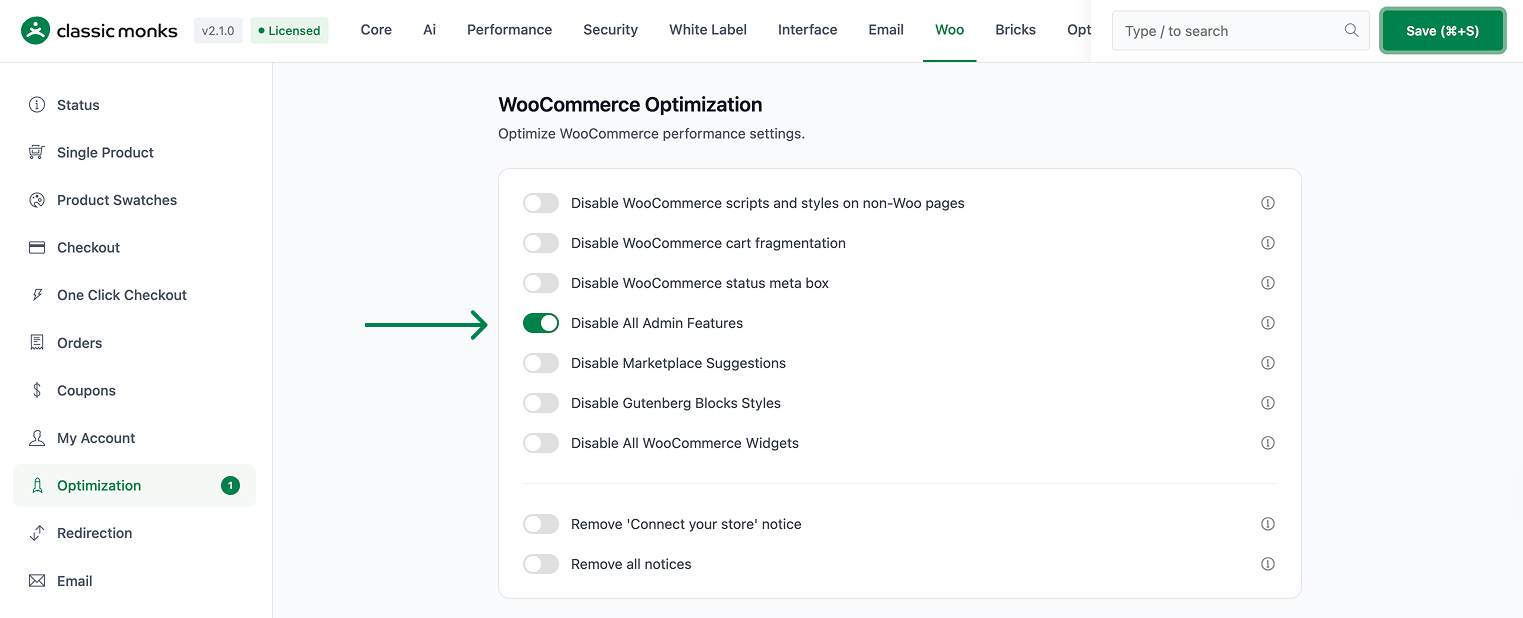
Step 2: Save and Test
Click Save Changes. Reload the WooCommerce admin area. The analytics and marketing dashboard additions the feature targets should no longer appear, while the shop and order management remain.
Configuration Options
| Option | Default |
|---|---|
| Disable WooCommerce Admin Features | Off |
There are no nested options. The feature is a single on/off control.
What Gets Affected
- WooCommerce’s admin experience areas: suppressed
- The marketing menu items: removed from the WooCommerce admin
- The registered admin feature list: cleared
What Does NOT Get Affected
- Products, orders, customers, and settings: fully available
- The shop and checkout on the front end: unchanged
- Other admin menus in WordPress outside the targeted WooCommerce additions: unaffected
Advanced Options (Developers)
The feature registers its logic in functions/woocommerce/woocommerce-functions.php:
add_filter( 'woocommerce_admin_disabled', '__return_true' );
add_filter( 'woocommerce_marketing_menu_items', '__return_empty_array' );
add_filter( 'woocommerce_admin_features', function (array $features): array {
    return [];
}, 90 );
When enabled, the feature sets WooCommerce’s admin-disabled flag to true, clears the marketing menu, and returns an empty admin features list at priority 90.
Common Use Cases
Lite stores. Stores that only sell through the shop do not need analytics and marketing admin areas.
Staff focus. Removing unused admin sections keeps the dashboard centered on orders and products.
Single-purpose sites. When the admin experience is handled elsewhere, suppressing the WooCommerce admin additions avoids duplication.
Keeping It Set Up
Set the toggle once and it stays active across the site. To change behavior, return to the WooCommerce settings, adjust the option, and save again. The store continues to run normally throughout, and you can turn the feature off at any time to restore the previous default behavior. For teams managing multiple environments, confirm the setting on staging first, then apply it to production and verify a real page load before treating it as live.

Add your first comment to this post