




What Does the Feature Do?
On a variable product page, WooCommerce leaves every variation unselected until the customer picks one. That is one extra step before the add to cart action can be used. The Auto-Select First Variation feature preselects the first option in each variation dropdown as soon as the page renders.
It works through the dropdown argument filter, so when a dropdown has options, the first one is set as the selected value.
Why You Need It
Preselecting the first variation removes friction:
- Customers reach the add to cart action faster
- The default option is already chosen, so the price and selection state render immediately
- Stores with the most popular option listed first give new customers a sensible default
- The customer can still change the selection to any other variation
How to Auto-Select the First Variation in WooCommerce
Step 1: Enable the Feature
- In WordPress admin, open Classic Monks > WooCommerce.
- Open the Single Product settings area.
- Toggle on Auto-Select First Variation.
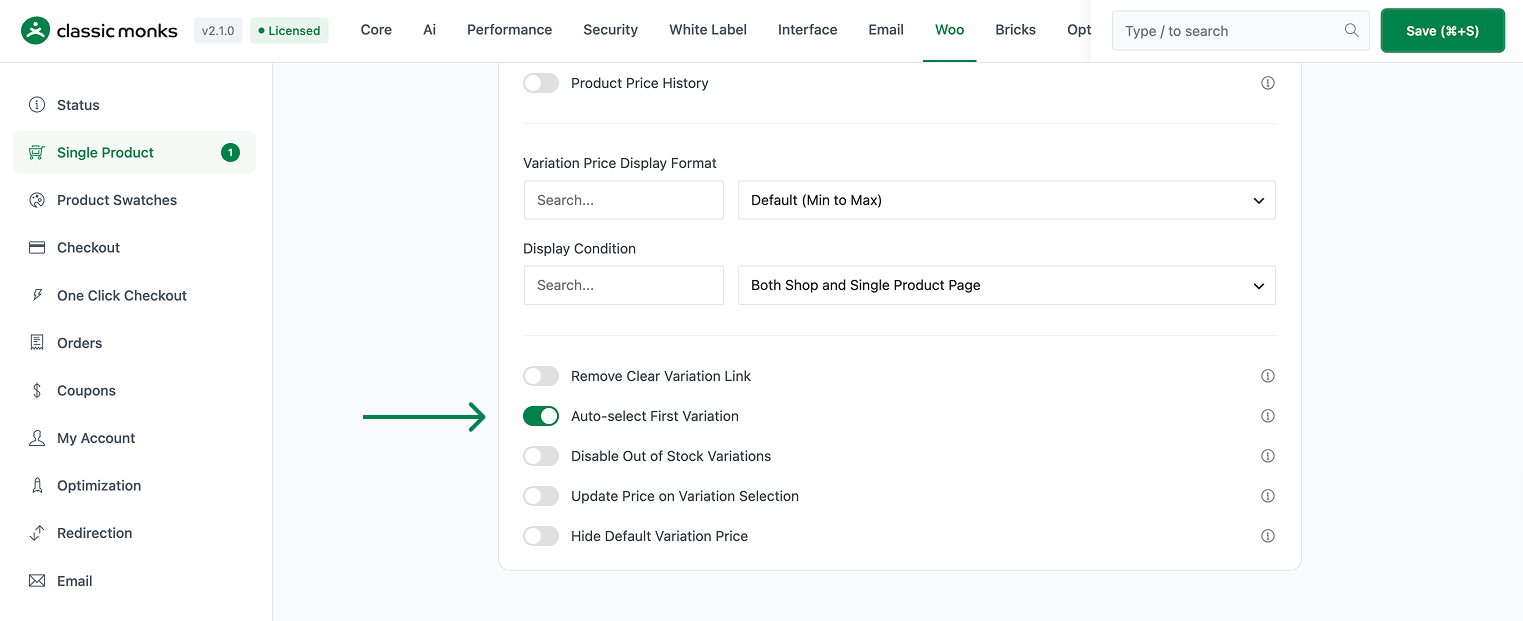
Step 2: Save and Test
Click Save Changes. Visit a variable product on the front end. The first option in each variation dropdown should be preselected, and the customer can still pick another variation.

Configuration Options
| Option | Default |
|---|---|
| Auto-Select First Variation | Off |
There are no nested options. The feature is a single on/off control.
What Gets Affected
- Variable product pages: the first option in each variation dropdown is preselected on load
- The selection state: a variation is chosen as soon as the page renders
What Does NOT Get Affected
- The variation choices themselves: all options remain available to change
- The product data and prices: these are unchanged
- Non-variable products: the feature only applies to variable products with dropdown options
- The cart: the feature preselects an option; it does not add anything to the cart
Advanced Options (Developers)
The feature registers its logic in functions/woocommerce/variation-display.php, gated on the Auto-Select First Variation option:
add_filter( 'woocommerce_dropdown_variation_attribute_options_args', function($args) {
    if (count($args['options']) > 0) {
        $args['selected'] = $args['options'][0];
    }
    return $args;
});
woocommerce_dropdown_variation_attribute_options_args modifies the dropdown options before rendering. When the dropdown has at least one option, the first one is set as the selected value.

Add your first comment to this post