




What Does the Feature Do?
WooCommerce shows the original price crossed out next to the sale price, but it does not tell the shopper how much they actually save. The Show Price Savings feature adds a [price_savings] shortcode that prints the difference between the regular and sale price with customizable surrounding text.
When placed in a product context, the shortcode reads the current product’s regular and sale prices, shows the savings as a formatted WooCommerce price, and wraps it in your prefix and suffix text. If the product is not on sale, it outputs nothing.
Why You Need It
Displaying the saved amount is a well-known conversion lever:
- It makes the value of a sale concrete instead of abstract
- “You save $20 now” reads as a stronger reason to buy than a crossed-out price
- It works on the product page, archives, and custom layouts
- It is easy to tune: change the prefix and suffix once, and it updates across the site
How to Show the Amount Saved on Sale Products in WooCommerce
Step 1: Enable the Feature
- In WordPress admin, open Classic Monks > WooCommerce.
- Open the Single Product settings area.
- Toggle on Show Price Savings.
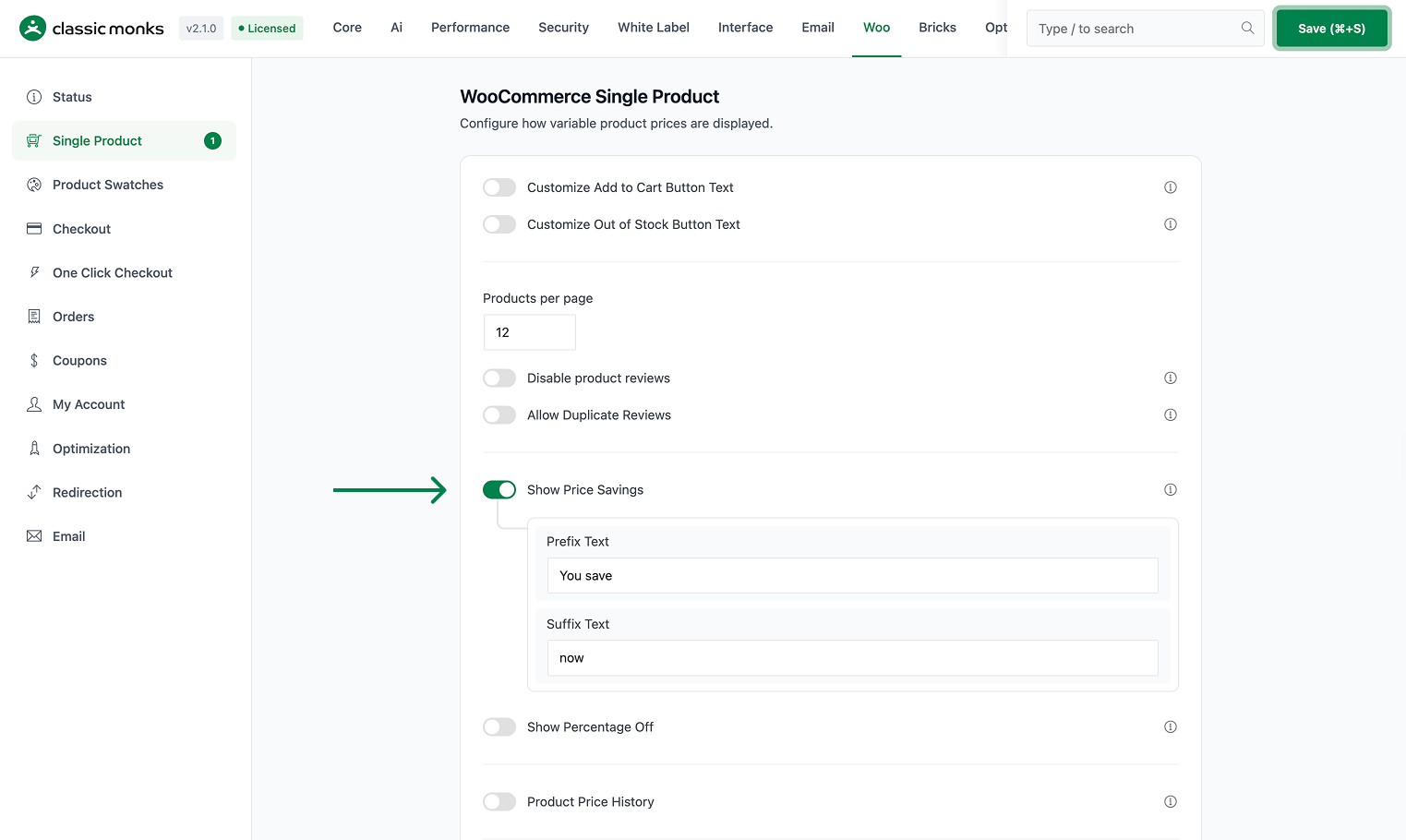
Step 2: Set the Surrounding Text
- Prefix Text appears before the amount (default
You save). - Suffix Text appears after the amount (default
now).
Together, the output reads like “You save $20 now”.
Step 3: Place the Shortcode
Insert the shortcode where you want the savings displayed:
[price_savings]This works on the single product page, in page-builder content, and in loop templates, as long as a product is in context. If you also enabled Show Percentage Off, use [percentage_off] for the discount percent.
Step 4: Save and Test
Click Save Changes. Open a product that is on sale and confirm the savings message appears where you placed the shortcode. Products not on sale show nothing.
Configuration Options
| Option | Behavior | Default |
|---|---|---|
| Show Price Savings | Master toggle for the [price_savings] shortcode. |
Off |
| Prefix Text | Text before the saved amount. | You save |
| Suffix Text | Text after the saved amount. | now |
| Show Percentage Off | Separate toggle for the [percentage_off] shortcode. |
Off |
What Gets Affected
- Any page containing the
[price_savings]shortcode: the saved amount renders when the product is on sale - Customizable wording: prefix and suffix apply wherever the shortcode is used
What Does NOT Get Affected
- The WooCommerce price display: the regular and sale prices keep their normal formatting
- Sale prices themselves: savings are calculated from the existing regular and sale prices
- Cart and checkout: the shortcode is for product display, not order totals
- Products not on sale: these output nothing from the shortcode
How the Savings Is Calculated
The shortcode looks at the current product’s regular price and sale price, subtracts the sale price from the regular price, and formats the result as a WooCommerce price. The percentage version divides the savings by the regular price and multiplies by 100, shown to two decimal places.
- Amount version (
[price_savings]):regular price - sale price, formatted with the store currency. - Percent version (
[percentage_off]):((regular price - sale price) / regular price) * 100, shown as e.g.Flat 25.00% off.
Both require the current global product to be on sale; otherwise the shortcode returns empty.

Add your first comment to this post