

The short answer: ASE (Admin and Site Enhancements) is a focused WordPress enhancement suite built around admin cleanup, content utilities, security switches, and a wide set of narrow controls. Classic Monks is a broader modular core stack that covers those admin jobs and then adds Bricks Builder, WooCommerce, AI, performance operations, media management, setup automation, staging protection, and agency white label. If the job is only admin and site tweaks, ASE is a strong free starting point. If the job includes building, operating, and handing over WordPress sites, Classic Monks is the broader fit. This page stays honest about both directions.
I build Classic Monks as part of the team behind it, so this page is biased in that direction. To keep it fair, I re-verified ASE’s official feature list and pricing and mapped every claim against both products’ current inventories rather than relying on memory or older posts.
Quick verdict: Choose Classic Monks when you want one broader stack for building, operating, and handing over WordPress sites. Keep ASE when you depend on Custom Content Types, its Form Builder, full backup and migration, File Manager operations, or a narrow ASE workflow that Classic Monks does not currently match. Run both during migration if that reduces risk.
Freshness check: Both plugins are active. Classic Monks is at 2.3.0 (September 9, 2026) with a documented changelog. ASE is at 9.0.0 with 76 modules (59 free, 18 Pro) on its official feature list. You are not choosing between an abandoned project and an active one; you are choosing between two different jobs.
This comparison was checked on August 19, 2026 against the ASE feature list, ASE pricing, the Classic Monks feature library, Classic Monks pricing, the Classic Monks changelog, and the local feature references used to verify scope.
How we classified the comparison: We marked a workflow as covered when Classic Monks supports the core job in its current implementation or documentation. Role, provider, post-type, execution-context, editor-depth, and edge-case differences stay in the notes as limitations. This is a workflow comparison, not a claim that similarly named features behave identically.
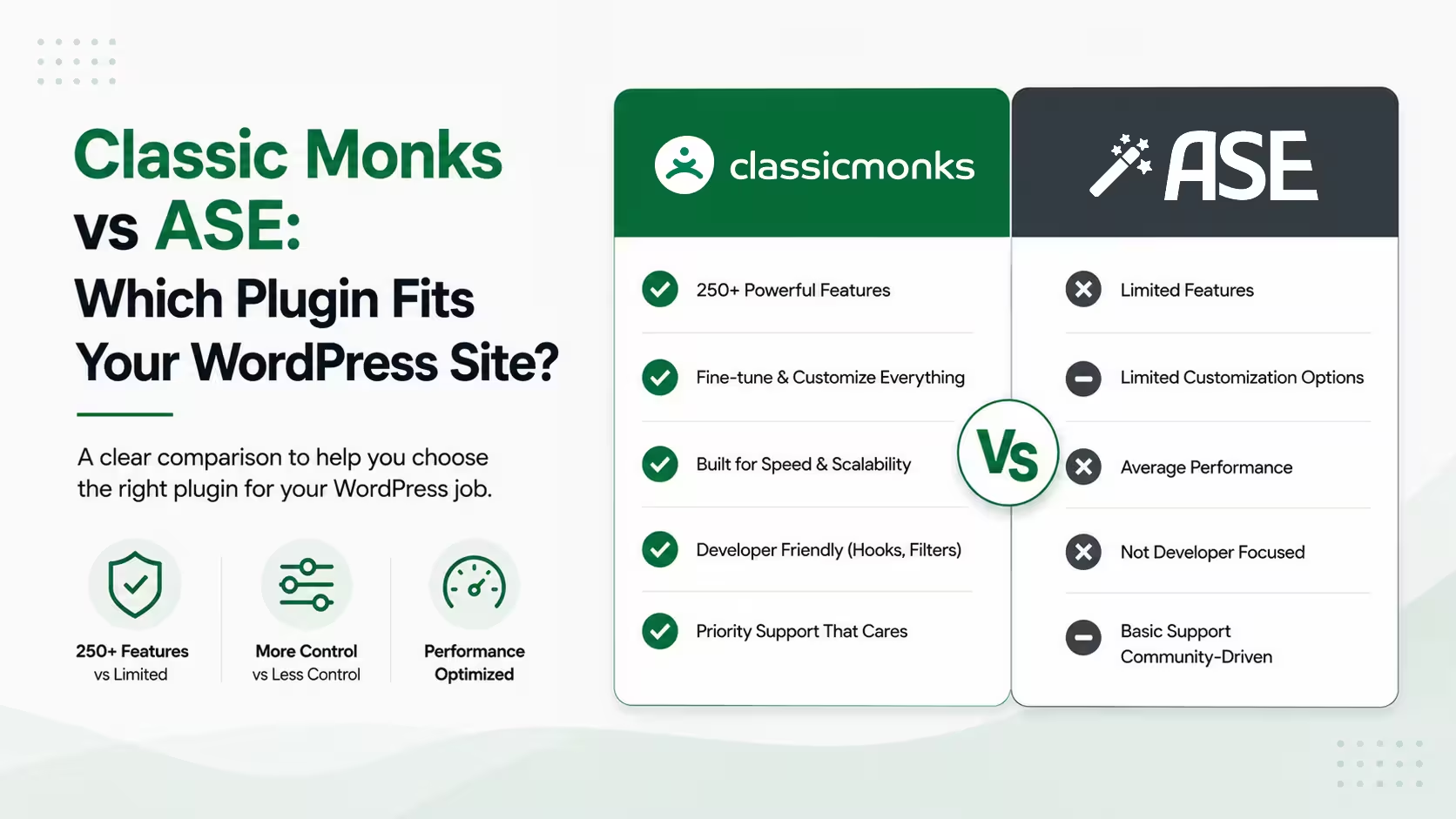
Classic Monks vs ASE at a glance
The official ASE page presents 76 feature cards. The Classic Monks feature inventory lists 393+ features across 10 tabs, including 162 Bricks-specific controls for the builder workflow. Those counts use different inventory methods, so they are not an apples-to-apples benchmark. The useful comparison is what each lets your team do.
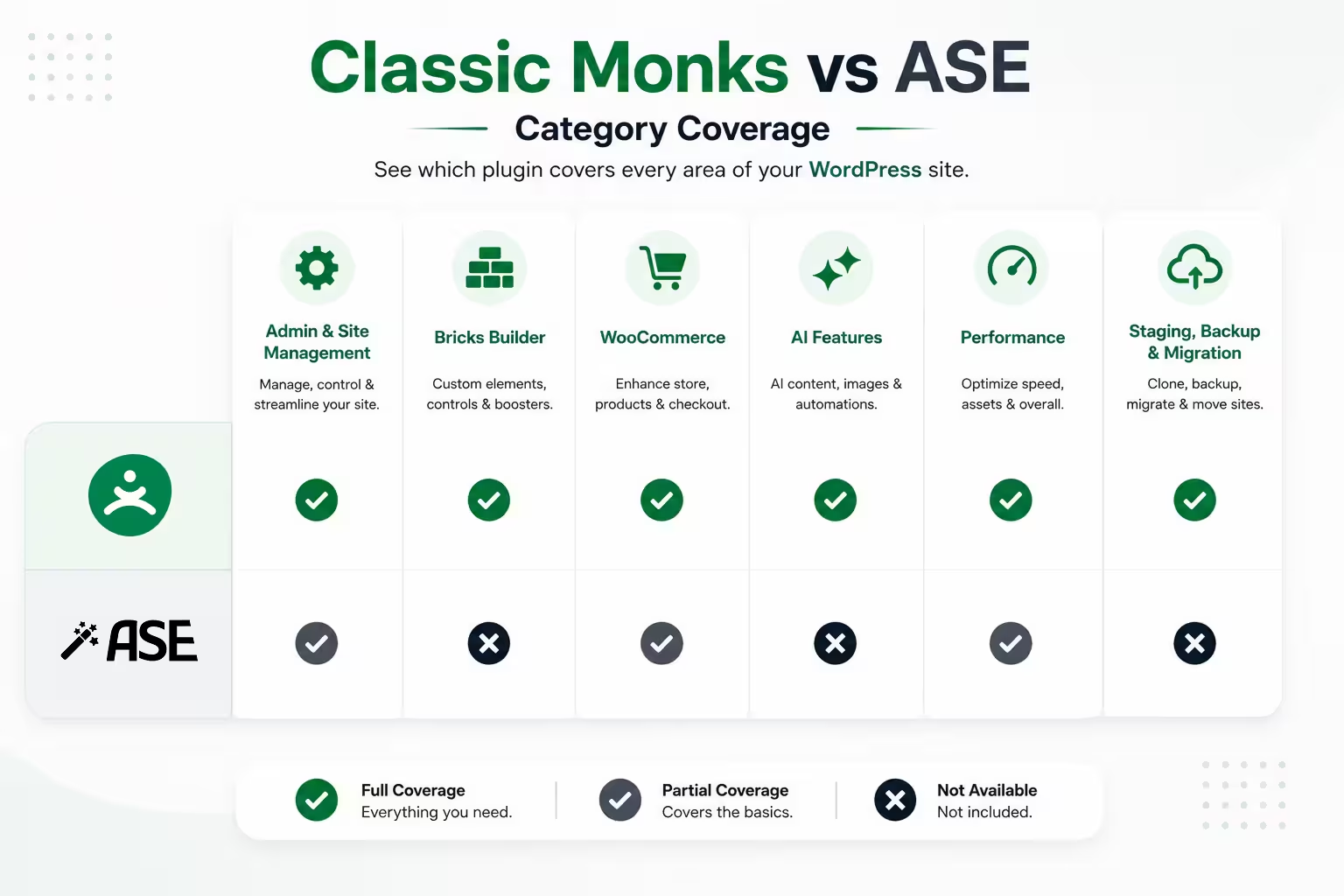
| Area | Classic Monks | ASE | Better fit |
|---|---|---|---|
| Core focus | Broader modular stack for building and operating sites | Admin and site enhancement suite | Depends on scope |
| Admin cleanup | Menu, toolbar, notices, columns, widgets, roles, branding | Strong admin cleanup and utility coverage | Tie for core admin work |
| Custom code | Code Manager: PHP, JS, CSS, HTML/PHP Content, TXT, conditions, hooks, validation, safe mode, fatal-error recovery | Code Snippets Manager with its own editor and execution options | Classic Monks for the core snippet workflow |
| Content modeling | Post and taxonomy utilities | Custom Content Types: CPTs, taxonomies, field groups, options pages | ASE |
| AI | AI Agent, AI Tools, image workflows, 8 providers, Bricks AI Builder | No AI category in the official feature list | Classic Monks |
| Bricks Builder | Native setup, Live Code Sync & Import, elements, dynamic data, conditions, interactions, optimization | No Bricks category in the official feature list | Classic Monks |
| WooCommerce | Products, checkout, coupons, orders, My Account, redirects, optimization, email | No WooCommerce category in the official feature list | Classic Monks |
| Performance | Assets Manager, CDN Rewrite, lazy loading, preloading, image conversion, asset controls | Focused WordPress and media controls | Classic Monks for broader operations |
| Setup and staging | Quick WordPress Setup, staging protection, HTTP auth, tokens, indicators | No equivalent setup or staging category listed | Classic Monks |
| Agency delivery | White-label and login branding; full plugin white label is Enterprise-only | Selected admin and login branding | Classic Monks for broader agency control |
| Pricing model | $39–$299/yr annual, $299–$599 LTD | $39–$399/yr annual, $99–$1,499 LTD | Compare scope, not the number |
The pattern you’re seeing: ASE wins on breadth of narrow backend modules, especially Custom Content Types and a real Form Builder. Classic Monks wins on the categories around the admin toolkit: builder, store, AI, performance, media, setup, staging, and white label. Neither plugin wins every row, and a lot of agencies end up running both.
Which plugin is better for WordPress admin controls?
For traditional WordPress admin work, the comparison is close. ASE has a deep set of focused modules for content management, admin interface cleanup, login and registration utilities, custom code, disable switches, security, optimization, and utilities.
Classic Monks covers many of the same core jobs with features such as:
- Admin Menu Manager and Top Toolbar Manager
- Admin Notices Manager
- Admin Columns Manager
- Code Manager for PHP, JavaScript, CSS, HTML/PHP Content, TXT files, conditions, hooks, validation, safe mode, and fatal-error recovery
- Remove Dashboard Widgets
- Wider Admin Sidebar
- Custom Taxonomy Filters
- Post Type Switcher and Taxonomy Switcher
- Content Duplication
- Custom Login URL and Login Page Customization
- Login Lockdown and 2FA
- REST API access controls and exclusions
- Disable All Updates
- Limit Post Revisions and Heartbeat controls
- SMTP, email logging, and WordPress email customization
CM Code Manager is a stronger core snippet workflow than an initial read suggests: PHP, JavaScript, CSS, HTML/PHP Content, TXT files, conditional execution, syntax validation, safe mode, automatic fatal-error recovery, and hook placement for head, body, footer, and content.
Bottom line for this category: Both are credible for core WordPress administration. ASE has more narrow utilities in some areas. Classic Monks makes more sense when admin controls are only one part of the site’s stack.
Which ASE security and WordPress controls does Classic Monks cover?
Classic Monks covers more of the ASE overlap than the first version of this comparison suggested. The current CM implementation includes:
- Login lockdown and extended lockout controls
- Cloudflare Turnstile and Math Captcha integrations
- TOTP, Email OTP, trusted devices, rate limiting, grace periods, and enrollment controls
- Email and phone protection with multiple obfuscation methods
- User-enumeration protection across author query parameters, REST user endpoints, and author archive pages
- Disable Feeds and Remove RSS Feed Links
- Disable Embeds
- Disable XML-RPC
- Image upload resizing, format conversion, skip-smaller logic, and unnecessary image-size controls
- Admin-bar and login logo replacement
- Public Post Preview with temporary URLs, expiration, and optional global password protection
These are current CM capabilities, not roadmap claims. Provider or option differences still belong in the notes, but the core jobs are covered.
Bottom line for this category: For the hardening and WordPress-control class of ASE work, Classic Monks is a strong replacement candidate. Test the exact option depth on staging before removing an ASE module.
Does Classic Monks offer more than ASE for Bricks Builder?
Yes. Bricks is one of the clearest differences between the two plugins.
The current ASE feature list does not include a Bricks Builder category. Classic Monks has a native Bricks section with tools for the builder interface, setup, elements, dynamic data, conditions, interactions, animations, imports, exports, and optimization.
Key Classic Monks Bricks tools include:
- Live Code Sync & Import for HTML, CSS, and JavaScript
- Bricks AI Builder for turning design instructions into structured Bricks layouts
- Bricks Setup for importing theme styles, global settings, and templates
- BEM Class Generator and CSS variable picking
- Dynamic data tags for WordPress, media, taxonomies, and WooCommerce
- Conditions based on users, content, media, taxonomies, and store data
- Interaction triggers and actions for custom frontend behavior
- Custom elements for galleries, tables, image comparison, hotspots, timelines, sliders, and more
- Bricks asset controls and CSS minification
If your team builds client sites with Bricks, this is not a minor feature difference. Classic Monks can sit inside the builder workflow instead of only cleaning up the WordPress dashboard around it.
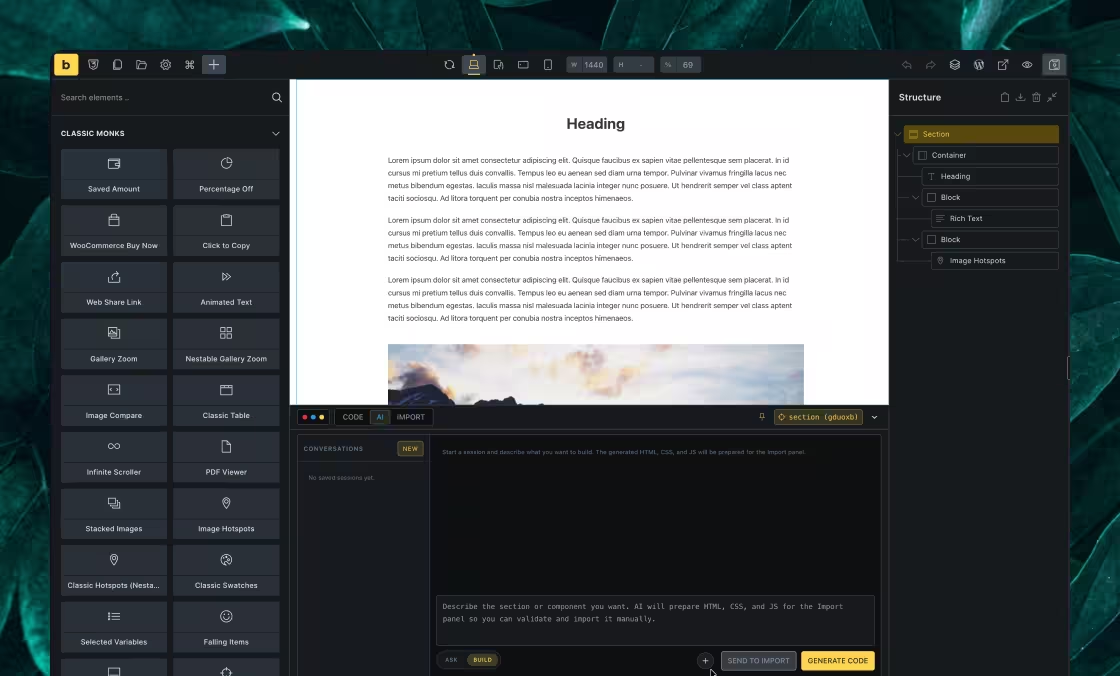
Bottom line for this category: ASE does not cover Bricks. Classic Monks does, deeply. If you build with Bricks, that gap alone explains the comparison.
What does Classic Monks add for WooCommerce?
ASE’s current official feature list does not include a WooCommerce category. Classic Monks includes a dedicated WooCommerce tab with tools for products, checkout, coupons, orders, My Account, redirects, optimization, and transactional email behavior.
The WooCommerce feature set includes:
- Product swatches for colors, images, and labels
- Variation selection and out-of-stock controls
- Checkout field cleanup, placeholders, inline validation, and custom headings
- Direct checkout links and a checkout product selector
- URL coupons, auto-apply coupons, BOGO deals, and role-based restrictions
- Custom order statuses and order-table columns
- Cart-fragmentation and WooCommerce asset controls
- Redirection for cart, login, logout, and My Account workflows
- Product price history tracking with display and shortcode options
- WooCommerce email controls
For a WooCommerce agency, Classic Monks is not only an alternative to ASE. It can also reduce the number of store-specific add-ons around the admin toolkit.
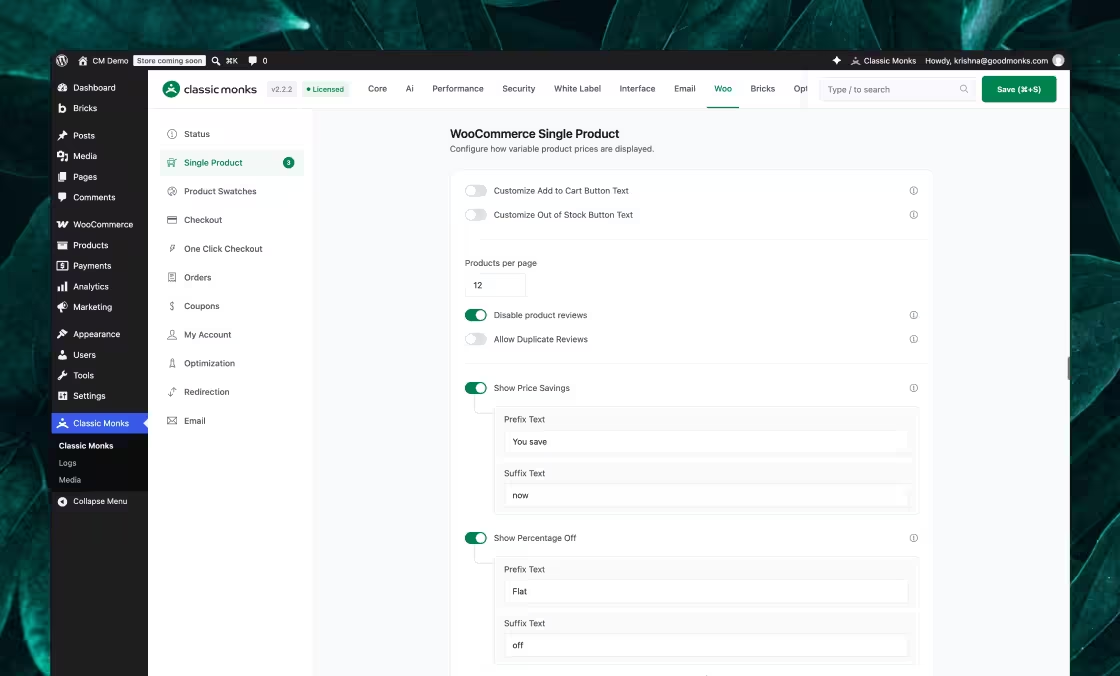
Bottom line for this category: ASE does not cover WooCommerce. Classic Monks owns that category when a store is part of the stack.
Which plugin has stronger performance and media tools?
Classic Monks has the broader performance operations layer. It does not claim to replace full-page caching, hosting-level optimization, or every dedicated performance product. Its job is to give the team more control over assets, loading, media, and WordPress output.
Classic Monks includes:
- Assets Manager for disabling CSS and JavaScript per page
- CDN Rewrite for selected site directories
- Lazy loading for images, iframes, backgrounds, videos, and YouTube embeds
- Critical-image preloading and above-the-fold exclusions
- Lazy rendering and negative loading for off-screen content
- Intelligent page preloading and selective media preloading
- Image conversion to WebP and AVIF
- Bricks asset disabling and CSS minification
- Media replacement that preserves the attachment ID and existing URLs
- Watermarks, bulk media downloads, image renaming, cleanup, and unused or missing media checks
- Folder Manager with drag-and-drop organization and multiple folders per item
ASE has media and optimization modules, including Media Categories, Media Replacement, Image Upload Control, Revisions Control, and Heartbeat Control. Classic Monks covers several of those same jobs, then adds the wider asset and media workflow.
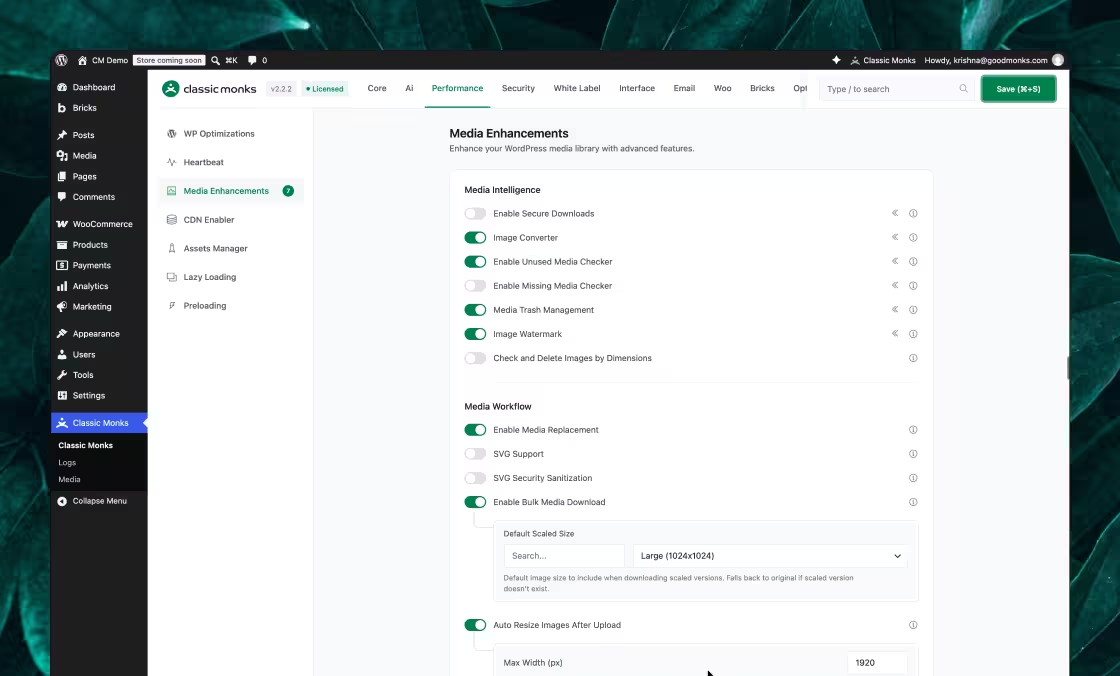
Bottom line for this category: Choose ASE for selected WordPress and media controls. Choose Classic Monks when performance and media operations are part of a larger site-delivery stack.
Which plugin is better for site setup and staging?
Classic Monks is the clearer fit for repeatable site provisioning and staging protection.
Quick WordPress Setup is a one-time wizard for fresh WordPress installations. It can configure site identity, plugins, themes, homepage settings, permalinks, standard pages, cleanup, and environment settings. Bricks Setup handles a separate builder baseline.
Classic Monks also includes Staging Protection with controls for HTTP authentication, search-engine blocking, staging indicators, access tokens, IP allowlists, URL patterns, testing tools, and development endpoints.
ASE’s current feature list does not show an equivalent setup wizard or staging-protection category.
This matters because the same setup and access mistakes repeat across projects. A setup wizard shortens the first hour. Staging controls reduce the chance that a private client site gets indexed or exposed by an overlooked access rule.
Bottom line for this category: Setup wizard and staging protection are Classic Monks territory. ASE does not list an equivalent category.
What does Classic Monks offer for AI and agency delivery?
Classic Monks includes AI workflows that are not represented in ASE’s current official feature list.
The AI layer includes an AI Agent in the WordPress admin, AI Tools for content and media workflows, alt-text generation, image generation, image editing, and support for multiple providers including OpenRouter, OpenAI, Anthropic, Google Gemini, NVIDIA, Zhipu AI, OpenAI-compatible services, and custom endpoints.
Classic Monks also goes further on agency delivery. Its white-label and branding features cover admin-bar greetings, admin footers, WordPress logos, dashboard cleanup, login backgrounds, login form styling, navigation links, notices, language controls, plugin visibility, version visibility, and support-link visibility. Full white-label plugin capability is an Enterprise-only benefit. It is not included in every plan.
ASE has selected admin and login branding features. Classic Monks is the better fit when branding is part of the client handover, not just a one-off logo change.
Bottom line for this category: AI and full agency white label sit outside ASE’s current scope. Classic Monks owns them, with the enterprise gate on full plugin rebranding made visible.
What does ASE do better than Classic Monks?
This is where the comparison stays honest. Classic Monks is broader, but it is not a 100% ASE replacement for every site.
Keep ASE, or use a dedicated product, when you depend on:
- Custom Content Types: CPTs, custom taxonomies, field groups, and options pages. A full-featured external CM plugin is on the roadmap and awaiting WordPress.org repository approval, but it is not part of the current core stack.
- Form Builder: a general drag-and-drop builder with fields, autoresponders, and webhooks. Classic Monks Form Desk manages submissions from supported systems such as Bricks Forms and Fluent Forms; it is not a general form builder.
- Full Site Backup and Migration: scheduled backup, restore, migration, and sync workflows. Classic Monks settings export/import is not a full backup system.
- File Manager: file editing, permissions, compression, extraction, and copy or move operations.
- Detailed Redirect Manager rules: regex, status codes, groups, notes, caching, or loop detection where those details matter.
- Specific narrow utilities: external permalinks, dynamic login/logout menus, role-specific login redirects, maintenance mode, media visibility rules, and custom body-class workflows.
These distinctions are not footnotes. They decide whether a migration is safe. See the Classic Monks feature library before you disable a required ASE module.
Classic Monks vs ASE pricing
In one line: Classic Monks runs $39/yr on a single site, or $299 one-time for 100 sites on the Agency lifetime plan. ASE is a strong free starting point, and its paid tiers scale up to $399/yr at the top end.
Pricing changes, so treat these as the values verified during this comparison and re-check each page before buying.
ASE annual pricing
| License | Sites | Price |
|---|---|---|
| Solo | 1 | $39/year |
| Team | 5 | $99/year |
| Business | 25 | $149/year |
| Agency | 100 | $199/year |
| Enterprise | 200 | $299/year |
| Large Agency | 500 | $399/year |
ASE also lists lifetime licenses. The verified lifetime ladder runs $99 (1 site) → $1,499 (500 sites): Solo $99 (1 site) / $299 (5), Team $499 (25) / $699 (100), Agency $1,099 (200) / $1,499 (500). This pricing is effective until December 31, 2026. Lifetime licenses include one year of support, with support renewal sold separately.
Classic Monks pricing
| Plan | Sites | Yearly | Lifetime |
|---|---|---|---|
| Personal | 1 | $39/year | Not listed |
| Professional | 25 | $119/year | Not listed |
| Agency | 100 | $199/year | $299 one-time |
| Enterprise | Unlimited | $299/year | $599 one-time |
At 25 sites, Classic Monks is currently $30 less per year than ASE’s 25-site Business license. At 100 sites the yearly prices are the same. Classic Monks also has an unlimited yearly plan at $299, while ASE’s largest listed annual license is 500 sites at $399.
The prices are not the whole story. ASE’s free version is genuinely useful and its Pro adds many narrow modules. Classic Monks bundles a wider stack including AI, Bricks, WooCommerce, performance, setup, security, media, and email tools. Compare the workflows you need, not just the license number. Check the current Classic Monks pricing before buying; plan contents and limited-time offers can change.
Can you use Classic Monks and ASE together?
Yes. Running both during migration is often the safest approach.
Do not let both plugins own the same concern. Pick one owner for:
- SMTP and email delivery
- Login lockdown
- 2FA
- CAPTCHA
- Code snippets
- Redirects
- Media replacement
- Admin menu and toolbar cleanup
- Password protection and access gates
Duplicate ownership can create conflicting hooks, duplicate emails, confusing login behavior, and rules that are difficult to debug. A common end state is Classic Monks as the operating stack and ASE only where its narrow modules are required.
How to migrate from ASE to Classic Monks
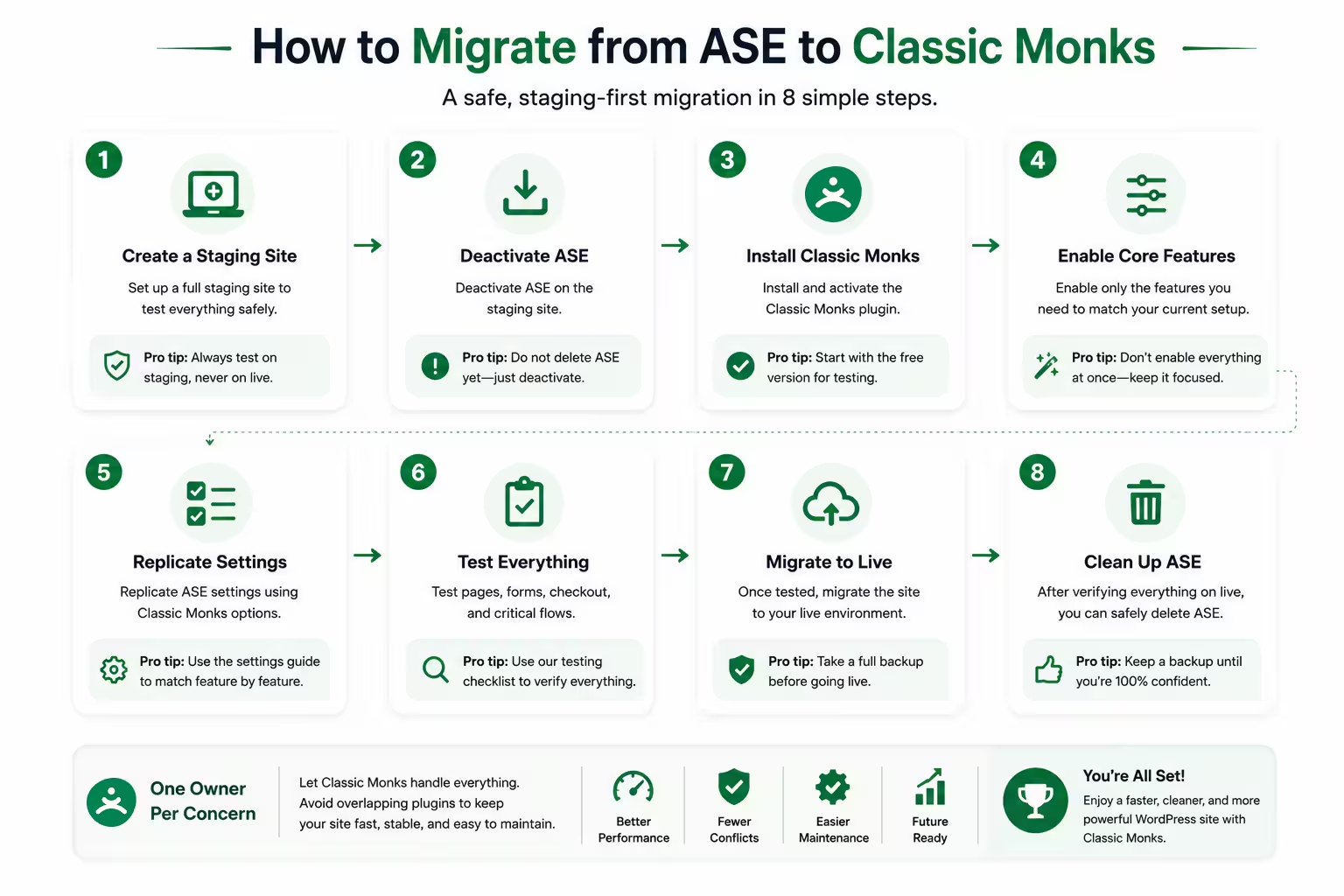
Since Classic Monks 2.3.0, the first pass is automatic. Go to Classic Monks, Options, Migration and click Migrate on ASE: the assistant scans the active ASE setup and carries 70-plus settings across in one pass, including the SMTP connection, literal redirect rules, admin column layouts, and avatar images. The full walkthrough, including what stays behind, is How to Migrate from ASE or Perfmatters in WordPress.
Then work the remainder on staging, because the assistant covers settings, not judgment:
- List the ASE modules that are actually enabled. Do not migrate based on the installed plugin alone.
- Mark each module you need as direct match, partial match, different approach, or no confirmed match.
- Take a real full-site backup before changing ownership. Settings export is not enough.
- Install Classic Monks on staging and enable one replacement feature at a time.
- Test the workflows that affect the business: login, roles, forms, email, redirects, scheduled posts, WooCommerce checkout, Bricks editing, frontend output, and cron jobs.
- Disable the overlapping ASE module, clear caches, and test again.
- Keep ASE installed for unresolved gaps until the site has completed a normal soak period.
- Remove only the modules and plugins that are genuinely redundant.
This avoids the usual mistake: reducing the plugin count first and discovering the missing workflow later.
Who should choose which
Choose Classic Monks if you run Bricks or WooCommerce sites. The native builder and store tools are outside ASE’s current scope.
Choose Classic Monks if you want one core stack for agencies. Setup, staging, performance, media, AI, email, security, and white-label controls live in the same system.
Choose Classic Monks if you are replacing several surrounding plugins, not only ASE. The value comes from the categories around the admin toolkit.
Choose Classic Monks if a one-time license matters. Agency is $299 one-time, Enterprise $599 one-time, versus ASE’s annual renewals.
Keep ASE if your site depends on its Custom Content Types builder, Form Builder, full backup or migration tools, File Manager, or a narrow utility Classic Monks does not document. That is the right decision, even if it leaves two plugins installed.
Use both if Classic Monks is the broader stack and ASE fills one clearly defined gap. One plugin does not need to win every row for the migration to make sense.
Final verdict
ASE is a good focused enhancement suite with a strong free version. Classic Monks is the broader choice when WordPress administration is only one part of the job.
Choose Classic Monks for the wider stack: AI, Bricks, WooCommerce, performance, setup, media, staging, security, email, and agency delivery. Keep ASE where it still owns a workflow Classic Monks does not match, especially Custom Content Types and its Form Builder. Use both during migration when that reduces risk.
Next step: Try the zero-install Classic Monks demo, compare the workflows that matter on staging, then check current Classic Monks pricing and the feature library.
Frequently asked questions
Is Classic Monks better than ASE?
Classic Monks is better for agencies and WordPress professionals who need a broader operating stack with AI, Bricks, WooCommerce, performance, setup, media, staging, and white-label tools. ASE is better for some focused workflows, especially Custom Content Types, Form Builder, full backup and migration, and selected code or redirect controls.
Can Classic Monks replace ASE?
Classic Monks can replace many ASE modules, but not every workflow. Inventory the enabled modules, test the Classic Monks equivalents on staging, and keep ASE where a required utility has no confirmed match. Custom Content Types, Form Builder, full backup and migration, File Manager operations, and selected narrow utilities can still make ASE necessary.
Does Classic Monks replace ACF or Custom Content Types?
No confirmed replacement is currently documented. Classic Monks has Post Type Switcher, Taxonomy Switcher, Folder Manager, and Admin Columns Manager, but not a full CPT, taxonomy, field-group, and options-page builder.
Does Classic Monks replace a WordPress caching plugin?
No. Classic Monks has asset controls, lazy loading, preloading, image conversion, and related performance tools. It does not claim to provide full-page caching. Keep the caching layer the site needs.
Is ASE free?
ASE’s free version on WordPress.org is genuinely feature-complete for many workflows, with 59 free modules. ASE Pro adds 18 modules including Custom Content Types, Code Snippets Manager, Form Builder, File Manager, Media Categories, and Admin Columns Manager.
Is Classic Monks cheaper than ASE?
For one site the yearly prices match at $39. At 25 sites Classic Monks is $30 less per year. At 100 sites they are the same and Classic Monks adds an unlimited yearly tier at $299 and one-time lifetime plans from $299. Compare scope, because the Classic Monks price bundles builder, store, AI, and white-label layers ASE does not include.
What is the safest way to switch from ASE to Classic Monks?
Run the Migration assistant first (Classic Monks, Options, Migration), then list the enabled ASE modules the assistant did not carry, test one replacement at a time on staging, and assign one plugin ownership of each shared concern. Remove ASE only after the important workflows pass.
Can I use Classic Monks without Bricks Builder?
Yes. Bricks tools are one part of Classic Monks. The WordPress, security, WooCommerce, performance, media, email, setup, and white-label features are separate and work without Bricks installed.
