




What Does the Feature Do?
Variable products show a price range or a “From” price based on their variations. For products with many options across a wide range, that default display can confuse customers about the price they will actually pay.
The Hide Default Variation Price feature hides the default price element until the customer selects a variation. Once a variation is chosen, the featured price shows for that specific selection, so the customer sees the exact price instead of a range.
Why You Need It
The default range display is not always helpful:
- “From $10” suggests the cheapest option, but the customer may want a $50 variation
- A wide range makes a product look unpredictable
- Customers cannot tell which variation is priced where until they select it
- Showing the price only after selection makes the choice specific and clear
If the range itself is a selling point (for example, “From $5”), keep the default display and leave this off.
How to Hide the Default Variation Price in WooCommerce
Step 1: Enable the Feature
- In WordPress admin, open Classic Monks > WooCommerce.
- Open the Single Product settings area.
- Toggle on Hide Default Variation Price.
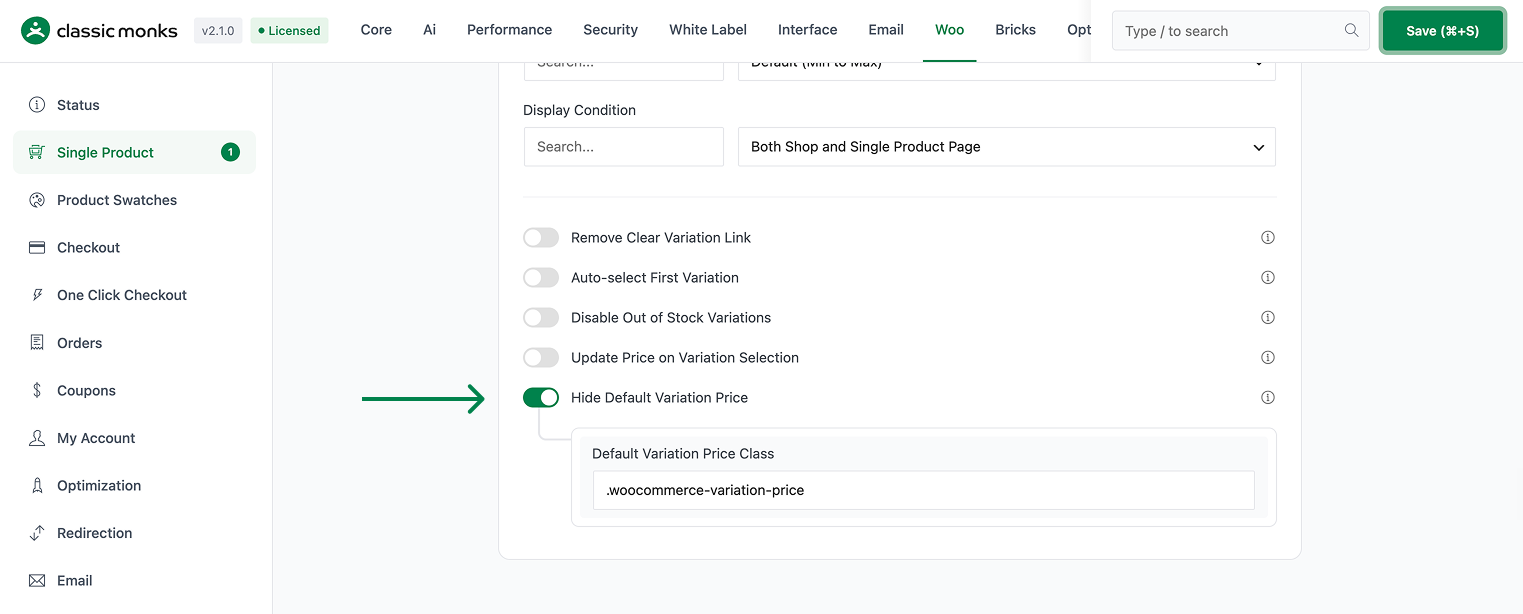
Step 2: Set the Target Class
In Default Variation Price Class, set the CSS selector that targets the default price element. The default is .woocommerce-variation-price, which matches most themes. Adjust it if your theme uses a different class for the variation price area.
Step 3: Save and Test
Click Save Changes. Open a variable product. Before selecting a variation, no default price should be shown. Select a variation and confirm the specific price appears.
Configuration Options
| Option | Behavior | Default |
|---|---|---|
| Hide Default Variation Price | Master toggle. | Off |
| Default Variation Price Class | CSS selector for the default price element to hide. | .woocommerce-variation-price |
What Gets Affected
- Variable product pages: the default price element is hidden until a variation is selected
- The price element matched by Default Variation Price Class
What Does NOT Get Affected
- The variation’s actual price data: these are set in WooCommerce > Products > Variations
- Simple products and non-variable products: unaffected
- The selected variation’s price: this still shows after selection
- Cart and checkout: prices are final at that point
Advanced Options (Developers)
The feature registers its logic in functions/woocommerce/variation-display.php, gated on the Hide Default Variation Price option:
add_action( 'wp_head', function() {
    echo '<style>.woocommerce-variation-price { display: none !important; }</style>';
} );
wp_head injects CSS that hides the default variation price element. The Default Variation Price Class option supplies the selector, defaulting to .woocommerce-variation-price. The same selector value is passed to the update-price-on-variation scripts so the behavior stays consistent.

Add your first comment to this post