




The short answer: WP Extended is a genuinely good modular toolkit for WordPress admin, content, media, login, and export utilities. If your only need is a clean set of admin and content tools, WP Extended is excellent and its free tier is hard to beat. Classic Monks is the alternative when you have outgrown that admin-only layer: it covers the same utility jobs and then goes further into security, WooCommerce, Bricks Builder, media, AI, and white label, in one license with a one-time LTD option.
I build Classic Monks, so this page will be honest about where WP Extended stays a better fit. It wins in real places, starting with price for the admin-utility job.
Low-risk next step: Explore the full stack in the zero-install Classic Monks demo, then compare the current pricing once you know which categories matter to your sites.
This comparison was checked on August 20, 2026 against the WP Extended page on WordPress.org, the WP Extended site, the WP Extended pricing page, the Classic Monks pricing page, and the Classic Monks features page.
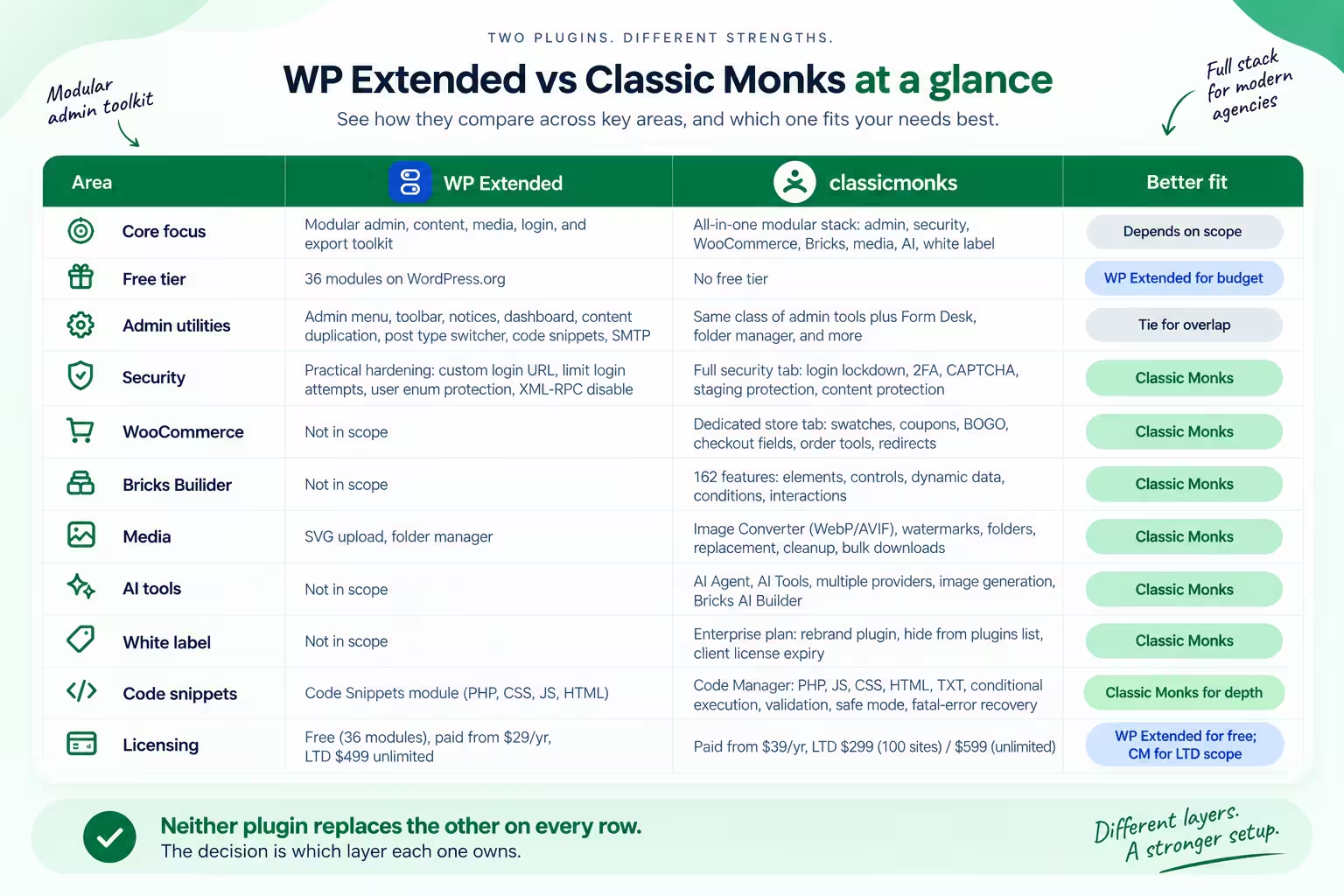
WP Extended vs Classic Monks at a glance
| Area | WP Extended | Classic Monks | Better fit |
|---|---|---|---|
| Core focus | Modular admin, content, media, login, and export toolkit | All-in-one modular stack: admin, security, WooCommerce, Bricks, media, AI, white label | Depends on scope |
| Free tier | 36 modules on WordPress.org | No free tier | WP Extended for budget |
| Admin utilities | Admin menu, toolbar, notices, dashboard, content duplication, post type switcher, code snippets, SMTP | Same class of admin tools plus Form Desk, folder manager, and more | Tie for overlap |
| Security | Practical hardening: custom login URL, limit login attempts, user enum protection, XML-RPC disable | Full security tab: login lockdown, 2FA, CAPTCHA, staging protection, content protection | Classic Monks |
| WooCommerce | Not in scope | Dedicated store tab: swatches, coupons, BOGO, checkout fields, order tools, redirects | Classic Monks |
| Bricks Builder | Not in scope | 162 features: elements, controls, dynamic data, conditions, interactions | Classic Monks |
| Media | SVG upload, folder manager | Image Converter (WebP/AVIF), watermarks, folders, replacement, cleanup, bulk downloads | Classic Monks |
| AI tools | Not in scope | AI Agent, AI Tools, multiple providers, image generation, Bricks AI Builder | Classic Monks |
| White label | Not in scope | Enterprise plan: rebrand plugin, hide from plugins list, client license expiry | Classic Monks |
| Code snippets | Code Snippets module (PHP, CSS, JS, HTML) | Code Manager: PHP, JS, CSS, HTML, TXT, conditional execution, validation, safe mode, fatal-error recovery | Classic Monks for depth |
| Licensing | Free (36 modules), paid from $29/yr, LTD $499 unlimited | Paid from $39/yr, LTD $299 (100 sites) / $599 (unlimited) | WP Extended for free; CM for LTD scope |
Neither plugin replaces the other on every row. The decision is which layer each one owns.
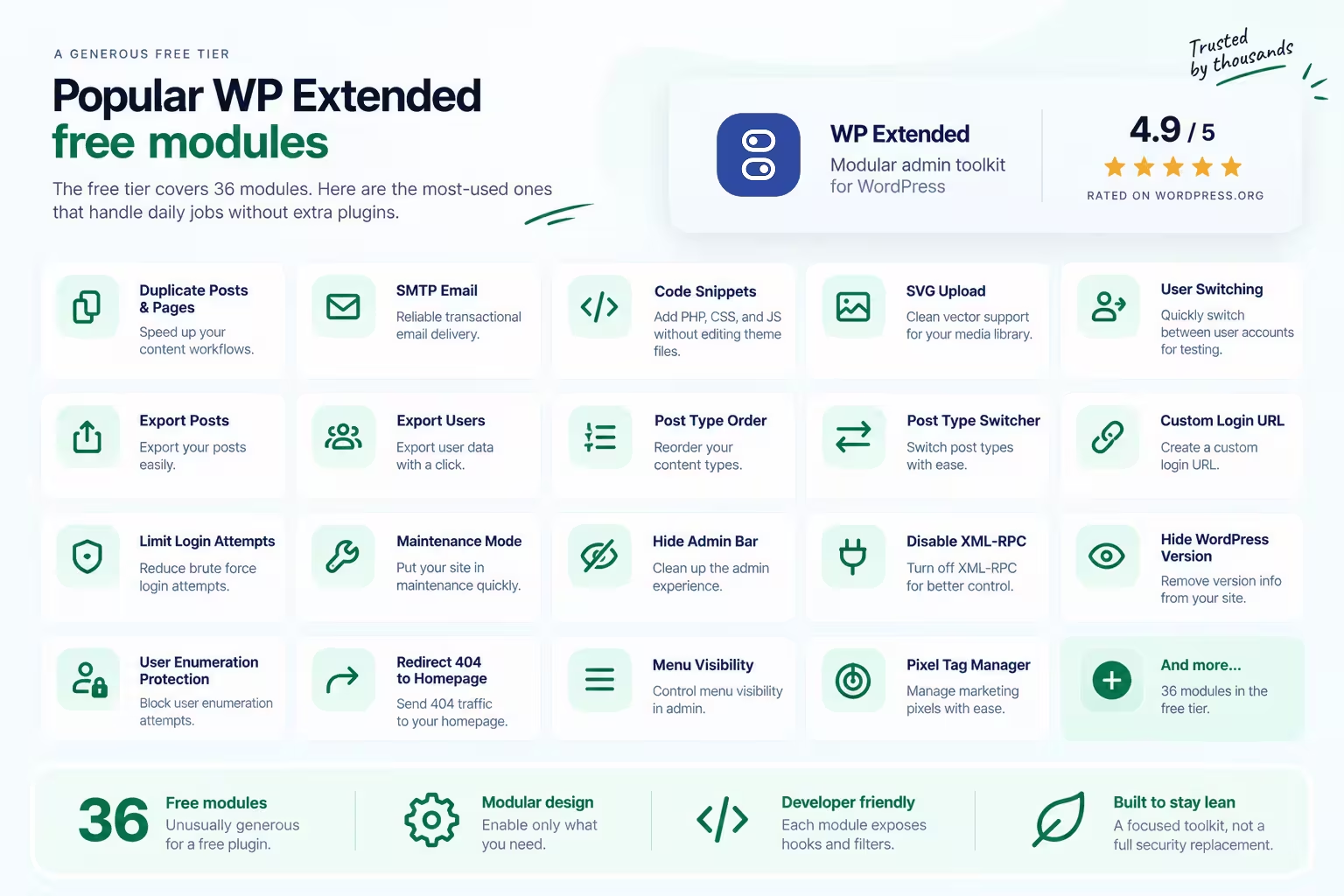
What WP Extended is genuinely good at
WP Extended deserves full credit here. It is a modular all-in-one toolkit that replaces a pile of small admin, content, media, login, export, and developer plugins. On WordPress.org it holds a 4.9 out of 5 rating, and it has earned that reputation through steady execution.
The free tier covers 36 modules, which is unusually generous for a WordPress plugin. The most-used ones handle daily jobs that otherwise require separate installs:
- Duplicate Posts & Pages for content workflows
- SMTP email for transactional delivery
- Code Snippets for PHP, CSS, and JS without editing theme files
- SVG upload for clean vector support
- User Switching for quick account testing
- Export Posts and Export Users for data portability
- Post Type Order and Post Type Switcher for content structure control
- Custom Login URL and Limit Login Attempts for basic login hardening
- Maintenance Mode for staging and development
- Hide Admin Bar, Disable XML-RPC, Hide WordPress Version for surface-level cleanup
- User Enumeration protection, Redirect 404 to Homepage, Menu Visibility, Pixel Tag Manager for the long tail of admin needs
That is a real stack for $0. A freelancer who needs a handful of admin, content, and login tools and wants them free, WP Extended is the honest pick.
It is built to stay lean. Every feature is its own module, you enable only what a site needs, and each module exposes hooks and filters for developers. WP Extended itself says it is not a replacement for a full security plugin; it calls its security offerings practical hardening and login tools, best used alongside a dedicated security solution. That honesty matters, and Classic Monks matches it.
Where you outgrow WP Extended
WP Extended is focused on the admin, content, media, login, and export layers. It is open about that scope. Its own FAQ says it is not a replacement for a full security plugin, and its feature set is deliberately admin and workflow utilities.
This is where a freelancer or small agency hits the limit. Once a stack needs all of the following, WP Extended stops being the single tool that covers them:
- Full login security: custom login URL, login lockdown, 2FA with authenticator app and email OTP, CAPTCHA, staging protection, user enumeration blocking.
- WooCommerce operations: product swatches, checkout field cleanup, direct checkout links, URL and auto-apply coupons, BOGO deals, order statuses and columns, redirects, store email controls.
- Builder features: 162 features for Bricks Builder, including 30+ exclusive elements, dynamic data, conditions, and interactions.
- Media conversion and management: WebP and AVIF conversion, media folders, media replacement.
- White label and agency delivery: rebrand the plugin, hide it from the plugins list, client license expiry controls.
- AI tools, staging protection, Code Manager with validation and safe mode, email controls, and settings export and import.
For that wider set, the alternative to WP Extended is not one more admin toolkit. It is a plugin that covers the admin layer and the deeper jobs in the same install. See the all-in-one WordPress plugin alternatives guide for how the whole field lines up before you decide.
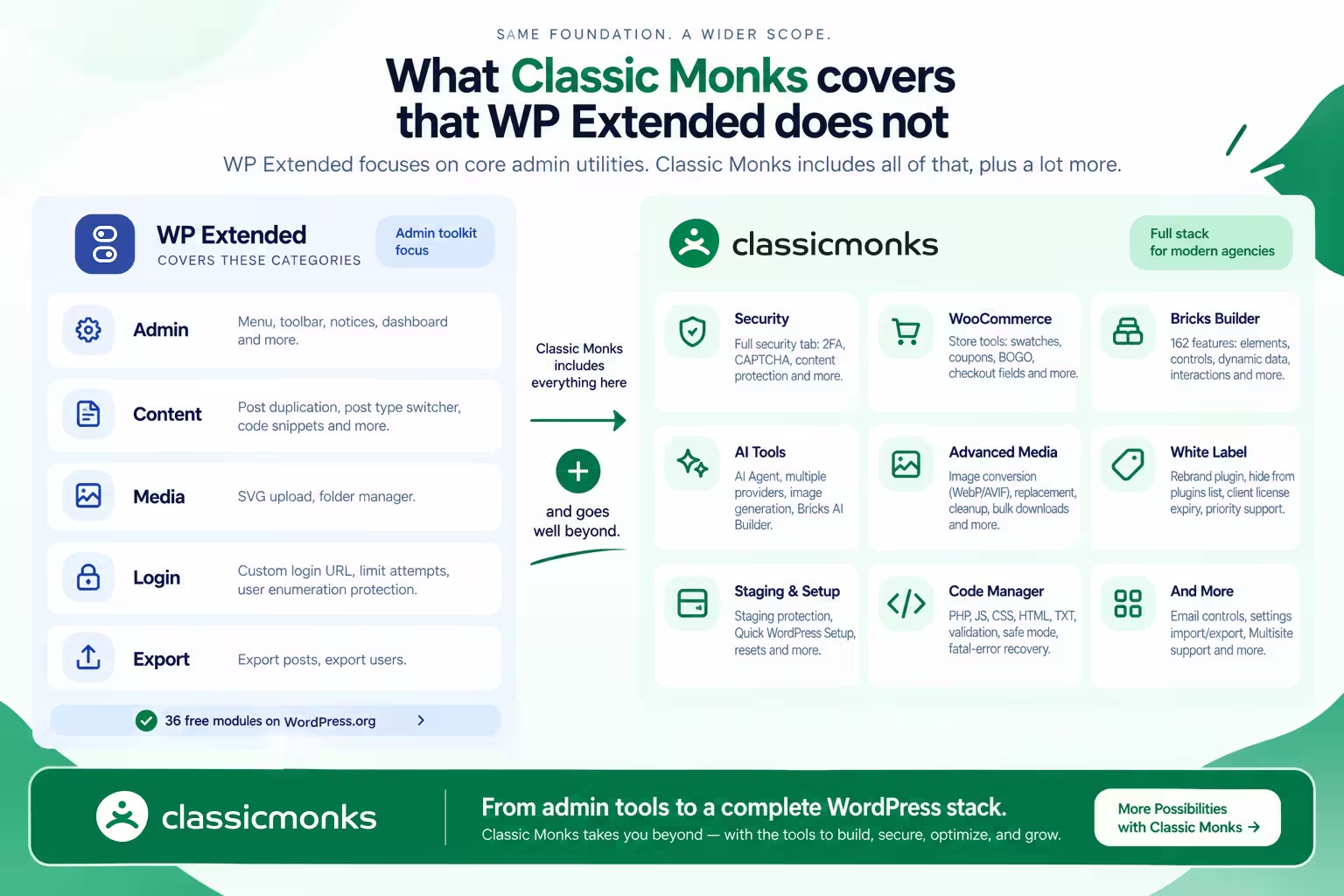
What Classic Monks covers that WP Extended does not
Classic Monks is a modular stack too, but its scope is WordPress-wide rather than admin-utility-first. It overlaps WP Extended on the admin, content, and media layer, then extends well past it.
Security beyond hardening. WP Extended offers practical hardening and login tools: custom login URL, limit login attempts, user enumeration protection, XML-RPC and feed disabling. Classic Monks has a full security tab: custom login URL, login lockdown with extended lockout, Cloudflare Turnstile, math CAPTCHA, 2FA with authenticator app and email OTP, auto logout, user enumeration protection, XML-RPC and REST API controls, content protection, and Staging Protection with HTTP auth, access tokens, and IP allowlists. WP Extended’s own FAQ states it is best used alongside a dedicated security solution; Classic Monks carries that layer itself. Read the WordPress security documentation for the current list.
WooCommerce operations. WP Extended is not a WooCommerce store plugin. Classic Monks has a store tab: product swatches, checkout field cleanup, direct checkout links, URL and auto-apply coupons, BOGO deals, order statuses and columns, redirects, and store email controls.
Bricks Builder. Classic Monks has 162 features for Bricks Builder: 30+ exclusive elements, controls, dynamic data, conditions, interactions, Live Code Sync and Import, and Bricks AI Builder. WP Extended works alongside builders but adds no builder features.
Media conversion and management. Classic Monks Image Converter turns uploads into WebP or AVIF, Folder Manager organizes media, and media replacement swaps files. WP Extended has an SVG upload utility and a folder manager, but not the format conversion pipeline.
White label and agency delivery. Enterprise plan: rebrand the plugin, hide it from the plugins list, client license expiry controls, priority support, and priority feature requests. This is the layer that lets an agency present one branded tool to clients. WP Extended does not white label.
The rest of the stack. AI tools, Quick WordPress Setup, email controls, Code Manager with syntax validation, safe mode, and fatal-error recovery, staging protection, settings export and import, Multisite support, and resets.
That is the switch story. A freelancer or small agency whose WP Extended stack is admin-only, but who now needs security, store tools, builder extensions, and client handover, would otherwise buy three to five more plugins. Classic Monks collapses the whole set into one paid license with a one-time option.
When WP Extended is still the right call
This is where the comparison stays honest, because WP Extended wins in real cases.
Price for the admin-utility job. WP Extended has a strong free tier with 36 modules on WordPress.org. If a site genuinely needs only a handful of admin, content, and login utilities and wants them free, WP Extended is the better value. Classic Monks is a paid product, so for that narrow free need it is not the economical choice.
Lightweight modular granularity. WP Extended is built as a modular toolkit with per-module hooks and filters for developers, designed to stay lean. For a developer who wants the smallest possible handler of a few specific admin jobs, WP Extended’s focused modularity can be the better fit. Classic Monks is a broad stack, useful precisely when the scope is broad.
Rating and reputation. WP Extended holds an excellent 4.9 out of 5 on WordPress.org and an active, positive user base. Classic Monks does not dismiss it. It is a well-liked, credible tool, and the honest line is that it is excellent for the admin-utility job and that you outgrow it when you need the deeper layers Classic Monks bundles.
No lock-in on the free tier. WP Extended confirms that if your annual subscription expires, the installed plugin keeps working. You just lose updates and support. That means a migration from WP Extended to Classic Monks is not a forced cutover. You can run both side by side, verify the Classic Monks configuration, and remove WP Extended modules only when you are sure.
Neither claim should be overstated: Classic Monks does not replace WP Extended one-for-one, and WP Extended is not a bad plugin. The two solve different widths of the same problem.
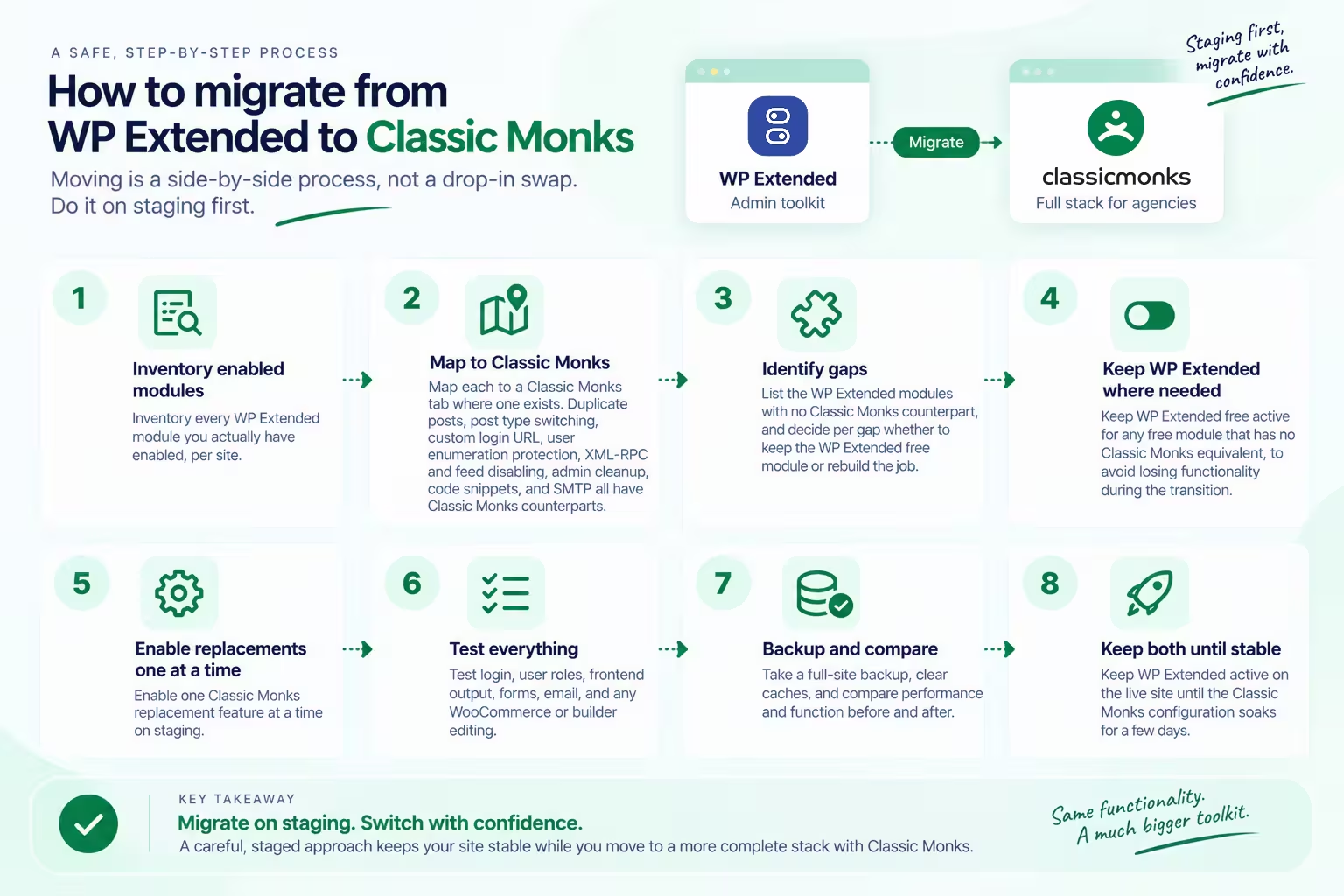
How to migrate from WP Extended to Classic Monks
Moving is a side-by-side process, not a drop-in swap. Do it on staging first:
- Inventory every WP Extended module you actually have enabled, per site.
- Map each to a Classic Monks tab where one exists. Duplicate posts, post type switching, custom login URL, user enumeration protection, XML-RPC and feed disabling, admin cleanup, code snippets, and SMTP all have Classic Monks counterparts.
- List the WP Extended modules with no Classic Monks counterpart, and decide per gap whether to keep the WP Extended free module or rebuild the job.
- Keep WP Extended free active for any free module that has no Classic Monks equivalent, to avoid losing functionality during the transition.
- Enable one Classic Monks replacement feature at a time on staging.
- Test login, user roles, frontend output, forms, email, and any WooCommerce or builder editing.
- Take a full-site backup, clear caches, and compare performance and function before and after.
- Keep WP Extended active on the live site until the Classic Monks configuration soaks for a few days.
Classic Monks vs WP Extended pricing
Pricing changes, so these are the values verified on August 20, 2026.
WP Extended pricing
| Plan | Sites | Price | Notes |
|---|---|---|---|
| Free | 36 modules | $0 | Available on WordPress.org |
| Single Site (annual) | 1 | $29/year | Pro access, updates and support while active |
| Multi Site (annual) | 50 | $119/year | Pro access, updates and support while active |
| Unlimited (annual) | Unlimited | $199/year | Pro access, updates and support while active |
| Unlimited Lifetime | Unlimited | $499 one-time | Lifetime access and support |
If your annual subscription expires, the installed plugin keeps working. You lose updates and support, but the active modules remain functional.
Classic Monks pricing
| Plan | Sites | Yearly | Lifetime |
|---|---|---|---|
| Personal | 1 | $39/year | Not listed |
| Professional | 25 | $119/year | Not listed |
| Agency | 100 | $199/year | $299 one-time |
| Enterprise | Unlimited | $299/year | $599 one-time |
What the price comparison actually says
For the admin-utility-only buyer, WP Extended wins on price: the free tier covers the core jobs. That should be stated plainly, because it is true.
For an agency that needs the wider stack, the math changes. WP Extended Unlimited Lifetime is $499 one-time for admin and workflow tools only. Classic Monks Agency LTD is $299 one-time for 100 sites, and Enterprise LTD is $599 one-time for unlimited sites plus white label, priority support, and priority feature requests. The Classic Monks price buys security, WooCommerce, Bricks features, media, and white label on top of the same class of admin utilities.
The caveat is scope. WP Extended’s price is for its admin and workflow toolkit, which is excellent at that job. Classic Monks’ price is for a broader stack, which matters only if that breadth is what a site needs.
The bottom line
WP Extended is an excellent admin, content, and workflow toolkit, and its free tier is the right value for that narrow job. Classic Monks is the larger replacement when the scope grows past admin utilities into security, WooCommerce, Bricks features, media, and white label.
If that wider scope is where your sites are headed, explore the Classic Monks demo, see the feature library, or check the pricing. If you only need the admin-utility layer, WP Extended, especially its free tier, is the honest pick.

Add your first comment to this post