




The short answer: ASE (Admin and Site Enhancements) is one of the most popular WordPress admin toolkits, with 76 modules, a strong free tier, and a 5-star rating across 200,000+ active installations. If your only need is admin cleanup, content utilities, security switches, and code snippets, ASE is excellent and its free tier covers the core jobs. Classic Monks is the alternative when you have outgrown that admin layer: it covers the same utility jobs and then adds Bricks Builder, WooCommerce, AI, performance, media management, staging protection, and agency white label, in one license with a significantly cheaper LTD option.
I build Classic Monks, so this page will be honest about where ASE stays a better fit. It wins in real places, starting with its free tier and its Custom Content Types module.
Low-risk next step: Explore the full stack in the zero-install Classic Monks demo, then compare the current pricing once you know which categories matter to your sites.
This comparison was checked on August 20, 2026 against the ASE feature list, the ASE pricing page, the Classic Monks pricing page, and the Classic Monks features page.
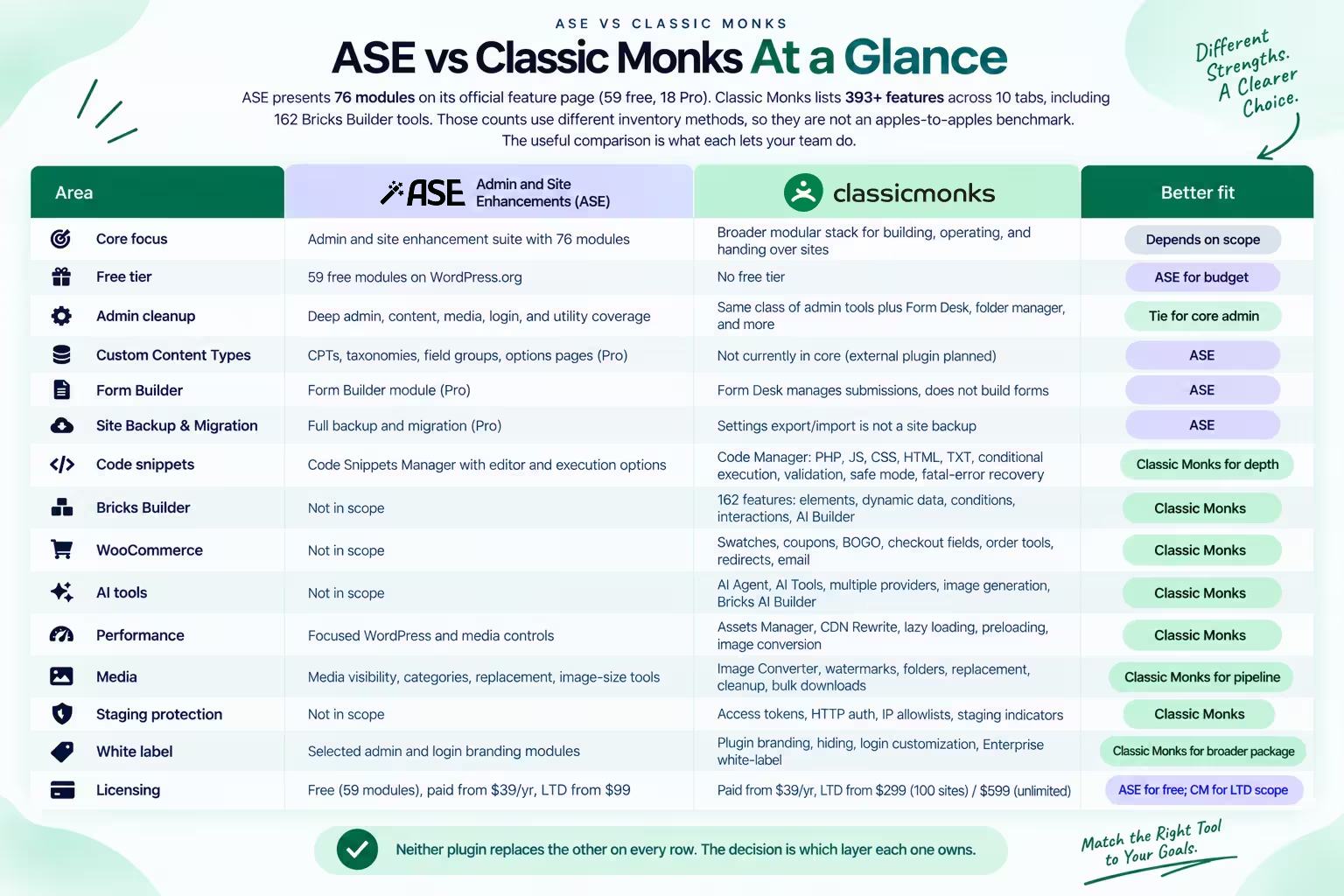
ASE vs Classic Monks at a glance
ASE presents 76 modules on its official feature page (59 free, 18 Pro). Classic Monks lists 393+ features across 10 tabs, including 162 Bricks Builder tools. Those counts use different inventory methods, so they are not an apples-to-apples benchmark. The useful comparison is what each lets your team do.
| Area | ASE | Classic Monks | Better fit |
|---|---|---|---|
| Core focus | Admin and site enhancement suite with 76 modules | Broader modular stack for building, operating, and handing over sites | Depends on scope |
| Free tier | 59 free modules on WordPress.org | No free tier | ASE for budget |
| Admin cleanup | Deep admin, content, media, login, and utility coverage | Same class of admin tools plus Form Desk, folder manager, and more | Tie for core admin |
| Custom Content Types | CPTs, taxonomies, field groups, options pages (Pro) | Not currently in core (external plugin planned) | ASE |
| Form Builder | Form Builder module (Pro) | Form Desk manages submissions, does not build forms | ASE |
| Site Backup & Migration | Full backup and migration (Pro) | Settings export/import is not a site backup | ASE |
| Code snippets | Code Snippets Manager with editor and execution options | Code Manager: PHP, JS, CSS, HTML, TXT, conditional execution, validation, safe mode, fatal-error recovery | Classic Monks for depth |
| Bricks Builder | Not in scope | 162 features: elements, dynamic data, conditions, interactions, AI Builder | Classic Monks |
| WooCommerce | Not in scope | Swatches, coupons, BOGO, checkout fields, order tools, redirects, email | Classic Monks |
| AI tools | Not in scope | AI Agent, AI Tools, multiple providers, image generation, Bricks AI Builder | Classic Monks |
| Performance | Focused WordPress and media controls | Assets Manager, CDN Rewrite, lazy loading, preloading, image conversion | Classic Monks |
| Media | Media visibility, categories, replacement, image-size tools | Image Converter, watermarks, folders, replacement, cleanup, bulk downloads | Classic Monks for pipeline |
| Staging protection | Not in scope | Access tokens, HTTP auth, IP allowlists, staging indicators | Classic Monks |
| White label | Selected admin and login branding modules | Plugin branding, hiding, login customization, Enterprise white-label | Classic Monks for broader package |
| Licensing | Free (59 modules), paid from $39/yr, LTD from $99 | Paid from $39/yr, LTD from $299 (100 sites) / $599 (unlimited) | ASE for free; CM for LTD scope |
Neither plugin replaces the other on every row. The decision is which layer each one owns.
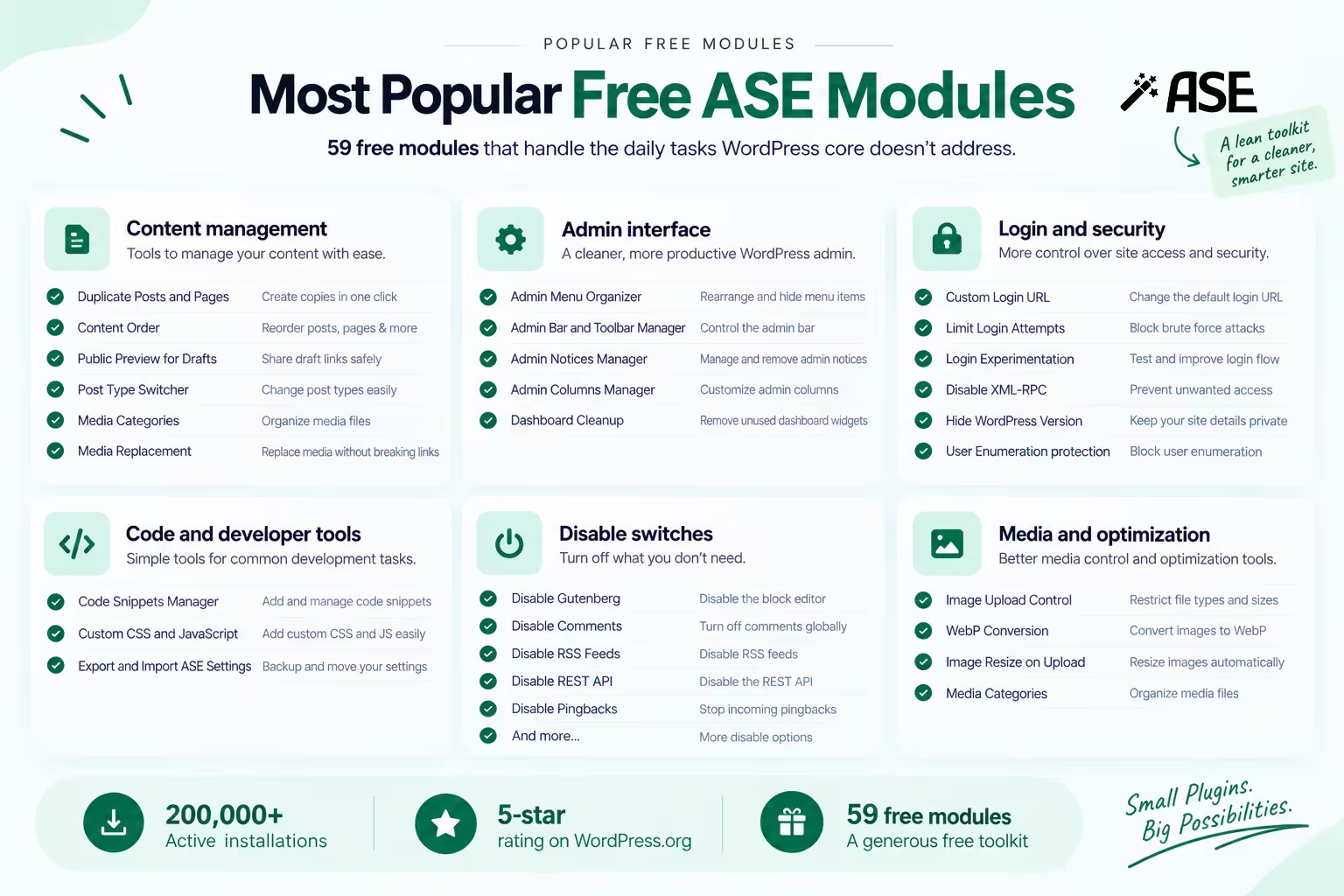
What ASE is genuinely good at
ASE deserves its reputation. It is one of the most installed WordPress enhancement plugins, with over 200,000 active installations and a 5-star rating on WordPress.org. The developer has built a lean, well-organized toolkit that replaces a pile of small admin, content, media, login, and developer plugins.
The free tier is unusually generous: 59 modules covering jobs that normally require separate installs. The most popular ones handle daily tasks that WordPress core does not address:
- Content management: Duplicate Posts and Pages, Content Order, Public Preview for Drafts, Post Type Switcher, Media Categories, and Media Replacement
- Admin interface: Admin Menu Organizer, Admin Bar and Toolbar Manager, Admin Notices Manager, Admin Columns Manager, and Dashboard Cleanup
- Login and security: Custom Login URL, Limit Login Attempts, Login Experimentation, Disable XML-RPC, Hide WordPress Version, and User Enumeration protection
- Code and developer tools: Code Snippets Manager, Custom CSS and JavaScript, Export and Import ASE Settings
- Disable switches: Disable Gutenberg, Disable Comments, Disable RSS Feeds, Disable REST API, Disable Pingbacks, and more
- Media and optimization: Image Upload Control, WebP Conversion, Image Resize on Upload, and Image Upload Control
The Pro modules add deeper capabilities: Custom Content Types with field groups and options pages, Form Builder, Site Backup and Migration, File Manager, and additional Admin Columns controls. For a freelancer who needs a clean admin toolkit with strong content modeling and does not need builder, store, or AI features, ASE is the honest pick.
ASE also deserves credit for its honesty. It does not claim to be a security plugin, a performance plugin, or a page builder. It does one job and does it well.
Where you outgrow ASE
ASE is focused on administration, content utilities, security switches, and code management. It is open about that scope. It does not claim to be a security plugin, a performance plugin, or a builder tool.
This is where a freelancer or small agency hits the limit. Once a stack needs all of the following, ASE stops being the single tool that covers them:
- Bricks Builder tools: native setup, Live Code Sync and Import, exclusive elements, dynamic data, conditions, interactions, and Bricks AI Builder. ASE works alongside builders but adds no builder features.
- WooCommerce operations: product swatches, checkout field cleanup, direct checkout links, URL and auto-apply coupons, BOGO deals, order statuses, redirects, and store email controls.
- AI inside WordPress: AI Agent chat overlay, AI-powered content workflows, alt-text generation, image generation, image editing, and multiple provider support.
- Performance operations: Assets Manager for conditional script disabling, CDN Rewrite, lazy loading, intelligent preloading, and image conversion to WebP and AVIF.
- Media pipeline: Image Converter, watermarks, Folder Manager with drag-and-drop, media replacement, unused media checks, bulk downloads, and SVG sanitization.
- Staging protection: access tokens, HTTP authentication, IP allowlists, testing-tool detection, and staging indicators.
- Agency white label: full plugin branding and hiding, login customization, and client license expiry controls.
For that wider set, the alternative to ASE is not one more admin toolkit. It is a plugin that covers the admin layer and the deeper jobs in the same install. See the all-in-one WordPress plugin alternatives guide for how the whole field lines up before you decide.
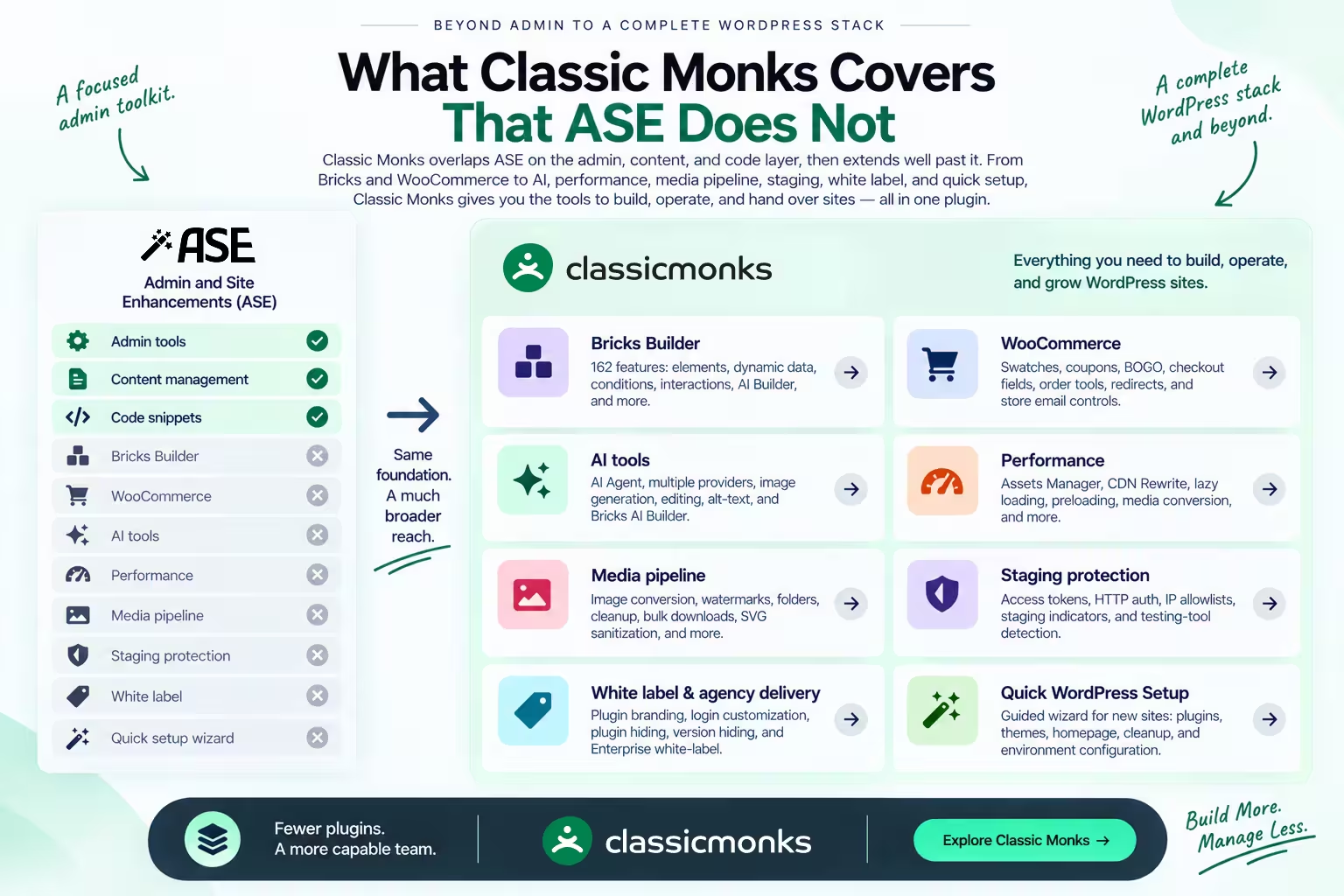
What Classic Monks covers that ASE does not
Classic Monks is a modular stack too, but its scope is WordPress-wide rather than admin-utility-first. It overlaps ASE on the admin, content, and code layer, then extends well past it.
Bricks Builder. Classic Monks has 162 features for Bricks Builder: 30+ exclusive elements, controls, dynamic data, conditions, interactions, Live Code Sync and Import, Bricks AI Builder, and Bricks asset optimization. ASE does not cover Bricks. If your team builds with Bricks, that gap alone explains the comparison.
WooCommerce operations. ASE is not a WooCommerce store plugin. Classic Monks has a store tab: product swatches, checkout field cleanup, direct checkout links, URL and auto-apply coupons, BOGO deals, order statuses and columns, redirects, and store email controls.
AI tools. Classic Monks includes an AI layer: AI Agent chat overlay, AI-powered content and management workflows, alt-text generation, image generation, image editing, and Bricks AI Builder. It connects to OpenRouter, OpenAI, Anthropic, Google Gemini, NVIDIA, Zhipu AI, and custom endpoints. ASE has no AI category.
Performance operations. Classic Monks has a Performance tab: Assets Manager for conditional script and style disabling per page, CDN Rewrite, lazy loading with lazy rendering and negative loading, intelligent preloading with predictive page preloading, and media conversion. ASE has focused WordPress and media controls but not this breadth.
Media pipeline. ASE covers media visibility, categories, replacement, and image-size tools. Classic Monks adds Image Converter for WebP and AVIF, watermarks, Folder Manager with drag-and-drop and ZIP downloads, media replacement that preserves attachment IDs, unused and missing media checks, filename cleanup, renaming, bulk downloads, and SVG sanitization.
Staging protection. Classic Monks includes access tokens, HTTP authentication, IP allowlists, testing-tool detection, development endpoints, and staging indicators. ASE has no staging-protection category.
White label and agency delivery. Classic Monks includes admin-bar greeting changes, admin footer customization, WordPress logo replacement, dashboard cleanup, help-tab removal, custom login logos, login form styling, plugin hiding, version hiding, and controls for hiding support or community links. The full white-label plugin capability is listed under the Enterprise plan. ASE has selected admin and login branding modules, but not the same broader agency package.
Quick WordPress Setup. A guided wizard for fresh WordPress installations: site identity, plugin and theme selection, homepage settings, cleanup of default content, and environment configuration. Plus a separate Bricks setup workflow. ASE has no setup wizard.
That is the switch story. A freelancer or small agency whose ASE stack is admin-only, but who now needs builder tools, store operations, AI, performance, and client handover, would otherwise buy four to six more plugins. Classic Monks collapses the whole set into one paid license with a one-time option.
When ASE is still the right call
This is where the comparison stays honest, because ASE wins in real cases.
Custom Content Types. ASE Pro includes a full Custom Content Types module: register post types, taxonomies, field groups, and options pages from the WordPress admin. Classic Monks does not currently match this. A full-featured external Custom Content Types plugin for Classic Monks is planned and awaiting WordPress.org repository approval, but it is not available today. If Custom Content Types is a core part of your workflow, ASE or a dedicated CCT product is the right tool.
Form Builder. ASE Pro includes a Form Builder for creating forms from the WordPress admin. Classic Monks has Form Desk for managing form submissions, but it does not build forms. If you need a form builder inside the admin toolkit, ASE has it and Classic Monks does not.
Site Backup and Migration. ASE Pro includes full backup and migration tools. Classic Monks has settings export and import, which is not a site backup. For real backup and migration, keep a dedicated backup system regardless of which admin toolkit you choose.
File Manager. ASE Pro includes file management inside WordPress. Classic Monks has download tools but not a general file manager. If you need to manage files inside the WordPress admin, ASE covers it.
Price for the admin-utility job. ASE has a strong free tier with 59 modules. If a site genuinely needs only admin, content, and login utilities and wants them free, ASE is the better value. Classic Monks is a paid product, so for that narrow free need it is not the economical choice.
Rating and reputation. ASE holds a 5-star rating on WordPress.org with 200,000+ active installations and strong user testimonials. Classic Monks does not dismiss it. It is a well-liked, credible tool, and the honest line is that it is excellent for the admin-utility job and that you outgrow it when you need the deeper layers Classic Monks bundles.
Neither claim should be overstated: Classic Monks does not replace ASE one-for-one, and ASE is not a bad plugin. The two solve different widths of the same problem.
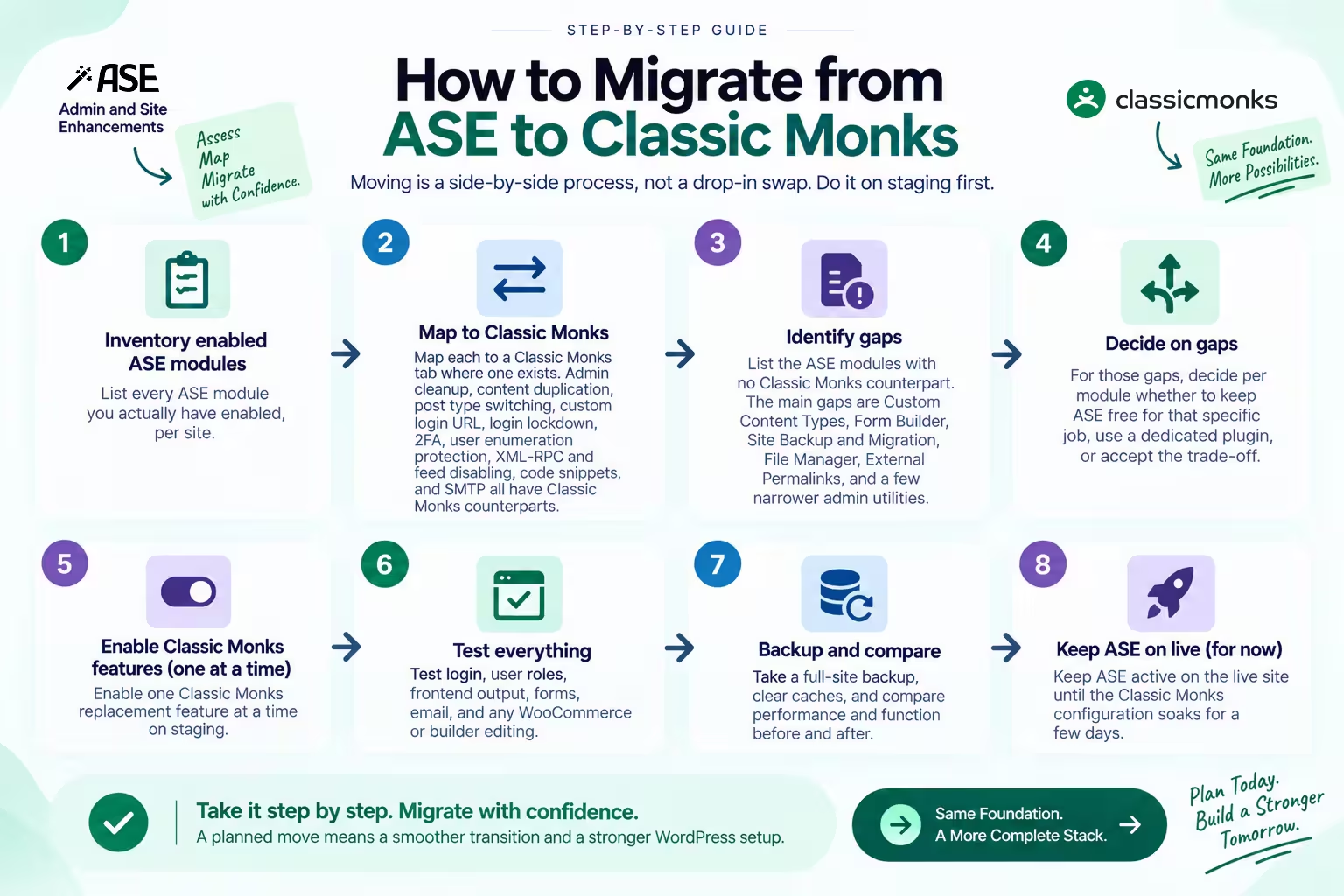
How to migrate from ASE to Classic Monks
Moving is a side-by-side process, not a drop-in swap. Do it on staging first:
- Inventory every ASE module you actually have enabled, per site.
- Map each to a Classic Monks tab where one exists. Admin cleanup, content duplication, post type switching, custom login URL, login lockdown, 2FA, user enumeration protection, XML-RPC and feed disabling, code snippets, and SMTP all have Classic Monks counterparts.
- List the ASE modules with no Classic Monks counterpart. The main gaps are Custom Content Types, Form Builder, Site Backup and Migration, File Manager, External Permalinks, and a few narrower admin utilities.
- For those gaps, decide per module whether to keep ASE free for that specific job, use a dedicated plugin, or accept the trade-off.
- Enable one Classic Monks replacement feature at a time on staging.
- Test login, user roles, frontend output, forms, email, and any WooCommerce or builder editing.
- Take a full-site backup, clear caches, and compare performance and function before and after.
- Keep ASE active on the live site until the Classic Monks configuration soaks for a few days.
Classic Monks vs ASE pricing
Pricing changes, so these are the values verified on August 20, 2026.
ASE pricing
Annual plans (updates and support while active):
| Plan | Sites | Price |
|---|---|---|
| Solo | 1 | $39/year |
| Solo | 5 | $99/year |
| Team | 25 | $149/year |
| Team | 100 | $199/year |
| Agency | 200 | $299/year |
| Agency | 500 | $399/year |
Lifetime plans (one-time, updates forever, support for one year):
| Plan | Sites | Price |
|---|---|---|
| Solo | 1 | $99 |
| Solo | 5 | $299 |
| Team | 25 | $499 |
| Team | 100 | $699 |
| Agency | 200 | $1,099 |
| Agency | 500 | $1,499 |
| Enterprise | 1,000 | $1,999 |
Support after the first year requires a separate support plan ($9 to $49 per year depending on tier). The pricing page notes these prices are effective until December 31, 2026.
Classic Monks pricing
| Plan | Sites | Yearly | Lifetime |
|---|---|---|---|
| Personal | 1 | $39/year | Not listed |
| Professional | 25 | $119/year | Not listed |
| Agency | 100 | $199/year | $299 one-time |
| Enterprise | Unlimited | $299/year | $599 one-time |
What the price comparison actually says
For the admin-utility-only buyer, ASE wins on price: the free tier covers the core jobs, and the LTD is affordable at the solo level. That should be stated plainly, because it is true.
For an agency that needs the wider stack, the math changes significantly. ASE’s LTD at 100 sites is $699. Classic Monks Agency LTD is $299 one-time for 100 sites, less than half the price. ASE’s LTD at 500 sites is $1,499. Classic Monks Enterprise LTD is $599 one-time for unlimited sites. The Classic Monks price buys Bricks Builder, WooCommerce, AI, performance, media, staging, and white label on top of admin utilities, and it costs less at every multi-site tier.
The caveat is scope. ASE’s price is for its admin and workflow toolkit, which is excellent at that job. Classic Monks’ price is for a broader stack, which matters only if that breadth is what a site needs. But for the agency running 25 to 100 client sites, the LTD math strongly favors Classic Monks.
The bottom line
ASE is an excellent admin, content, and workflow toolkit, and its free tier is the right value for that narrow job. Classic Monks is the larger replacement when the scope grows past admin utilities into Bricks Builder, WooCommerce, AI, performance, staging, and white label.
If that wider scope is where your sites are headed, explore the Classic Monks demo, see the feature library, or check the pricing. If you only need the admin-utility layer, ASE, especially its free tier, is the honest pick.

Add your first comment to this post