




What Does the Feature Do?
WooCommerce shows a heading, often “Your order”, above the order review section at checkout. The Custom Order Review Heading feature lets you replace that text with your own wording, such as “Review your order”, “Almost done”, or a brand-specific phrase.
The change targets the checkout form specifically, so it does not alter the order-received (thank you) page heading.
Why You Need It
The order review heading is a visible element at a key moment:
- It sets the tone for the final confirmation step
- Action-oriented wording can encourage completion
- Branded language keeps the checkout consistent with your store
- It is a small change with a visible effect on the checkout form
How to Customize the Order Review Heading in WooCommerce
Step 1: Enable the Feature
- In WordPress admin, open Classic Monks > WooCommerce.
- Open the Checkout settings area.
- Toggle on Custom Order Review Heading.
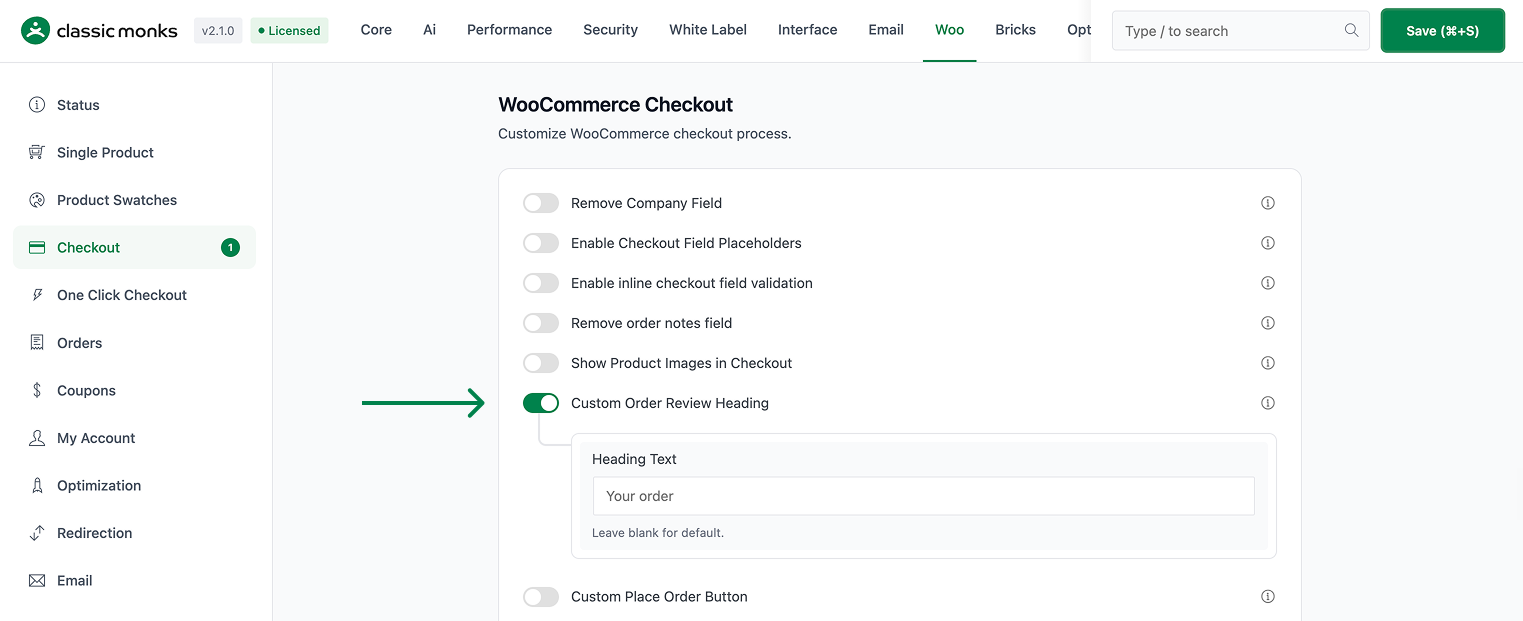
Step 2: Set the Heading Text
In Heading Text, enter the wording you want to appear above the order review. Leave it blank to keep the default “Your order”.

Step 3: Save and Test
Click Save Changes. Visit the checkout page and confirm the order review section shows your custom heading.
Configuration Options
| Option | Behavior | Default |
|---|---|---|
| Custom Order Review Heading | Master toggle. | Off |
| Heading Text | Text shown above the order review at checkout. | Blank (uses “Your order”) |
Common Use Cases
Reassurance at the final step. A calm, clear heading like “Review your order” helps customers confirm what they are about to buy.
Brand consistency. Wording that matches your store’s voice keeps the checkout on-brand.
Conversion focus. An action-oriented heading can nudge hesitant customers toward completing the order.
What Gets Affected
- The checkout page: the order review heading text is replaced
- The order review section’s visible label
What Does NOT Get Affected
- The order-received (thank you) page heading: the feature targets the checkout form
- Order review content and totals: only the heading text changes
- Other checkout section headings: billing, shipping, and payment headings are unchanged
- The checkout process itself: only the label changes
Advanced Options (Developers)
The feature registers a hook in functions/woocommerce/woocommerce-functions.php:
add_filter( 'gettext', 'cm_custom_order_review_heading', 20, 3 );gettext calls cm_custom_order_review_heading at priority 20 with three arguments. The function replaces the “Your order” string when it appears in the WooCommerce context on an is_checkout() page that is not the order-received endpoint, returning the custom heading text.

Add your first comment to this post