




What Does the Feature Do?
WooCommerce recommends extensions from its marketplace through in-admin suggestions. The Disable Marketplace Suggestions feature suppresses those recommendations, so the admin no longer shows the promotional suggestion prompts.
Existing extensions and Marketplace access are unaffected. The feature only hides the suggestion prompts WooCommerce would otherwise display.
Why You Need It
Marketplace suggestions can be an unwelcome distraction:
- Promotional prompts add noise to the admin
- Not every store plans to extend through the marketplace
- Removing them keeps staff focused on orders and products
- The marketplace connection remains available if you want it later
How to Disable Marketplace Suggestions
Step 1: Enable the Feature
- In WordPress admin, open Classic Monks > WooCommerce.
- Open the Optimization settings area.
- Toggle on Disable Marketplace Suggestions.
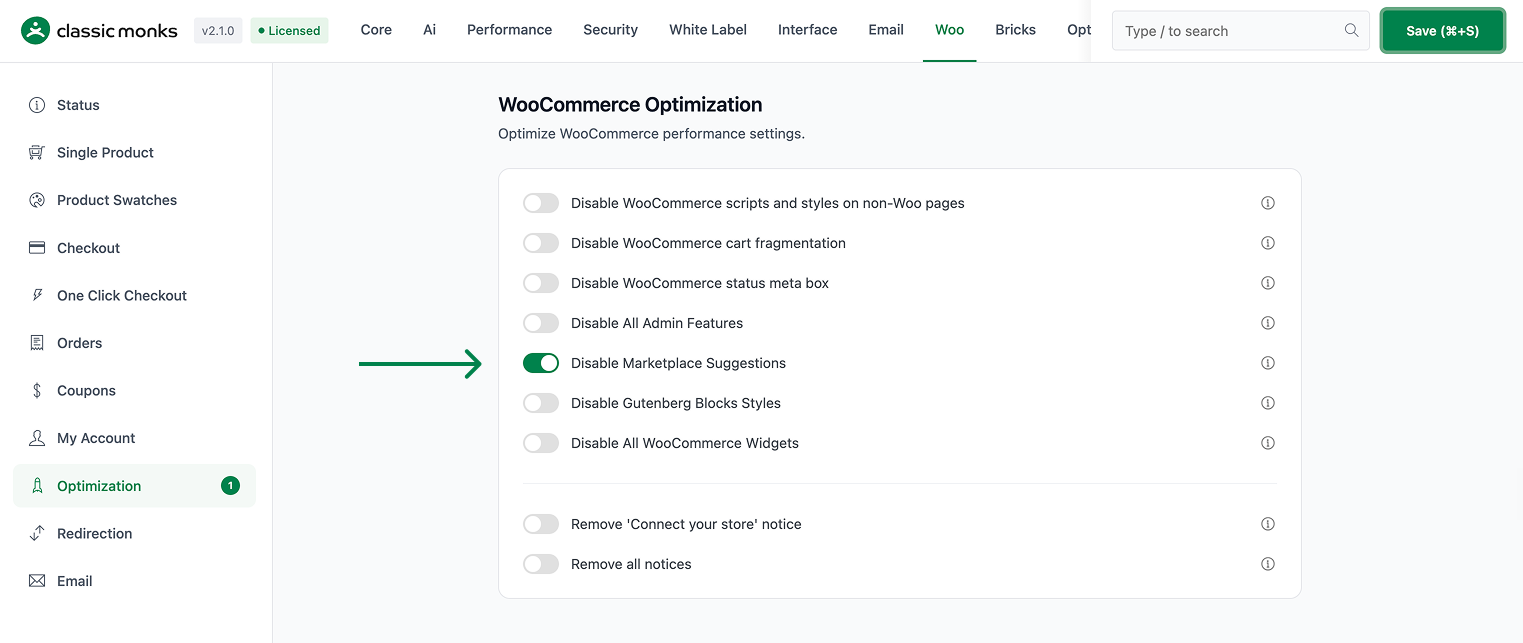
Step 2: Save and Test
Click Save Changes. Reload the WooCommerce admin and confirm the marketplace suggestion prompts no longer appear.
Configuration Options
| Option | Default |
|---|---|
| Disable Marketplace Suggestions | Off |
There are no nested options. The feature is a single on/off control.
What Gets Affected
- The admin: WooCommerce marketplace suggestions are suppressed
What Does NOT Get Affected
- Installed WooCommerce extensions: these remain active
- The Marketplace connection: still available in the admin
- Products, orders, and shop functions: unchanged
Advanced Options (Developers)
The feature registers one hook in functions/woocommerce/woocommerce-functions.php:
add_filter( 'woocommerce_allow_marketplace_suggestions', '__return_false', 999 );woocommerce_allow_marketplace_suggestions returns false at priority 999 when the feature is enabled, which disables the marketplace suggestion prompts.
Common Use Cases
Focused admin. Stores that do not plan marketplace extensions benefit from a quieter admin.
Lean teams. Teams managing the store through orders and products skip the promotional prompts.
Custom tooling. When the stack is built from a specific set of extensions, suggestion prompts are irrelevant.
Keeping It Set Up
Set the toggle once and it stays active across the site. To change behavior, return to the WooCommerce settings, adjust the option, and save again. The store continues to run normally throughout, and you can turn the feature off at any time to restore the previous default behavior. For teams managing multiple environments, confirm the setting on staging first, then apply it to production and verify a real page load before treating it as live.
Market Place Access Still Available
The toggle only hides the suggestion prompts. You can still open the WooCommerce marketplace, install extensions, and manage your existing plugins at any time. The feature does not block any part of the marketplace itself, so nothing is lost by turning suggestions off. If you later decide to see suggestions again, switch the toggle back on and they return. For a store that has already chosen its extension stack, keeping this on removes a source of admin noise without affecting functionality.
—Compare before changing. The feature affects only the suggestion prompts, so there is no functional downside to enabling it on a store that already has its extensions chosen. Teams that prefer a strictly promotional-free admin often keep this on permanently. A quick test on a staging site confirms that the marketplace and installed extensions continue to work, which is useful before applying the change to a production environment.

Add your first comment to this post