




What Does the Feature Do?
The Custom Place Order Button feature changes the wording and appearance of the checkout button that submits an order. It replaces the button text with your chosen label, and optionally adds an icon image beside the text.
When you set an icon, the feature inserts the image into the button at the position you choose. The button keeps its normal checkout behavior; only the label and image change.
Why You Need It
The place order button is the final action in the checkout flow:
- Action-oriented text (“Complete Purchase”, “Pay Now”, “Confirm Order”) can feel more decisive than the default
- A small icon, like a shopping cart or lock, adds visual context
- Matching the button to your store’s voice improves brand consistency
- It is a small change with a clear effect on the checkout
How to Customize the Place Order Button in WooCommerce
Step 1: Enable the Feature
- In WordPress admin, open Classic Monks > WooCommerce.
- Open the Checkout settings area.
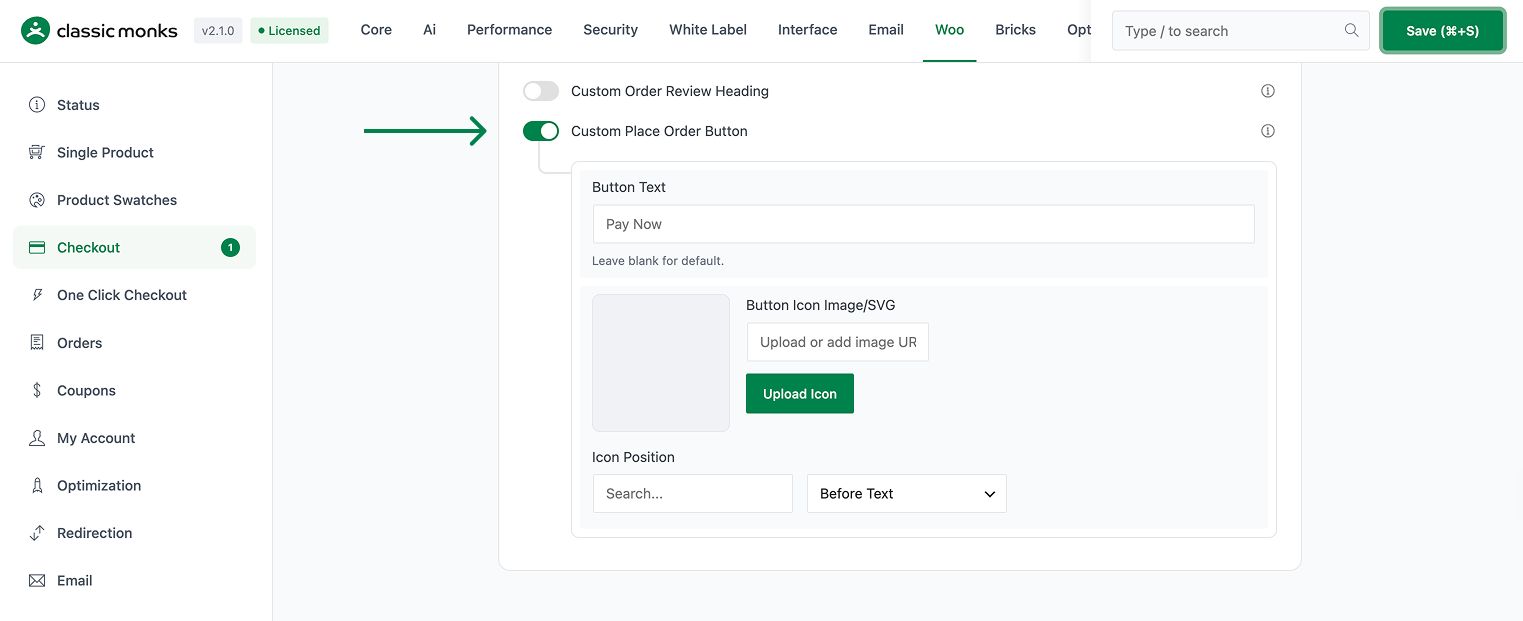
- Toggle on Custom Place Order Button. The nested options expand below the toggle.
Step 2: Set the Button Text
In Button Text, enter the label for the place order button. If you leave it blank, the feature falls back to Pay Now.
Step 3: Add an Icon Image (Optional)
In Button Icon, enter the URL of the image to show on the button. The field accepts an uploaded image URL, which is rendered inside the button. Leave it blank for text only.
Step 4: Set the Icon Position
Use Icon Position to place the icon before or after the text. The default is Before.
Step 5: Save and Test
Click Save Changes. Visit the checkout page and confirm the place order button shows your text and (if set) the icon in the chosen position.
Configuration Options
| Option | Behavior | Default |
|---|---|---|
| Custom Place Order Button | Master toggle. | Off |
| Button Text | Label on the place order button; blank falls back to Pay Now. |
Blank (uses “Pay Now”) |
| Button Icon | Image URL shown on the button. | Blank (no icon) |
| Icon Position | Before or after the button text. | Before |
What Gets Affected
- The checkout page: the place order button text and optional image
- The button markup: an image is inserted when an icon URL is set
What Does NOT Get Affected
- The checkout process: the button still submits the order normally
- The cart page: this feature targets the checkout place order button
- Payment processing: no change to the order or payment flow
- The button styling beyond the inserted image: theme CSS still applies
Advanced Options (Developers)
The feature registers hooks in functions/woocommerce/woocommerce-functions.php:
add_filter( 'woocommerce_order_button_text', 'cm_custom_place_order_button_text' );
add_filter( 'woocommerce_order_button_html', 'cm_custom_place_order_button_html' );
add_action( 'wp_footer', 'cm_checkout_place_order_button_js', 999 );woocommerce_order_button_textsets the button label. If Button Text is empty, it returnsPay Now.woocommerce_order_button_htmlinserts the icon image. When an icon URL is set, it renders an<img>inside the button, positioned before or after the button text according to Icon Position.wp_footer(priority 999) injects the small jQuery handler that applies the icon to the#place_orderbutton on the checkout page for three-digit-safe display when the button is not replaced by the HTML filter.

Add your first comment to this post