

What Does the Feature Do?
WooCommerce loads its styles and scripts on every page by default, including pages that show no store content. The Disable WooCommerce Scripts and Styles on Non-WooCommerce Pages feature removes those assets on non-shop pages, so the browser does not download files the page does not need.
Shop pages and WooCommerce endpoints keep their assets, so the store still works normally. Only pages outside the shop skip the unnecessary files.
Why You Need It
Loading files a page never uses is wasted performance:
- Fewer CSS and JavaScript requests on blog posts and landing pages
- Lower page weight on content pages
- Faster load times and a lighter page footprint where WooCommerce is not visible
- Cleaner delivery for sites where the shop is only one section
How to Disable WooCommerce Scripts and Styles on Non-WooCommerce Pages
- Step 1
Enable the Feature
- In WordPress admin, open Classic Monks > WooCommerce.
- Open the Optimization settings area.
- Toggle on Disable WooCommerce Scripts and Styles on Non-WooCommerce Pages.
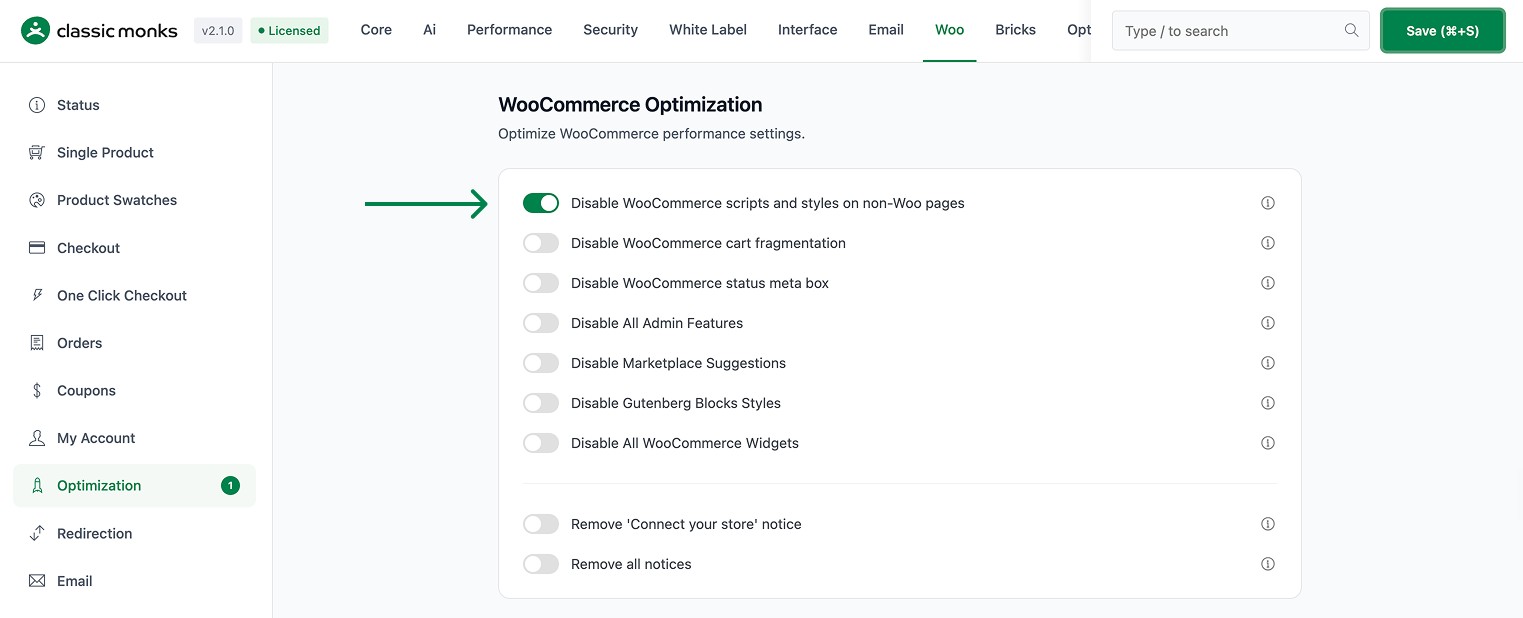
- Step 2
Save and Test
Click Save Changes. Open a non-WooCommerce page (for example, a blog post) and view its source. The WooCommerce CSS and JavaScript files should not be loaded, while shop and checkout pages keep them.
Configuration Options
| Option | Default |
|---|---|
| Disable WooCommerce Scripts and Styles on Non-WooCommerce Pages | Off |
There are no nested options. The feature is a single on/off control.
What Gets Affected
- Non-WooCommerce pages: WooCommerce styles and scripts are not loaded
- Page performance: fewer requests and less weight on content pages
What Does NOT Get Affected
- Shop pages, cart, checkout, and account endpoints: these keep their assets
- WooCommerce data, orders, and products: unaffected
- Active WooCommerce functionality on the pages that use it
Advanced Options (Developers)
The feature registers one hook in functions/woocommerce/woocommerce-functions.php:
add_action( 'wp_enqueue_scripts', 'cm_disable_woocommerce_scripts', 99 );wp_enqueue_scripts (priority 99) calls cm_disable_woocommerce_scripts(), which dequeues WooCommerce’s registered scripts and styles on non-WooCommerce pages. The shop context checks keep the assets loading where the store needs them.
Common Use Cases
Content-heavy sites. Blogs with many articles benefit when WooCommerce assets do not load on every post.
Landing pages. Targeting specific sales or signup pages, the store files are unnecessary and add weight.
Stores where the shop is a small part. If the catalog is a minor section, there is no reason to load shop assets across the whole site.
Optimized delivery. Reducing requests on content pages improves their load profile without touching the store itself.
Frequently asked questions
Which pages keep their WooCommerce assets?
Shop pages, the cart, checkout, and account endpoints retain their scripts and styles. Only pages outside the WooCommerce context lose the assets.
Does this change how the store works?
No. The store and its pages are unaffected. The change only removes unnecessary assets on non-shop pages.
Is it a large performance win?
It depends on the site. Sites with many blog or landing pages see the most benefit, as each non-shop page avoids several WooCommerce requests.
Can I undo it easily?
Yes. Turn the toggle off and the assets load everywhere again.
Troubleshooting
3 problems and how to fix each one.
The feature has no effect
Cause: The toggle is off, or the page being tested is treated as a shop page.
Fix: Confirm the toggle is on and test a page outside the WooCommerce context. Shop, cart, checkout, and account pages keep their assets by design.
Store styles disappear on shop pages
Cause: The feature removes assets only on non-shop pages. If a shop page is missing styles, check for another source.
Fix: Confirm the page is recognized as a WooCommerce page. If a custom template does not register as a shop page, it may be treated as non-WooCommerce.
A plugin breaks after enabling
Cause: The plugin may rely on WooCommerce assets loading globally.
Fix: Disable the toggle for that setup, or load the required WooCommerce asset conditionally from the affected plugin.
Not listed here? Ask on the forum.
Ask on the forum