Black Friday 40% off yearly and lifetime plans · 8d left Ends in 8d15h13m Claim 40% off
Latest release

Classic Monks v2.6.0

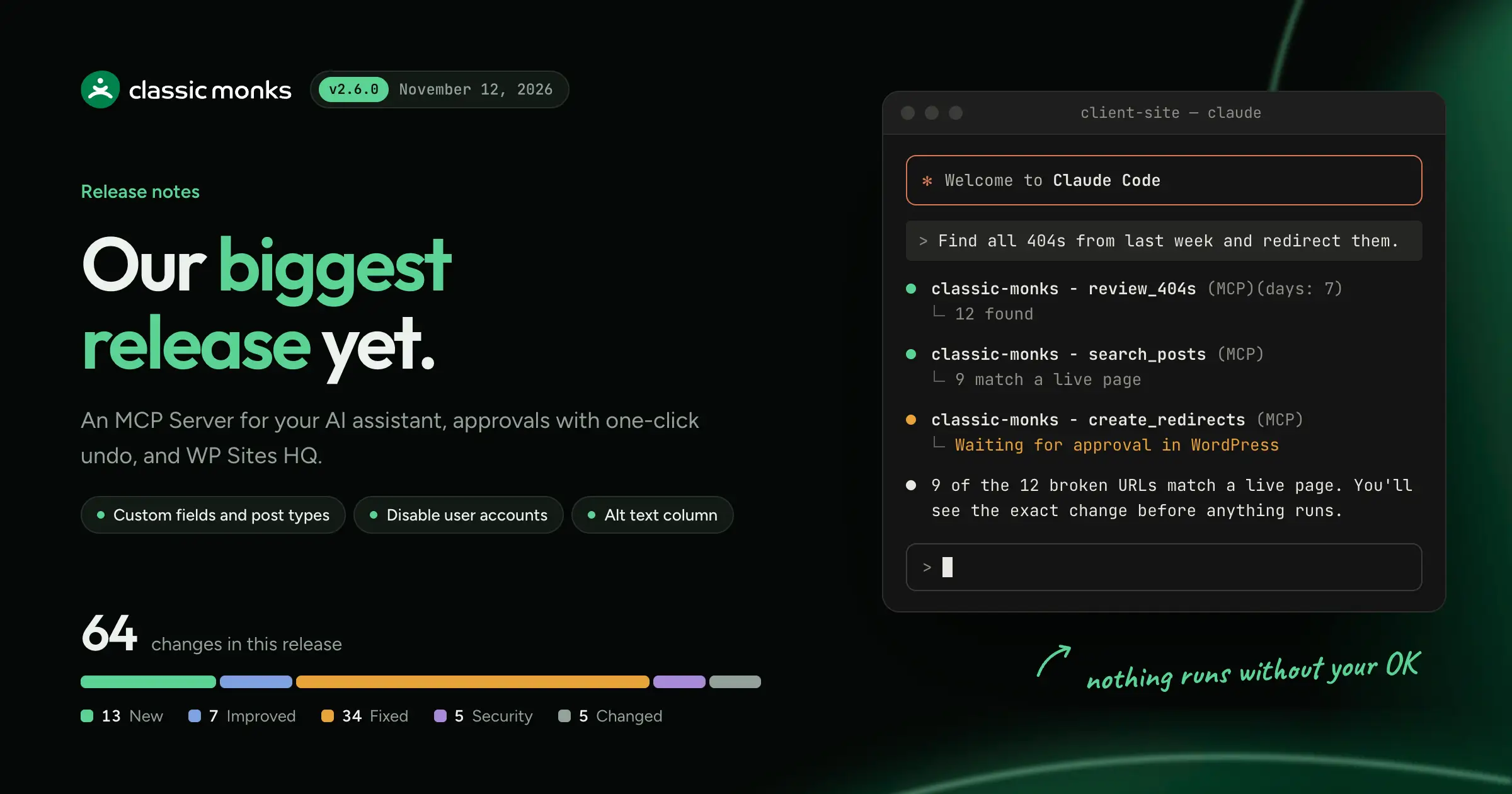
Classic Monks v2.6.0 adds an MCP Server that lets Claude, ChatGPT, Cursor and VS Code work on your WordPress site, with approvals for risky changes and undo for everything. Plus WP Sites HQ, Disable User Account, a dashboard system summary and new login form options, across 64 improvements and fixes.

  • 64 changes across 8 areas
  • Tested up to WordPress 7.1.4
  • 8 customers credited
Classic Monks v2.6.0

MCP Server and AI Activity & Approvals

64changes in this release
  • 13New features
  • 12Improvements
  • 34Bug fixes
  • 5Security updates
  • NEWMCP Server
  • NEWAI Activity & Approvals
  • NEWMCP Skills
  • NEWCustom Fields & Post Types
  • NEWWP Sites HQ
November 12, 2026classicmonks.com/changelog
Read this first

Before you update

No action needed. Update as usual. Nothing to change before or after.

Tested up to
  • WordPress7.1.4
  • WooCommerce11.2.2
  • Bricks Builder2.4.5

A note from Joy

Classic Monks v2.6.0 is our biggest release yet, and it’s built around one idea: your AI assistant should be able to work on your WordPress site, not just talk about it. The new MCP Server connects Claude, ChatGPT, Cursor and VS Code straight to your site. They can write and edit posts, fix SEO, build Bricks and Elementor pages, update WooCommerce products and clean up your site, all within the limits you set.

Handing an AI the keys to a live site is a big step, so most of the work in this release went into making it safe. Every connection gets its own access level. Anything risky waits for your OK, and you see exactly what will change before you say yes. Every change is logged with an Undo button. And it all runs on your own site, so your content never passes through our servers.

Alongside it: WP Sites HQ for managing your site from one app, a way to block a user without deleting them, a server summary on your dashboard, city-level short link stats and a lot more control over your login forms.

Joy ChetryFounder & Lead Developer

01

MCP Server: Let AI Work on Your Site, Safely

Most AI tools can only talk about your website. You copy text out of the chat, paste it into WordPress and do that again for every page. The tools that can make changes usually get full admin access, with no limits and no record of what they did.

The MCP Server fixes both problems. MCP (Model Context Protocol) is the open standard AI apps use to connect to outside tools. Classic Monks now speaks it, so your assistant gets real tools to work with on your site, and you stay in control of every one.

Connect in three steps

  1. Turn it on under AI → MCP Server. It stays off until you switch it on.
  2. Create a connection. Choose what this assistant can access, then connect with a one-click sign-in or an app password. Test connection checks your setup and tells you the exact fix if something is blocked.
  3. Ask in plain language. For example: “Find last week’s 404s and redirect them” or “Write meta descriptions for every post that’s missing one.”

It works with Claude Code, Claude Desktop, claude.ai, ChatGPT, Cursor, VS Code and any other app that supports MCP over Streamable HTTP. To connect claude.ai or ChatGPT, your site needs to be reachable over public HTTPS.

What your assistant can do

More than 130 tools, grouped so each assistant only sees the areas you pick:

  • Content: Create, edit, duplicate and search posts and pages, edit individual blocks, manage menus, categories, tags and comments, and reply to form submissions.
  • SEO: Audit pages, review posts, write meta descriptions, suggest keywords and content ideas, and manage redirects and short links.
  • Site health: Fix broken links, sort out 404s, find unused or missing media and read the debug log.
  • Media: Import images from a URL, convert them to modern formats, add watermarks, write alt text and restore deleted media.
  • Page builders: Read and build pages in Bricks and Elementor, and create block patterns. These tools show up when the builder is installed.
  • WooCommerce: Update products in bulk, check price history and see how your store is doing.
  • Themes: Build a block theme in a private sandbox, preview it, review every change and publish it with automatic rollback.
  • Site admin: Manage plugins, themes, users, roles, scheduled tasks, cache, permalinks and code snippets, and run database search-and-replace with a preview first.
  • Your other plugins: If another plugin offers its own AI tools, you can turn them on for one connection at a time.

You stay in control

  • An access level for each connection: Read only, Content, Site admin or Full. A writing assistant never needs to touch your plugins or users, so it can’t.
  • You approve risky changes: Before anything destructive runs, you see exactly what the assistant wants to do and say yes or no. If the content changes after you approve, the approval no longer counts and the assistant has to ask again.
  • Changes that can’t be undone always ask: WordPress core updates, database search-and-replace, permanent deletes and new user accounts need your OK, even on a connection where you’ve switched approvals off.
  • Undo for every AI change: Everything an assistant does shows up under Logs → AI Activity with an Undo button. Undo won’t overwrite edits someone made after the AI change.
  • You see changes as they happen: A notice pops up in your dashboard whenever an assistant changes something, with a link to it.
  • Secrets stay secret: Passwords and API keys are removed from logs and from what the assistant sees.
  • Connections can only do one thing: An AI connection only works with the MCP Server, not the rest of your site’s API. Deactivate Classic Monks and every connection is cut off.

AI Activity and Approvals

A new AI Activity tab under Logs shows the last 30 days at a glance: changes made, requests waiting for you, blocked or failed calls and anything you’ve undone. A Needs Attention list puts pending approvals first, and the full log can be filtered by connection, so you can see exactly what each assistant did and undo any of it with one click.

MCP Skills: Teach Your Assistant How You Work

Every assistant starts out knowing nothing about how your team does things. Skills fix that. Classic Monks ships with ready-made guides for working safely, building Bricks pages, managing snippets, cleaning up 404s and building block themes. You can also upload your own instructions as .md files, such as your brand voice, your SEO checklist or your publishing steps, and every connected assistant can read them.

Custom Fields and Post Types by AI

Ask your assistant for an “Events” post type with a date, venue and ticket link, and it sets it up for you. Custom fields, post types and categories are saved with your site, not your theme, so switching themes won’t lose them. Bricks can show the fields on your pages, and you can check and edit everything on the new Custom Fields page. Turn it on under AI → MCP Server.

02 · New

WP Sites HQ

WP Sites HQ is our app for managing your site from one place, and it connects through the same MCP Server, with the same logging and undo. From the app you can:

  • Update plugins without worryIf an update breaks your site, it’s undone automatically.
  • Keep WordPress currentInstall core and translation updates.
  • Edit content from the appPosts, media and users.
  • Check on your storeSee how your WooCommerce store is doing.
  • Jump into wp-adminOne click signs you straight in.

WP Sites HQ and your AI assistants now also see all of your dashboard switches, with the same on/off state you see.

03

AI Providers and Bricks AI

  • Newer models work againAI titles, excerpts, summaries and alt text work on newer Claude models (Opus 4.7 and later, Sonnet 5, Haiku 5 and Fable) and on GPT-6. Before, these models rejected every request.
  • Current default modelsAnthropic, OpenAI, Gemini and Zhipu default to current models again. Choosing Anthropic or Gemini without picking a model used to fail every request, because the old default had been retired.
  • Image input on OpenRouterNewer Claude, GPT-5, GPT-6 and GLM vision models on OpenRouter can now read images.
  • Bricks AI builds bigger componentsLarger components like pricing tables are no longer cut off halfway, the live preview sends about a fifth of the data so it stays smooth, and a prompt you cancel goes back into the prompt box instead of being sent with your next one.
  • Live HTML to BricksEditing an element’s HTML updates that element instead of adding a copy, half-typed CSS no longer wipes your styles, hover and responsive rules save correctly, and imported HTML and AI designs look on the front end the way they did when generated.

04 · New

Users and Dashboard

  • Disable User AccountStop someone from logging in without deleting their account. Click Disable Login on the Users list or their profile, for one user or many at once. They’re signed out everywhere, and their posts stay up. Turn it on under Core → Users.
  • System SummarySee your server, PHP version, database and disk usage in the “At a Glance” box on your dashboard. Only admins see it. Turn it on under Interface → Dashboard.

05 · New

Login Forms

  • Fields by pageShow a login or register field only on the pages where you want it.
  • Optional usernameDrop the username field from your register form. People sign up with their email, and a username is made for them.
  • Magic link styling and code messagesChange the magic link’s text, show it as a button and hide the long URL. Rewrite the “code sent” and “no account found” messages, and add the visitor’s email with {email}.
  • Login custom CSSAdd your own CSS under White Label → Login Page Identity. It loads last, so your styles always win.
  • Smarter redirectsIf you haven’t set a redirect, people land back on the page they were on after they log in, sign up or log out.
  • Clearer feedbackA spinner with “Signing in…” or “Creating account…” while the form works, and success and error messages with icons.

Login fixes ship too: new users get the role you picked, your form styles show on the WordPress login page when Replace wp-login is on, and turning off Form Shadow removes the shadow on every layout.

07

Email

Mailgun, Mailjet and Postmark send again (before, every email was rejected), the SMTP2GO key check works with send-only keys, and the SMTP Config tab no longer shows up blank. The Zoho preset now tells you which server to use for your region and plan.

08 · Security

Security Hardening

  • User SwitchingWe closed a hole that could let someone take over an admin account through User Switching.
  • Settings importA settings file can only change Classic Monks settings, and every value is checked first. Before, a tampered file could change who can sign up and what role they get.
  • Per-item permissionsAuthors and contributors can no longer make preview links for other people’s posts, reorder posts they can’t edit, or replace or delete media that isn’t theirs.
  • Content duplicationAuthors and contributors can no longer copy other people’s unpublished posts to read them, and Duplicate only works on the post types you turned it on for.
  • SVG uploadsWith SVG sanitization on, uploaded SVGs are cleaned properly before they’re saved, and broken files are refused.

The full list of all 64 changes is below.
Classic monks changelog v2
Every change

Full changelog

All 64 changes in v2.6.0, grouped by kind. Filter by kind, or search for a module or setting.

New features

13 changes
  • MCP Server

    Connect AI assistants like Claude, ChatGPT, Cursor or VS Code to your site and let them help with posts, media, SEO, Bricks, Elementor, WooCommerce and your settings. You choose how much each assistant can do, from read-only to full access. Anything risky waits for your OK, and you can undo any change. It all runs on your own site. Turn it on under AI → MCP Server.

  • AI Activity & Approvals

    See everything an AI assistant did under Logs → AI Activity, and undo it with one click. When an assistant asks to make a change, you see exactly what it wants to do before you say yes or no.

  • MCP Skills

    Teach AI assistants how you like things done. Upload your own instructions as .md files, and every connected assistant can read them.

  • Custom Fields & Post Types

    Ask an AI assistant to set up custom fields, post types and categories for you. They're saved with your site, not your theme, so switching themes won't lose them, and Bricks can show them. Check and edit them on the Custom Fields page. Turn it on under AI → MCP Server.

  • WP Sites HQ

    Manage your site from the WP Sites HQ app. Update plugins without worry (if an update breaks the site, it's undone automatically), install WordPress and translation updates, edit posts, media and users, check how your store is doing, and jump into wp-admin with one click.

  • Disable User Account

    Stop someone from logging in without deleting their account. Click Disable Login on the Users list or their profile, for one user or many at once. They're signed out everywhere, and their posts stay up. Turn it on under Core → Users.

  • System Summary

    See your server, PHP version, database and how much disk space your site uses, right in the "At a Glance" box on your dashboard. Only admins see it. Turn it on under Interface → Dashboard.

  • Short Link Locations

    See which cities and regions your short link clicks come from, not only the country, plus which sites send you the most clicks.

  • Login Form Fields by Page

    Show a login or register field only on the pages where you want it.

  • Optional Username on Register

    Drop the username field from your register form. People sign up with their email, and a username is made for them.

  • Magic Link Styling & OTP Messages: Make the magic login link look the way you want

    change its text, show it as a button, and hide the long URL under it. You can also rewrite the "code sent" and "no account found" messages, and add the visitor's email to them with `{email}`.

  • Login Custom CSS

    Add your own CSS to the login page under White Label → Login Page Identity. It loads last, so your styles always win.

  • Alt Text Column

    Edit alt text straight from the Media Library list, and filter to find images that are missing it.

Improvements

12 changes
  • WordPress 7.1 Required

    Classic Monks now needs WordPress 7.1 or newer. On an older version the plugin keeps running, but you'll see a notice asking you to update, and a few features, like approvals for AI changes, stay off until you do.

  • Login Redirects

    If you haven't set a redirect, people now land back on the page they were on after they log in, sign up or log out, instead of your homepage.

  • Login Conditions

    New conditions now stay where you add them instead of jumping around. On an empty Actions panel, you can copy the page rules from your other form.

  • Deactivate Template Editor

    This setting now only affects classic themes.

  • Login Form Feedback

    People now see a spinner and "Signing in…" or "Creating account…" while the form works. Success and error messages have icons, and WordPress error messages no longer show stray code.

  • Short Link Stats

    The click stats panel is easier to read, with totals up top, a 30-day chart and simple ranked lists instead of pie charts.

  • Faster Admin Pages

    Folder Manager now only loads where you can open the media library, and the Email Logs page makes 1 database check instead of 33.

  • Zoho SMTP Setup

    The Zoho preset now tells you which server to use for your region and plan, and explains app passwords and the From address.

  • Assets Manager Rule Editor

    Search results are easier to read and no longer cut off. A picked page now has a Change button, so it's clear it won't delete the rule.

  • Settings Groups

    The AI, White Label, Email and WooCommerce tabs now group related settings under headings, like the other tabs, so they're easier to find.

  • Bricks AI Streaming

    Build mode now sends about a fifth of the data while a component is being written, so the live preview stays smooth.

  • AI Max Tokens Setting

    This setting only cut long AI replies short. Replies now use each model's own limit, and you're still only charged for what the model writes.

Bug fixes

34 changes
  • Mailgun, Mailjet & Postmark

    Emails sent through these providers go out again. Before, every email was rejected.

  • SMTP2GO Key Check

    Checking your SMTP2GO API key works again, including send-only keys.

  • SMTP Config Tab

    The SMTP Config tab no longer shows up blank on some sites.

  • Block Theme Styles

    Pages on block themes keep their styling when the Gutenberg disable settings are on. Before, they could show up unstyled.

  • Remove Data on Uninstall

    You can switch this setting off again. Before, it stayed on, so uninstalling deleted all your plugin data anyway.

  • Media Library Columns

    Columns from other plugins, like ShortPixel, show their content again. Saving your column layout twice no longer loses the first save, and the Manage Columns button now sits next to Filter.

  • Assets Manager & Scheduled Tasks

    "Disable everywhere" rules no longer switch plugins off during background tasks, so things like subscription renewals run again.

  • Register Role

    New users now get the role you picked in the login settings. Before, they could end up as subscribers, or with no role at all.

  • Login Form Styling

    Your login form colors and styles now show on the WordPress login page when Replace wp-login is on.

  • Login Form Shadow

    Turning off Form Shadow now actually removes the shadow, on every layout.

  • Terms Order for Tags

    You can now reorder tags and other taxonomies without parent and child terms, like WooCommerce product tags.

  • Native Lazy Loading

    "Use Native Lazy Loading When Available" now works the same everywhere: on until you switch it off, as the dashboard shows. Switching it off now takes effect too.

  • Lazy Load HTML5 Videos

    Turning this switch off now sticks, and it's included when you import settings.

  • Login Video Mute & Loop

    These switches now show as on, which is how the login page already behaved. Before, saving the White Label tab could turn them off without you noticing.

  • Preloaded Images

    Images you picked to preload now load right away, as they should.

  • Emoji CSS

    Disable Emojis now removes all of WordPress's emoji code, including the CSS on every page.

  • Image Priority Hint

    Images at the top of the page no longer get the same loading hint added two or three times.

  • Posts & Products Lists

    Fixed an error that could stop the Posts and Products screens from loading when Folder Manager is on.

  • Custom Menu Links

    Custom links in the admin menu now open their page instead of a blank screen.

  • Theme Download Button

    The Download button now shows up when you only have one theme installed.

  • Debug Log Size

    Code Manager no longer fills your debug log with a line for every HTML snippet on every page view. The Logs page also no longer gets stuck loading when a tab fails.

  • Bricks Import/Export

    The Import/Export tab now uses the full page width.

  • Cloned Sites

    Activating your license on a copy of your site now gives the copy its own activation, and leaves the original alone.

  • Switches in WP Sites HQ

    WP Sites HQ and AI assistants now see all your dashboard switches, with the same on/off state you see.

  • AI Default Models

    The default models for Anthropic, OpenAI, Gemini and Zhipu are current ones again. Before, choosing Anthropic or Gemini without picking a model failed every request, because the old default had been retired. The Gemini image model list is up to date too.

  • Newer Claude Models

    AI tools like titles, excerpts, summaries and alt text work again on newer Claude models (Opus 4.7 and later, Sonnet 5, Haiku 5 and Fable). Before, these models rejected every request.

  • GPT-6 Models

    GPT-6 models now work with every AI tool, the same way GPT-5 does.

  • OpenRouter Image Input

    Newer Claude, GPT-5, GPT-6 and GLM vision models on OpenRouter can now read images. Before, they were treated as text-only.

  • Bricks AI Generation

    Larger components, like pricing tables, are no longer cut off halfway, and components without JavaScript no longer fail. If a reply does hit the model's limit, you now see a clear message instead of broken code.

  • Bricks AI Cancel

    A prompt you cancel no longer gets sent along with your next one. It goes back into the prompt box instead.

  • Live HTML to Bricks Editing

    Pasting into or editing an element's HTML now updates that element instead of adding a copy. Moving an element to another parent keeps it, a stray “ no longer adds an empty element, local classes stay local, and buttons and text keep their own tags.

  • Live HTML to Bricks CSS Editor

    Half-typed CSS no longer deletes your existing styles. Hover and responsive rules show up and save correctly, spacing gets valid units, each breakpoint shows once, and deleting a CSS property or attribute now sticks.

  • Live HTML to Bricks Imports

    Imported HTML and AI designs now look on the frontend the way they did when generated, including gaps, rounded corners, shadows, gradients, SVGs, forms, class CSS and CSS inside rich text.

  • Live HTML to Bricks Selection & Code

    Deleting an element no longer clears your selection, and the CSS and JS panels follow the element you pick. Element JavaScript runs after the element's content, and edited SVG and Code elements redraw right away and keep running.

Security updates

5 changes
  • User Switching

    Fixed a hole that could let someone take over an admin account through User Switching. If you're switched into another account when you update, log in again as yourself.

  • Settings Import

    A settings file can now only change Classic Monks settings, and every value is checked first. Before, a tampered file could change things like who can sign up and what role they get.

  • Per-Item Permissions

    Authors and contributors can no longer make preview links for other people's posts, reorder posts they can't edit, or replace or delete media that isn't theirs.

  • Content Duplication

    Authors and contributors can no longer copy other people's unpublished posts to read them. Duplicate also only works on the post types you turned it on for.

  • SVG Uploads

    With SVG sanitization on, uploaded SVG files are now cleaned properly before they're saved, and broken files are refused.

All 64 changes, grouped by kind. The first 5 of each kind show until you expand it.
Shipped because you asked

8 customers shaped this release.

Each of these people asked for a feature or reported a bug, and it shipped in v2.6.0. Thank you.

  • Yann Ott2 changes
    Asked for
    • Magic link styling
    • Editable login code messages
  • Aleksa Piljevic2 changes
    Helped with
    • Found the Assets Manager issue with background tasks
    • Shared the profiling that made Folder Manager and Email Logs faster
  • Saurabh Guttedar1 change
    Helped with
    • Found the block theme styling bug and the SMTP2GO key check bug
  • Emmanuel SOYER1 change
    Reported
  • Mike Murphy2 changes
    Asked for
    • City
    • Region in short link stats
  • Mark Strevens1 change
    Asked for
  • Ken Sim1 change
    Reported
    • The login shadow that couldn’t be turned off
  • Jan Lahoda1 change
    Reported
    • The missing theme Download button
5features asked for
3bugs reported
How to update

Update with a way back.

Read what needs you, switch on Rollback once, then update. If something breaks, you're one click from the version that worked.

  1. 01

    Read "Before you update"

    It says what needs action after this release.

  2. 02

    Turn on Rollback first

    Under Core → Plugins (from v2.5.0), so you can go back one click.

  3. 03

    Update from the Plugins screen

    As with any plugin.

  4. 04

    Something broke?

    Click Rollback on the Plugins screen and you're back on the version that worked.

Hear about major releases without checking back

Leave your email and we'll write when a major release ships. No spam.

Questions about this release.

Found a bug? Post it in Bug Reports on the forum or email help@classicmonks.com.

Report a bug
Do I need to do anything before updating?

Check Before you update at the top of this page. If it's not there, this release needs nothing from you.

Can I go back to the previous version?

Yes, with Rollback (Core → Plugins, from v2.5.0). Classic Monks keeps the last 5 versions of each premium or uploaded plugin.

I found a bug in this release.

Post it in Bug Reports on the forum or email help@classicmonks.com.

Where are the older releases?

Use the previous and next links above, or see every release.

A plugin that's still being built. Try it today.

Every release comes with notes like these. Try every module in the sandbox first, or pick a plan with a 15 day refund window.

26 releases since August 2025 15 day refund window