




What Is This Feature?
Disable Emojis in Classic Monks removes the WordPress emoji handling that loads a JavaScript file on every page to convert text emoticons into images. Enabling it removes the emoji detection script, the emoji stylesheet, the emoji staticization filters on feeds and emails, and the DNS prefetch for the emoji CDN. It is one of many WordPress optimization features available in the Performance tab.
Why You Need It
WordPress loads a JavaScript file and a stylesheet on every page to render emojis. For sites that do not use emojis in their content, this is unnecessary overhead that adds a request and a few kilobytes to every page load. Disabling emoji handling is a common, low-risk optimization for business and portfolio sites that rarely use emojis.
How to Enable this Feature in WordPress
Step 1: Navigate to Settings
Click into the Classic Monks plugin settings in your WordPress dashboard.
Step 2: Go to the Performance Tab
Click on the Performance menu, then click the WP Optimizations subtab.
Step 3: Find the Disable Emojis Toggle
Scroll to the Performance Wins category. The toggle is labeled Disable Emojis, with the note “Removes WordPress emoji scripts and styles.”
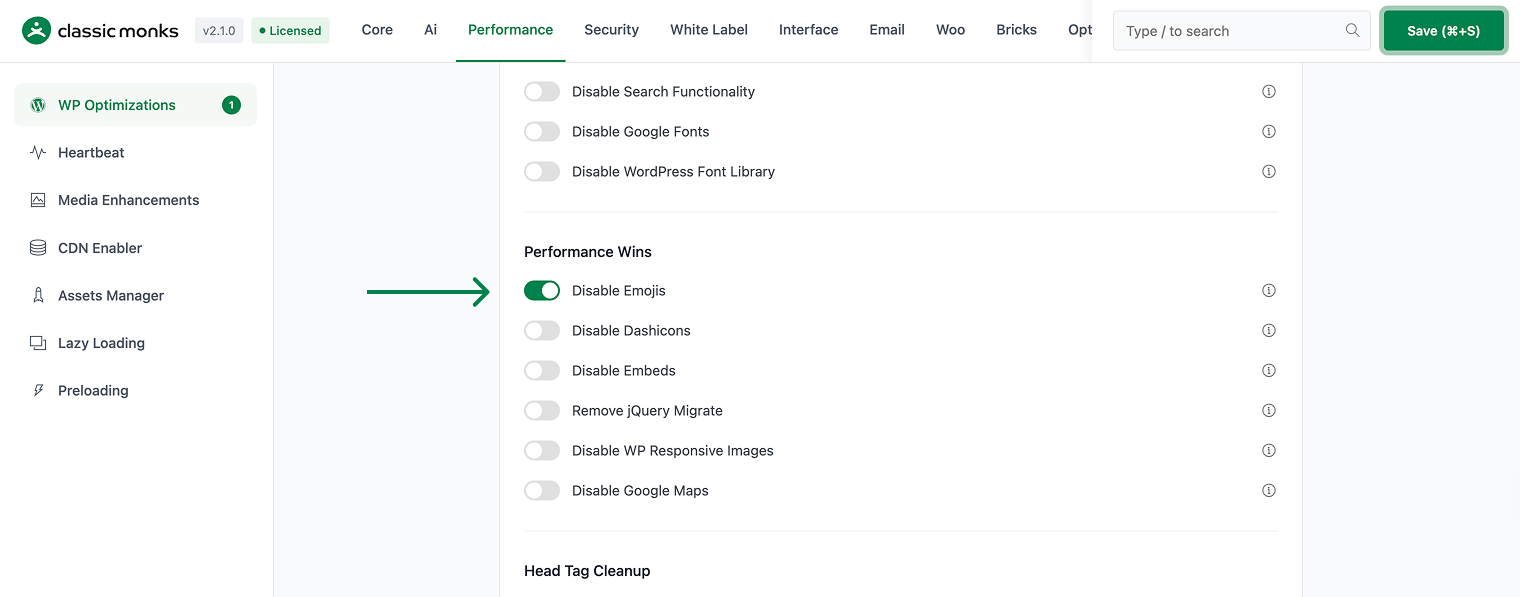
Step 4: Enable the Feature
Toggle the Disable Emojis switch on.
Step 5: Save Changes
Click Save Changes.
Step 6: Test
Clear your browser cache and visit the frontend. Verify the emoji script is no longer loaded.
Configuration Options
| Option | Description | Default |
|---|---|---|
| Disable Emojis | Removes WordPress emoji scripts and styles. | Off |
No nested options. This is a single toggle.
What Gets Affected
- The emoji detection script and stylesheet are removed from the frontend and admin
- Emoji staticization on feeds and emails is removed
- The DNS prefetch for the emoji CDN is removed
- The
wpemojiTinyMCE plugin is removed from the editor
What Does NOT Get Affected
- Your site content and existing emojis already in post content
- The WordPress admin layout and functionality
- Other plugin functionality
Common Use Cases
Business and portfolio sites
Business sites rarely use emojis in their content. Disabling the emoji script removes an unnecessary request and a few kilobytes from every page load, which is a small but real win for page speed.
Performance-focused sites
If you are chasing PageSpeed and Lighthouse scores, removing the emoji script eliminates one fewer request and one fewer stylesheet on the critical path. Combined with other Performance tab cleanups, this reduces page weight.
Email and feed-heavy sites
The emoji feature also runs staticization filters on wp_mail and RSS feeds. Disabling it removes that processing overhead for sites that send many emails or publish feeds.
Minimalist design
If your theme does not use emojis and your visitors never see them, keeping the emoji script loaded is pure waste. Disabling it gives visitors a slightly faster load with no visible change.
Agencies managing many client sites
For an agency, disabling emojis on every client site is a standard, low-risk optimization in a performance checklist. It is a single toggle per site with no configuration and no downside for sites that do not use emojis.
Verify It Works
After enabling and saving, open your site’s frontend in a browser and check the Network tab. You should no longer see wp-emoji-release.min.js in the loaded scripts. The emoji stylesheet and the s.w.org emoji DNS prefetch should also be gone.
Note: This Is Different From the Assets Manager Emoji Toggle
Classic Monks has two emoji-related features. This doc covers the global Disable Emojis toggle in the WP Optimizations subtab, which removes emoji handling on the entire site. A separate Disable WordPress Emoji toggle in the Assets Manager subtab gives page-level control, letting you disable the emoji script on specific pages while keeping it elsewhere. Choose the global toggle for a sitewide cleanup, or the Assets Manager toggle for granular control.

Add your first comment to this post