




What Is the Disable XML-RPC feature?
XML-RPC is a legacy WordPress API that predates the REST API. It uses XML over HTTP and allows remote clients to interact with WordPress. While it was deprecated in favor of the REST API, it’s still enabled by default for backward compatibility.
The Disable XML-RPC feature blocks all access to xmlrpc.php, the endpoint that handles XML-RPC requests.
Why You Need It
XML-RPC is a high-value attack surface:
- Brute force amplification: Attackers can use
system.multicallto test many passwords in one request - Pingback DDoS: Attackers can use your site to send pingbacks to target sites, hiding their origin
- Pingback spam: Spam blogs use XML-RPC pingbacks to create backlinks
- Information disclosure: XML-RPC errors can reveal usernames and other information
For most sites, XML-RPC is no longer needed (the REST API has replaced it). Disabling it eliminates these risks.
How to Disable XML-RPC in WordPress
Step 1: Navigate to Settings
Click into the Classic Monks plugin settings in your WordPress dashboard.
Step 2: Go to the Security Tab
Click on the Security menu, then click the WP Protection subtab.
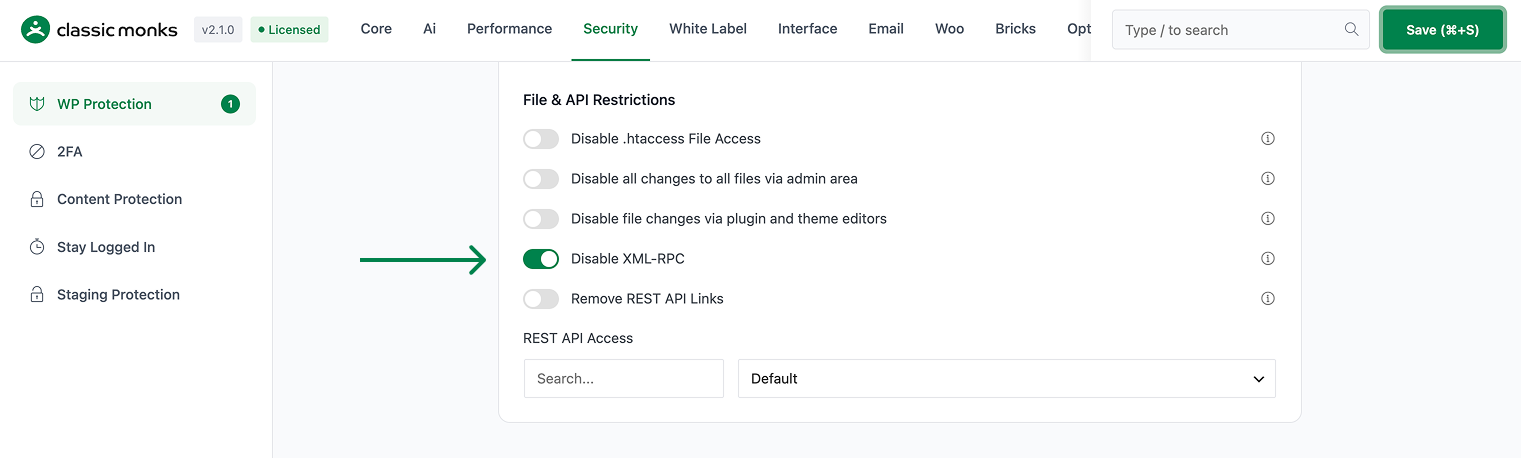
Step 3: Enable Disable XML-RPC
Scroll to Disable XML-RPC and toggle on.
Step 4: Save Changes
Click Save Changes.
Step 5: Test
Try to access https://yoursite.com/xmlrpc.php in your browser. The response should be 403 Forbidden or 404 Not Found. The page should no longer respond to XML-RPC requests.
Configuration Options
| Option | Description | Default |
|---|---|---|
| Disable XML-RPC | Master toggle. | Off |
No nested options.
What Gets Affected
- The XML-RPC endpoint: returns 403/404 for all requests
- The pingback functionality: disabled (other sites can’t ping your posts)
- The trackback functionality: disabled
- The Jetpack legacy features: may break (if you use Jetpack)
- The mobile app connections: older apps may break
What Does NOT Get Affected
- The REST API: still works
- The WordPress admin: not affected
- The frontend pages: not affected
- The plugin/theme update via WP-CLI: not affected
Advanced Options (Developers)
This feature registers 2 WordPress hooks in xmlrpc-pingbacks.php:
Filters:
xmlrpc_enabledcalls__return_false()(Disables XML-RPC completely)wp_headerscallscm_remove_x_pingback()(Removes X-Pingback header)
// Hooked in xmlrpc-pingbacks.php
add_filter( 'xmlrpc_enabled', '__return_false' );
The feature modifies WordPress behavior by registering or removing hooks. Disabling it reverses those changes and WordPress returns to its default behavior.

Add your first comment to this post