




What Is the Disallow File Modifications feature?
By default, WordPress admin users can edit theme and plugin files via the dashboard:
- Theme Editor: Appearance > Theme File Editor
- Plugin Editor: Plugins > Plugin File Editor
This is a convenience feature for developers but creates a security risk. A compromised admin account can use the file editor to inject malicious code.
The Disallow File Modifications feature disables these editors. The site can still be updated via WP-CLI, FTP, SSH, or Git.
Why You Need It
The file editors are a high-value attack surface:
- No version control: Direct file edits are not tracked
- No code review: Changes can be made without oversight
- No backup integration: Edits bypass most backup systems
- Common malware vector: Compromised admin accounts use the file editor to inject backdoors
For production sites, the file editors should always be disabled.
How to Disallow File Modifications in WordPress
Step 1: Navigate to Settings
Click into the Classic Monks plugin settings in your WordPress dashboard.
Step 2: Go to the Security Tab
Click on the Security menu, then click the WP Protection subtab.
Step 3: Enable Disallow All File Modifications
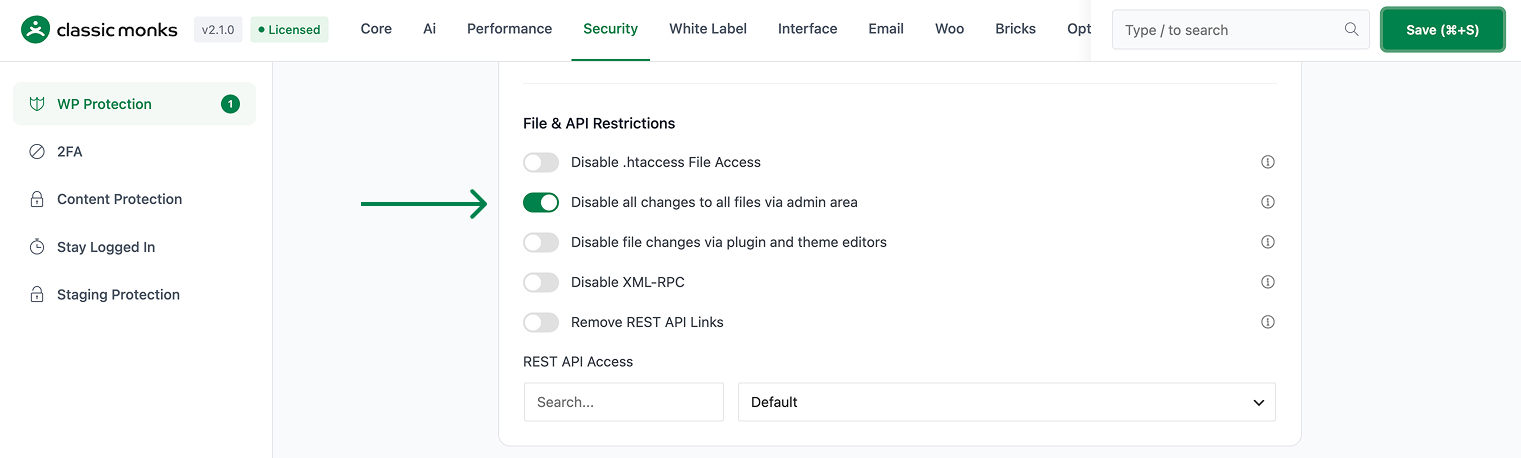
Scroll to Disable all changes to all files via admin area and toggle on. This is the master toggle that disables all file modifications via the admin (including the plugin/theme editor AND plugin/theme updates from the admin).
Step 4: (Optional) Enable Disallow Plugin/Theme Editor
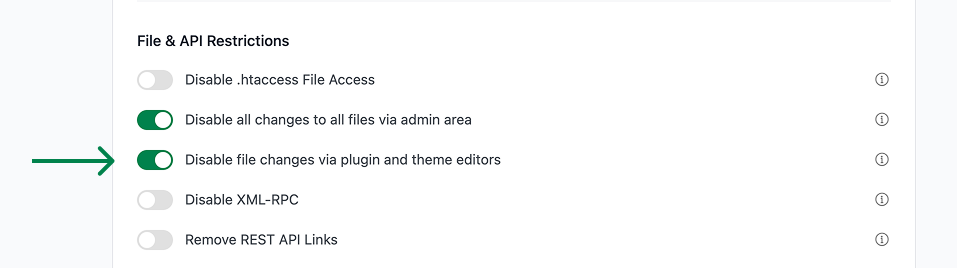
If you want to allow plugin/theme updates but still disable the editor, toggle on Disable file changes via plugin and theme editors (separate toggle). The admin can update plugins/themes from the Plugins page, but the editor is disabled.
Step 5: Save Changes
Click Save Changes.
Step 6: Test
Log in as an admin. Go to Appearance > Theme File Editor. The menu item should be missing (or show a “you don’t have permission” message). The same for Plugins > Plugin File Editor.
Configuration Options
| Option | Description | Default |
|---|---|---|
| Disable all changes to all files via admin area | Master toggle (disables all file changes via admin). | Off |
| Disable file changes via plugin and theme editors | Disable the editor only (allows updates). | Off |
The first toggle is the most restrictive. The second toggle is less restrictive (allows updates but not direct file editing).
What Gets Affected
- The Theme Editor: disabled
- The Plugin Editor: disabled
- The plugin/theme update flow: disabled (only with the first toggle)
- The admin’s ability to edit code via the dashboard: removed
What Does NOT Get Affected
- FTP/SSH access: not affected (admins can still edit files directly)
- The wp-cli: not affected (can be used to update plugins/themes)
- The plugin/theme update via the WP-CLI: not affected
- The custom code via Code Manager: not affected (this is a separate feature)

Add your first comment to this post