




Before You Enable It
Disable competing lazy-loading systems
Run one lazy-loading system at a time. Disable lazy loading in your theme, page builder, CDN, and other optimization plugins before enabling Classic Monks. Multiple systems can rewrite the same src, srcset, background, and iframe attributes and leave content blank.
Test while logged out
The Disable for Admin Users option skips lazy loading for administrators. Test performance in a logged-out private window so you are testing the visitor path, not the admin bypass.
Protect above-the-fold content
Do not lazy-load your logo, hero image, main featured image, or any image required to render the first viewport. Use Preload Critical Images, Exclude Above-the-Fold Images, or the exclusion field before measuring the result.
How to Configure Lazy Loading
Step 1: Open the Lazy Loading settings
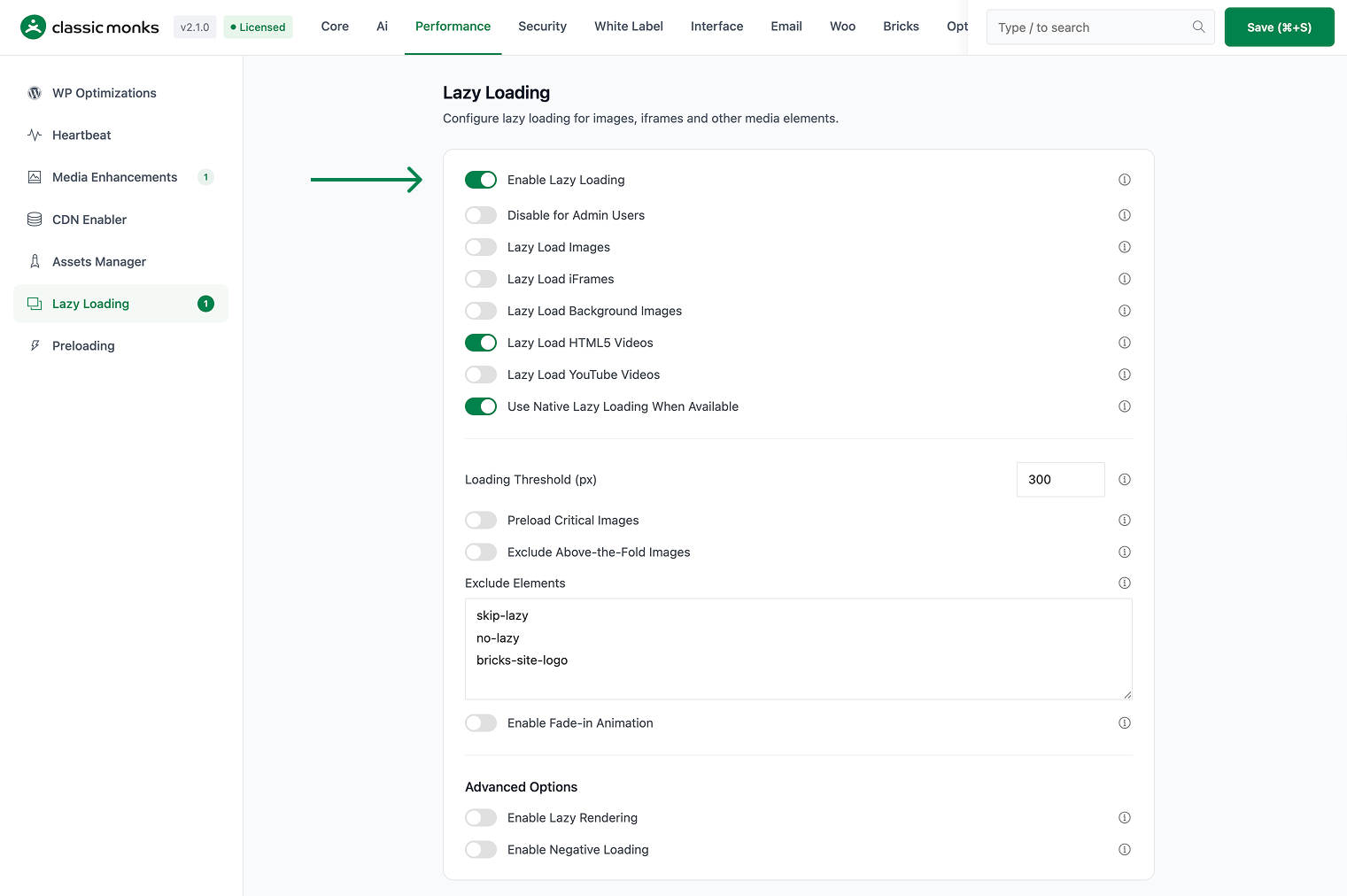
In WordPress admin, open Classic Monks > Performance and select the Lazy Loading subtab.
Step 2: Enable the master toggle
Enable Enable Lazy Loading. The media-specific options become active below it.
Step 3: Choose the media types
Enable only the content types you need:
- Lazy Load Images
- Lazy Load iFrames
- Lazy Load Background Images
- Lazy Load HTML5 Videos
- Lazy Load YouTube Videos
Start with images, iFrames, and videos. Add background images after checking your theme and page builder.
Step 4: Choose native loading behavior
Enable or disable Use Native Lazy Loading When Available. Native loading uses the browser’s loading="lazy" support. Classic Monks also has its own JavaScript loader. Do not assume native loading and JavaScript loading behave identically when diagnosing a conflict.
Step 5: Set the loading threshold
Set Loading Threshold (px). This controls how early content loads before it enters the viewport:
- Lower values are more aggressive and reduce early requests.
- Higher values begin loading earlier and can reduce visible pop-in while scrolling.
- Start with the default, then increase it only if users see content appear too late.

Step 6: Configure YouTube and animation
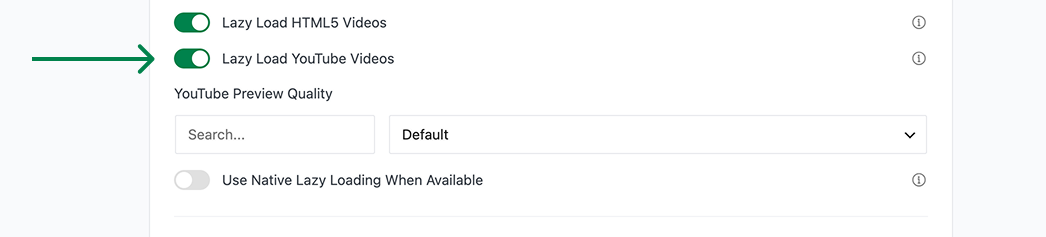
When Lazy Load YouTube Videos is enabled, check the available YouTube Preview Quality setting. The loader can replace an embed with a lightweight preview and load the iframe when the visitor activates it.
If you want a softer reveal, enable Enable Fade-in Animation and set Animation Duration (ms).
Step 7: Save and test
Click Save Changes. Test at least these cases while logged out:
- A page with images below the fold
- A page with an iframe or YouTube embed
- A page with a CSS background image
- A page with a video element
- A page with a hero image and logo above the fold
Configure Each Lazy-Loading Option
Lazy Load Images
Defers image requests until images approach the viewport. Use this for content images below the fold. Keep hero, logo, and featured images excluded or preloaded.
Lazy Load iFrames
Defers iframe loading for embeds such as maps, forms, and third-party widgets. Check embedded content after enabling it because some providers require the iframe to exist immediately.
Lazy Load Background Images
Defers background image handling for supported background attributes and content patterns. Test theme and builder sections individually. Do not apply it blindly to hero sections.
Lazy Load HTML5 Videos
Defers <video> elements until they approach the viewport. This is useful for video galleries and below-the-fold media. Keep above-the-fold background video behavior under review because delaying it may change the first visual impression.
Lazy Load YouTube Videos
Defers YouTube iframe loading and can use a preview image before activation. Check the preview quality setting and test cookie or consent plugins. If your site requires privacy-enhanced embeds, verify the generated embed URL and consent behavior.
Use Native Lazy Loading When Available
Uses native browser loading behavior where supported. Classic Monks also contains JavaScript behavior and can disable WordPress’s native lazy-loading filter when native loading is not selected. Treat this as an implementation choice, not as two independent systems to enable blindly.
Disable for Admin Users
Skips lazy loading for administrators. Keep this enabled when page builders, live previews, or admin editing need the original markup and media behavior.
Protect Critical Content
Preload Critical Images
Enable Preload Critical Images when the first viewport contains a known LCP image, such as a featured image, site logo, hero image, or banner. Classic Monks adds high-priority preload behavior for detected critical patterns.
Use this together with lazy loading: preload the few critical assets, lazy-load the rest.
Exclude Above-the-Fold Images
Enable Exclude Above-the-Fold Images when the site has hero, logo, featured, or other first-viewport images that should not be lazy-loaded.
Excluded classes and patterns
Use the Exclude Elements field when a specific image or container must bypass lazy loading. The source supports configured excluded classes plus filter-based exclusions for parent selectors and above-the-fold patterns.
If the exclusion field is not enough, developer-level controls include:
cm_lazy_exclude_leading_imagescm_lazy_parent_exclusionscm_above_fold_patterns
Verify exclusions in the rendered HTML and the browser Network panel. Do not rely only on the visual result.
Lazy Rendering and Off-Screen Unloading
These options are in the same Lazy Loading panel but behave differently from ordinary lazy loading.
Enable Lazy Rendering
Toggle on Enable Lazy Rendering to defer DOM section processing until content enters the viewport. Configure Lazy Render Selectors and Render Delay (ms), then choose the content types:
- Images
- iFrames
- Videos
- Background Images
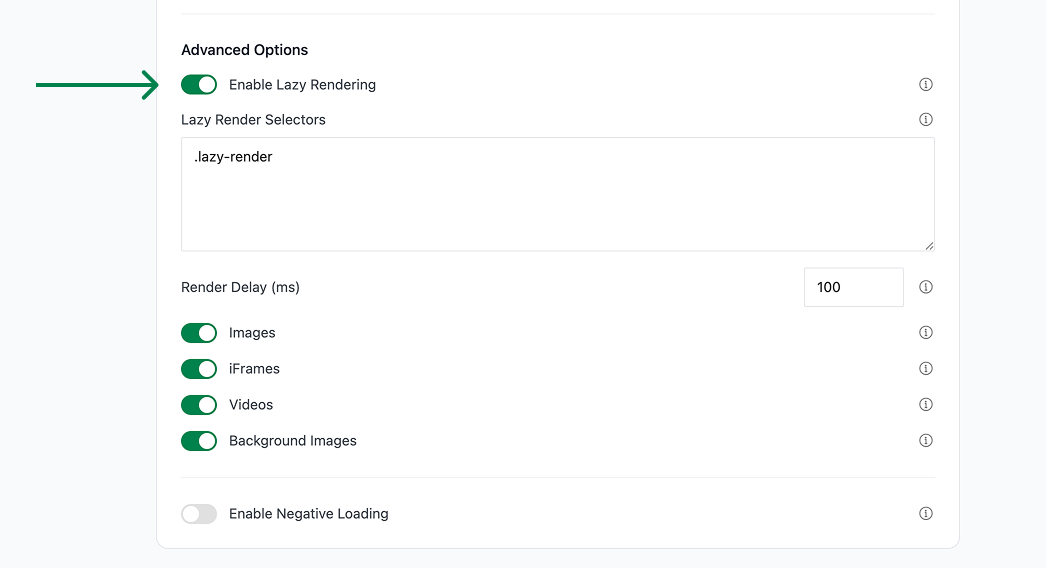
Start with a narrow selector and one content type. Broad selectors can break layout scripts that expect the full DOM to be available immediately.
Enable Negative Loading
Enable Enable Negative Loading to release or unload off-screen content after it leaves the viewport. Configure:
- Memory Threshold (MB)
- Unload Threshold (px)
- Unload CSS Styles
- Unload Images
- Unload Videos
- Unload iFrames
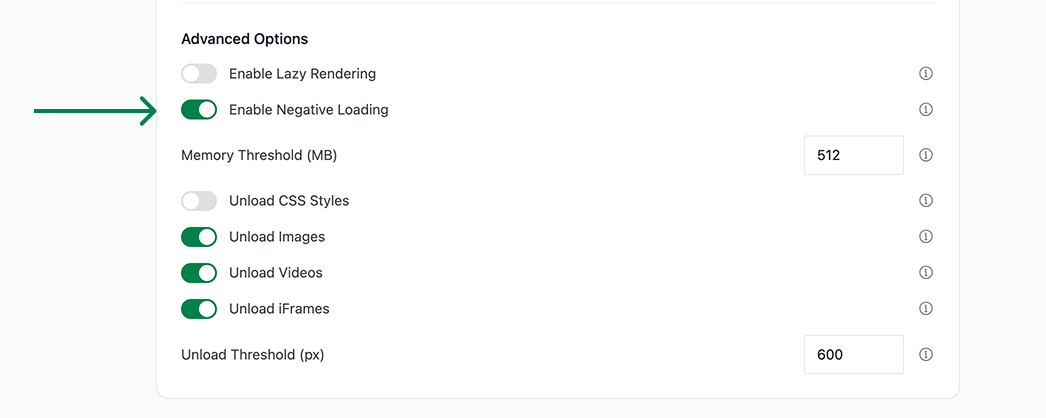
Use negative loading on long pages with heavy media. Avoid it when users frequently scroll back and forth or when a third-party widget cannot be safely reinitialized.
Verify the Result
Use a repeatable test instead of judging by feel.
Browser test
- Open a logged-out private window.
- Open DevTools and select the Network panel.
- Reload with the Network panel open.
- Confirm below-the-fold images and embeds are not requested immediately.
- Scroll toward the content.
- Confirm the request starts near the viewport and the content renders correctly.
- Scroll away and back if negative loading is enabled.
- Confirm content reloads without layout breakage.
Performance test
Run the same page through Lighthouse or PageSpeed Insights before and after enabling the feature. Record:
- Total requests
- Transfer size
- LCP
- Largest image request timing
- Total Blocking Time
- Any console errors
Do not reuse benchmark numbers from another plugin. Measure the Classic Monks configuration on the actual site.
Developer Notes
The implementation is in functions/performance/lazy-loading.php and assets/js/lazy-loading.js.
Important source options include:
enable_lazy_loadinglazy_load_disable_for_adminlazy_load_imageslazy_load_iframeslazy_load_backgroundslazy_load_videoslazy_load_youtubelazy_load_nativeyoutube_preview_qualitylazy_load_thresholdlazy_load_animationlazy_load_animation_durationpreload_critical_imagesexclude_above_fold_lazylazy_load_excluded_classesenable_lazy_renderinglazy_render_selectorslazy_render_delayenable_negative_loadingmemory_thresholdunload_thresholdunload_stylesunload_invisiblereload_invisible
The implementation registers wp_head, init, wp_enqueue_scripts, plugins_loaded, the_content, and media-related WordPress filters. Confirm hook names and option names against the current source before using them in custom code.

Add your first comment to this post