




Are you running twenty separate WordPress plugins and wondering why your site is slow, your admin is cluttered, and your renewal invoices keep climbing? If you are reading this, there is a good chance you already know the feeling. Every single job on your site has its own plugin, each with its own developer, its own update schedule, and its own quiet way of eventually breaking something.
All-in-one WordPress plugins exist to end that cycle. In this guide you’ll learn what an all-in-one plugin actually is, why it matters for site speed, security, and your sanity, and what happens behind the scenes when you consolidate your stack. We also compare the top all-in-one plugins available in 2026 so you can choose the one that fits your workload. I’m Joy, the founder of Classic Monks, so I’ll be honest from the start: my plugin is part of this comparison, and I’ll rank it where it belongs, with its limits clearly stated.
What an All-in-One WordPress Plugin Is and How It Works
An all-in-one WordPress plugin is a collection of modular tools delivered as a single install. You enable only the features you need and leave the rest switched off. That is the defining trait. It is not a plugin that does a little bit of everything all at once. It is a shared codebase full of individual tools you can turn on and off, so the plugin stays lean even when the library is large.
What “all-in-one” actually means and what happens when you enable it
A single-purpose plugin does one job. An all-in-one plugin is closer to a toolkit. One plugin may contain a security suite, an asset manager, a media converter, WooCommerce utilities, and an admin cleanup module. When you activate it, nothing changes until you enable the features you plan to use. The rest stay dormant and add no overhead.
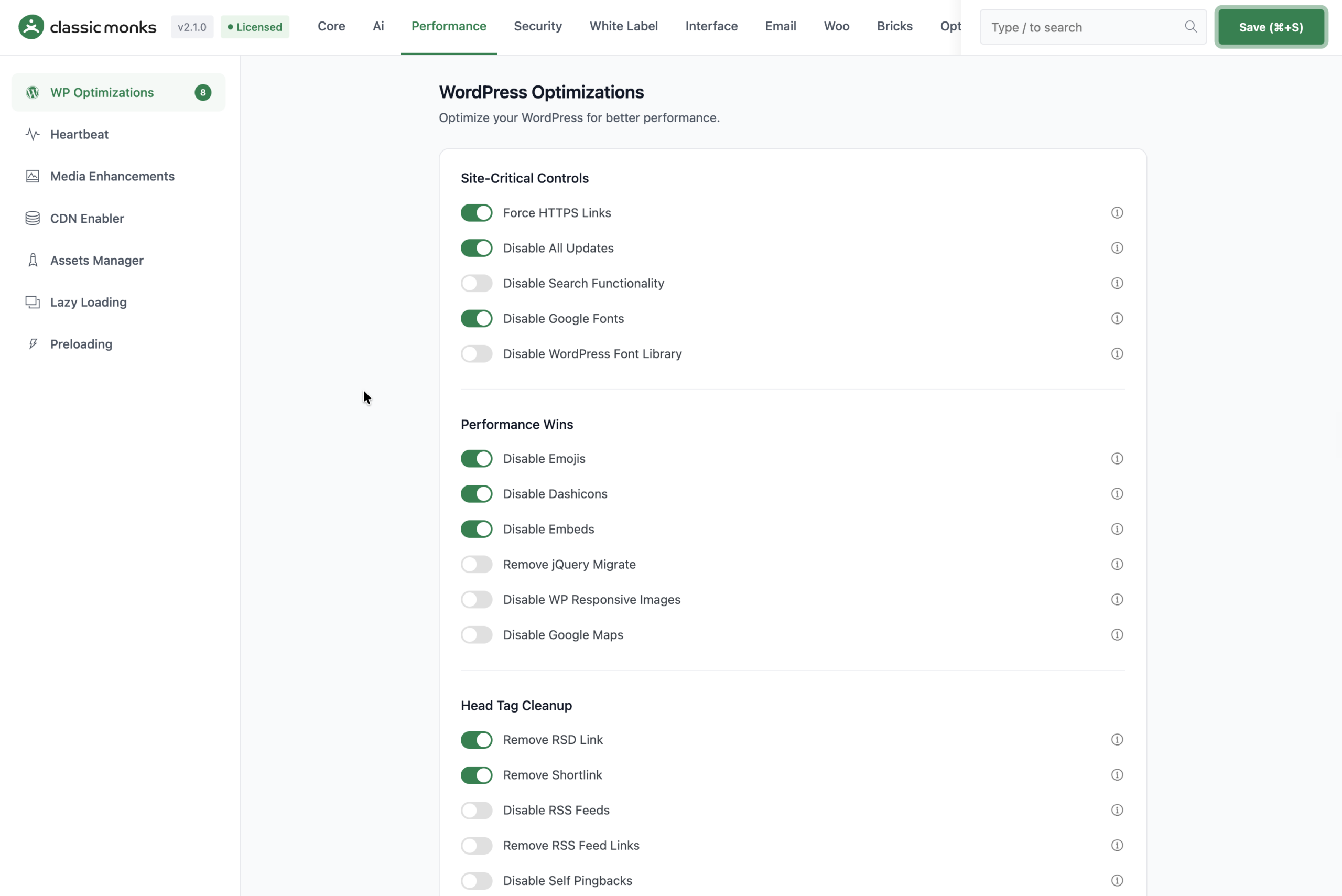
That granular control matters. The classic objection to all-in-one plugins is that they are heavy. A true modular plugin answers that by only loading what you activate. The result is a large feature library with the footprint of a small one, because unused modules are not running.
What an all-in-one plugin does with your existing stack
When you install one, it does not immediately tear out your other plugins. On the first run it introduces its own tabs, and you choose which jobs to move over. The realistic path is migration, not demolition: pick the recurring tasks, enable the matching features, confirm they work, then remove the plugins they replaced.
Each feature group lives under its own tab. On Classic Monks those tabs are AI, Bricks Builder, Core, Email, Interface, Options, Performance, Security, White Label, and WooCommerce, which gives you a single map of what the plugin covers before you enable anything.
What happens when you update or change content
Because everything shares one update cycle, one changelog, and one support contact, updating an all-in-one plugin is a single action rather than a checklist. When you change a setting, it applies immediately and lives in one place. When a WordPress release lands, you test one update instead of fifteen.
Why You Need an All-in-One Plugin
A collection of third-party code, each with its own authors and its own update cadence, is the most fragile part of a WordPress install. All-in-one plugins reduce that fragility. Here is why that matters in practice.
Benefit 1: Fewer plugins means fewer conflicts and a faster site
Every active plugin adds hooks, queued scripts, styles, and database queries. Even well-written plugins add weight at the admin and the front end. When you swap several plugins for one modular tool, you remove the overlapping functionality and the redundant scripts that often cause the same asset to load twice.
This is the same logic performance guides push: fewer assets, smarter loading, lower response overhead. An all-in-one plugin is not a replacement for caching, but it removes the bloat that optimization tools then have to clean up.
Benefit 2: One interface to learn and one place to configure
Your team stops opening a different plugin for every task. Everything lives under one tab structure. Onboarding a new developer or handing a site to a client becomes simpler because the configuration sits in one place.
Benefit 3: The support and update load drops
You update one plugin instead of fifteen. When a change breaks something, there is one changelog to read and one team to contact instead of scattered forums. For an agency managing dozens of client sites, this compounds: every consolidated client site is a portfolio with less daily maintenance.
That is not to say an all-in-one plugin is a universal answer. Caching is served better by a dedicated caching layer, backups deserve a tool that snapshots independently, and SEO has specialists that go deeper. The all-in-one plugin eliminates the sprawl around those core services; it does not replace them.
All-in-One Plugins vs a Stack of Single-Purpose Plugins
A stack of single-purpose plugins has one genuine advantage: you can assemble a best-in-class tool for every job. The cost is complexity. Every plugin is a separate subscription, a separate update, a separate support queue, and a separate place your configuration lives.
An all-in-one plugin trades a little raw depth per narrow job for consolidation. In return you get a single workflow, one license, one update, and fewer integration headaches. The two approaches are not mutually exclusive. The strong move is to keep a small number of dedicated tools for the jobs that genuinely need depth, and let the all-in-one plugin own the broad recurring baseline.
What’s Important When Choosing an All-in-One Plugin
When you compare all-in-one plugins, these are the criteria that separate a useful toolkit from a feature-count headline. There are seven worth weighing.
- Category coverage. List the jobs you do daily and match the plugin to that list, not to a marketing tagline.
- Builder compatibility. If you build with Bricks, Elementor, Gutenberg, or Breakdance, confirm native support, not generic hooks.
- Interface quality. Can you find a setting in ten seconds? A dense feature list is worthless if the admin buries every option.
- Honesty about gaps. Read what the plugin explicitly does not do. A product that names its limits is more trustworthy.
- Agency features. License per site counts, client expiry controls, staging protection, and white label matter when you manage other people’s sites.
- Support and update cadence. An all-in-one plugin concentrates your dependencies, so you want a fast, reachable maintainer.
- Pricing model. Check the yearly price, the site count per tier, and whether a lifetime deal exists. For agencies, cost per site over a portfolio is the number that matters.
Best Free and Paid All-in-One Plugins for WordPress
With those criteria in mind, here is our ranking of the best all-in-one WordPress plugins in 2026. Number one is my own plugin, Classic Monks, and I’ll tell you exactly what it does and what it does not do.
1. Classic Monks
Ranked #1
From $39/yr · LTD available
Classic Monks is an all-in-one modular plugin built for agencies and WordPress professionals. It replaces 20 to 30 separate plugins with one install and 393+ features, including 162 dedicated to Bricks Builder. It activates selectively, so you enable only the tools you need.
Key Features
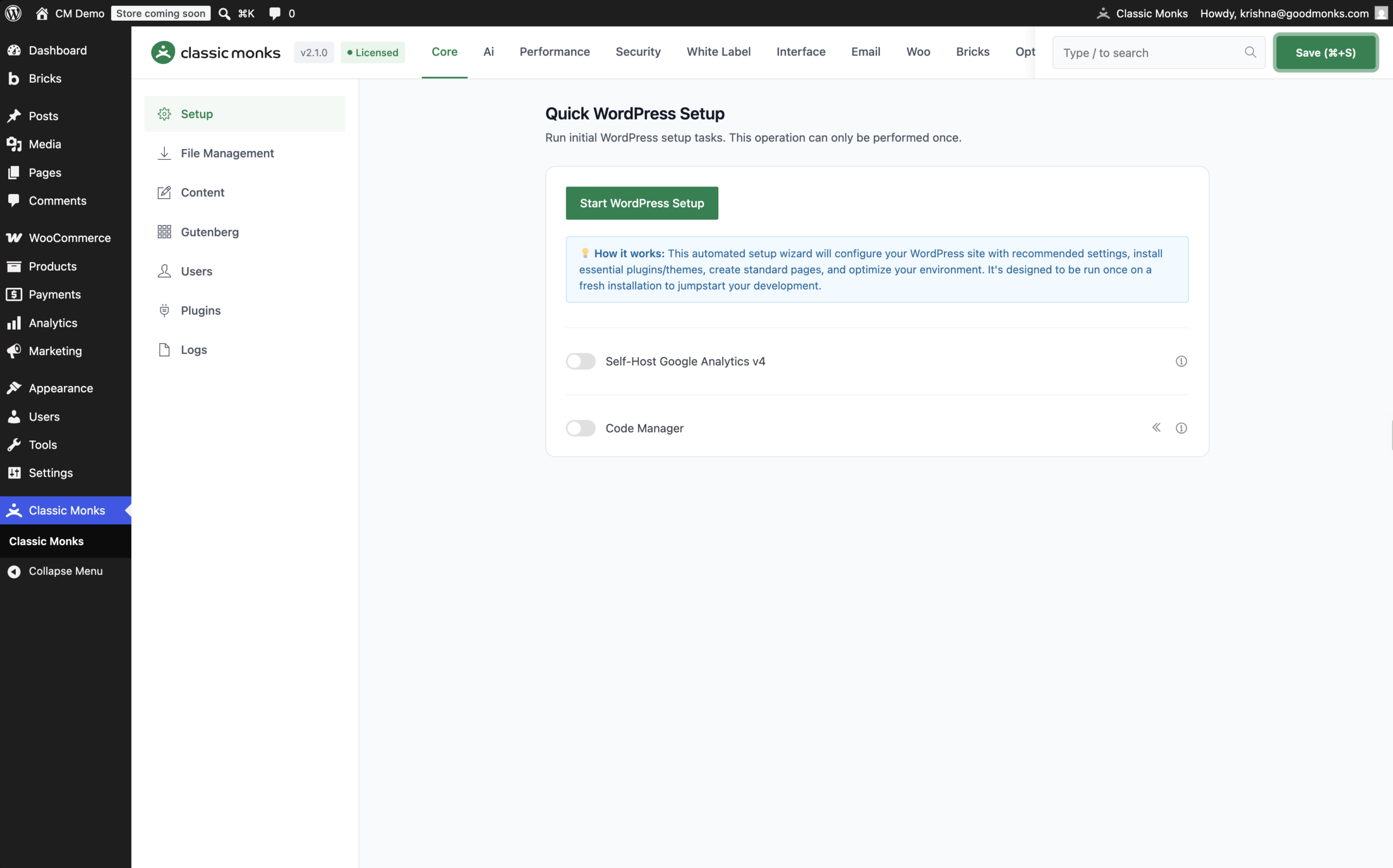
- Quick WordPress Setup for fast, repeatable site provisioning
- Code Manager for PHP, CSS, and JavaScript with validation and safe mode
- 39+ security tools: login lockdown, 2FA, CAPTCHA, staging protection
- 120+ WooCommerce features: swatches, checkout controls, coupons, order tools
- Performance controls: asset management, lazy loading, preloading, image conversion to WebP and AVIF
- Media toolkit, AI Agent in the admin bar, white label and client license expiry on higher tiers
What Classic Monks does not replace: full-page caching, backups, and SEO. It includes asset controls, lazy loading, and preloading, but it does not claim to own full-page caching. Keep a dedicated caching layer, backup tool, and SEO plugin where the site needs them.
Pricing: Yearly from $39/yr for one site to $299/yr for unlimited sites. Lifetime deals on Agency ($299 for 100 sites) and Enterprise ($599 unlimited). 15-day money-back guarantee.
2. WP Extended
Free · Pro plans
WP Extended is a modular WordPress plugin that groups admin, content, media, login, export, security, and developer utilities into one install. The vendor counts 51 modules, and the free WordPress.org plugin includes 36 of them. Every feature is its own module with an enable switch, so you turn on what you need and leave the rest off, and the whole plugin is built and tested as one codebase rather than a bundle of separate installs.
It is a close and honest competitor to Classic Monks on the "consolidate the small stuff" job. WP Extended's specialty is admin columns, code snippets, export tools, post-type switching, quick search, and folder organization, all with a clean modular interface and a strong free tier. It is lighter on Bricks depth, WooCommerce, AI, white labeling, and the security suite that Classic Monks carries.
Key Features
- 51 modules covering admin, content, media, login, export, and security utilities
- Free plan with 36 modules on WordPress.org
- Code snippets, post type switcher, quick search, admin columns, folder manager
- Clean modular interface with per-module enable switches
Pricing: Free to start with 36 modules on WordPress.org. Pro is sold as Single Site, Multi Site, and Unlimited annual plans, plus an Unlimited Lifetime one-time option. See WP Extended pricing.
3. Admin and Site Enhancements (ASE)
Free
ASE is a free WordPress toolkit focused on admin and site enhancements. It offers dozens of small utilities: admin menu management, code snippets, login customization, and post-type controls. It is free, popular, well maintained, and a sensible starting point when your need is admin cleanup and utility features.
ASE is an excellent option when your workload is admin polish and site utilities, and you do not need security depth, WooCommerce, Bricks, media workflows, or agency delivery. It is a focused admin toolkit rather than a broad core stack. For a full head-to-head, see the Classic Monks vs ASE comparison.
Key Features
- Admin menu, dashboard, and login customization
- Code snippets and post-type management
- Free and open source
Pricing: Free, with a Pro tier. Check the official ASE site for current Pro pricing.
4. Jetpack
Free tier · paid ~$119-299/yr
Jetpack bundles security, performance, and growth tools into one subscription backed by Automattic, the company behind WordPress.com and WooCommerce. It brings cloud-managed backups, malware scanning, brute-force protection, a CDN, and site analytics. Backups and cloud-managed security are its genuine strengths, and it benefits from running inside the Automattic ecosystem.
Jetpack is a strong choice if you want cloud-managed security and backups from a large provider and are comfortable in the WordPress.com ecosystem. It is less oriented toward the granular asset and page-builder controls an agency typically wants.
Key Features
- Real-time cloud backups and malware scanning
- Brute-force protection, spam protection, CDN
- Site stats and growth tools
Pricing: Free tier plus paid security and growth plans. Check Jetpack pricing for the current number, because plans change often.
5. WPMU DEV
WPMU DEV is a membership suite of separate WordPress plugins rather than one modular install. It includes popular tools like Smush for image compression, Defender for security, Hummingbird for performance, and a backup plugin, all under one subscription with 24/7 support.
If you prefer a collection of purpose-built plugins under a single license, WPMU DEV is a solid pick. Note the distinction: it is a suite of plugins you install separately, not one shared codebase. That nuance matters if your goal is a single settings interface.
Key Features
- Smush, Defender, Hummingbird, and backup tools
- 24/7 support and a hub dashboard
- CDN and white-label client billing on higher tiers
Pricing: Membership from roughly $36 to $120 per year depending on site count. WPMU DEV runs frequent promos, so check current pricing before buying.
6. Perfmatters
Perfmatters is a lightweight performance plugin focused on disabling unused WordPress scripts and styles, per-page control, and Core Web Vitals optimization. It is not a full all-in-one stack, but it is the standard choice for teams that already have caching and backups elsewhere and need granular script control.
Choose Perfmatters when performance is the entire job and you are comfortable managing security, WooCommerce, and backups separately.
Key Features
- Script manager to disable unneeded assets per page
- WooCommerce, emoji, and RSS cleanup controls
- Google Fonts and CDN rewrite settings
Pricing: Around $24.95 per site per year. Confirm on the official site before buying.
All-in-One WordPress Plugins Compared at a Glance
| Plugin | Best For | Setup | Main Strength | Notable Gap |
|---|---|---|---|---|
| Classic Monks | Agencies managing several client sites | Easy | One modular plugin replacing 20-30 tools | No caching, backups, or SEO |
| WP Extended | Consolidating small admin and utility plugins | Easy | Clean modular interface with a strong free tier | Light on Bricks, WooCommerce, AI, and white label |
| ASE | Admin cleanup, free | Easy | Focused free admin toolkit | No security depth, WooCommerce, or Bricks |
| Jetpack | Cloud-managed security and backups | Easy | Automattic-backed security and backups | Less granular asset and builder control |
| WPMU DEV | Suite of plugins under one license | Moderate | Many tools, one subscription | Separate plugins, not one codebase |
| Perfmatters | Pure performance and script control | Moderate | Granular asset and script management | Performance only |
How to Test an All-in-One Plugin Without Risk
Testing any WordPress plugin on a staging site is the safe path, and all-in-one plugins are no exception. Because they activate selectively, you can enable one feature, confirm it works, then move to the next.
- Create a staging copy of a real site. Use your host’s staging tool or a local environment. This is where you check conflicts and asset load before anything touches production.
- Enable features one at a time. Verify each area before adding the next, and keep a note of which plugins you expect to remove.
- For Classic Monks, use the zero-install demo. The demo has Bricks and Classic Monks pre-installed with full admin access. You can open the whole interface and confirm whether the workflow fits before you touch a live site. On a fresh site you can also run Quick WordPress Setup.
Wrapping Up
An all-in-one WordPress plugin helps you close the gap between a bloated stack and a lean, manageable setup. Choose one that matches your real workload, verify its honest boundaries, and test it on staging or in a demo before you commit. For most agencies and WordPress professionals, a single modular plugin is the difference between an afternoon of upkeep and five minutes.
If you run an agency or maintain client sites, Classic Monks is built for exactly that. Try it with zero risk: the demo is free, and the 15-day money-back guarantee covers the plans. You decide if it owns the job, not us.