




What Is the Math Captcha feature?
The Math Captcha feature adds a simple math problem to your forms. Users see a question like “What is 3 + 5?” and enter the correct answer before the form can be submitted. Numbers are between 1 and 20 and the problem uses addition or subtraction, so it changes every time the form loads.
The captcha is fully self-contained. It does not call Google, Cloudflare, or any other third-party service, and it does not track users across the web.
Why You Need It
Spam and automated bots target login, registration, and comment forms on every WordPress site. Traditional options have trade-offs:
- Image captchas: hard for some users and can be bypassed with OCR
- Google reCAPTCHA: tracks users and needs a Google account
- Cloudflare Turnstile: needs a Cloudflare account and can be rate-limited
Math captcha avoids all of that:
- No external service: everything runs on your site
- No tracking: it does not follow users across the web
- Accessible: no objects to identify in an image
- Language-independent: numbers are universal
For most basic spam protection, a math captcha is enough. It is the fastest way to add a barrier to your forms without a setup step.
Recommendations Before Enabling
- Know it is a soft barrier. A math captcha stops casual bots and bulk comment spam, but a sophisticated bot can solve it. For high-value forms like login or registration, consider Cloudflare Turnstile instead, or combine math captcha with the Login Lockdown feature.
- Comment protection applies to guests only. Logged-in users skip the comment captcha, so your own logged-in members are not interrupted.
How to Enable Math Captcha
Step 1: Open the Security Tab
Click Classic Monks in your WordPress admin sidebar, then click Security.
Step 2: Open the WP Protection Subtab
Click the WP Protection subtab.
Step 3: Enable Math Captcha
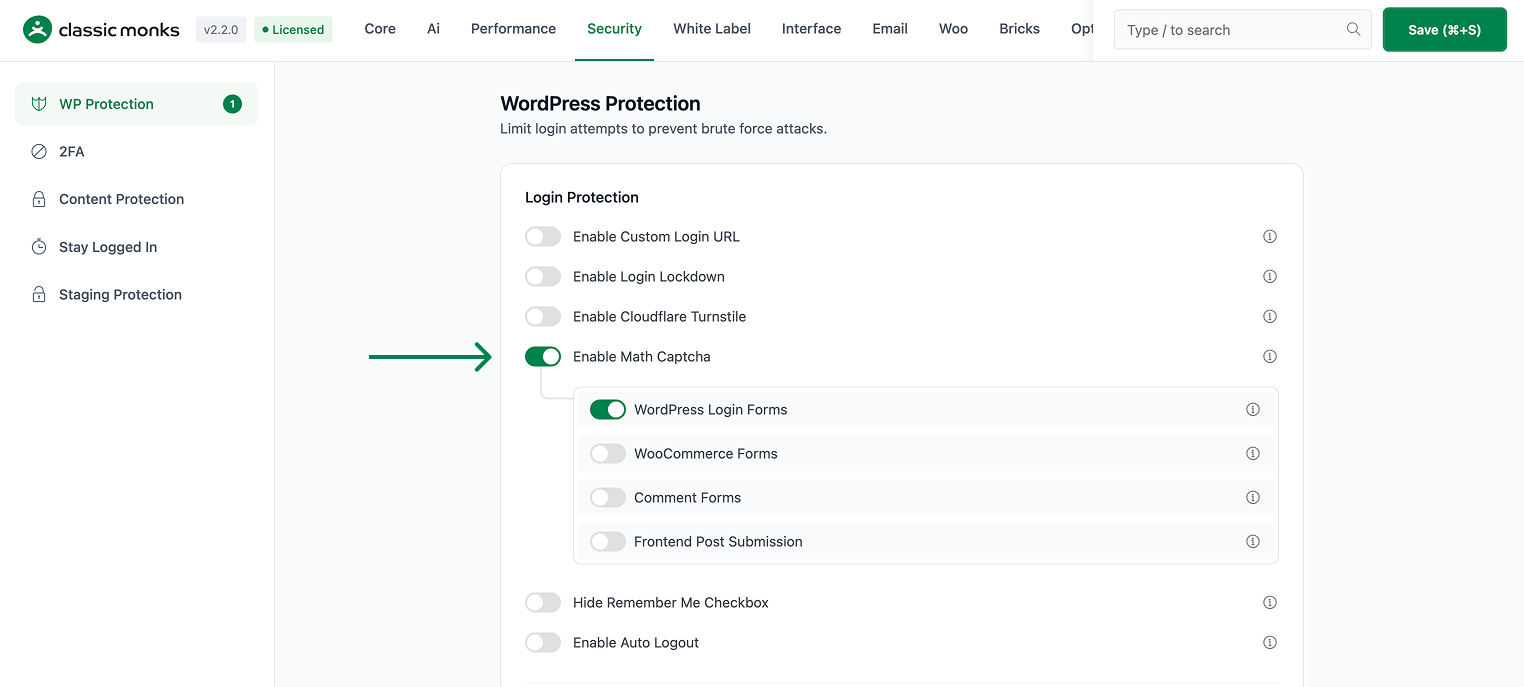
Scroll to Enable Math Captcha and toggle it on. The nested form-scope options expand automatically.
Step 4: Save Changes
Click Save Changes. The captcha is now live on the forms that are enabled by default.
Step 5: Verify It Works
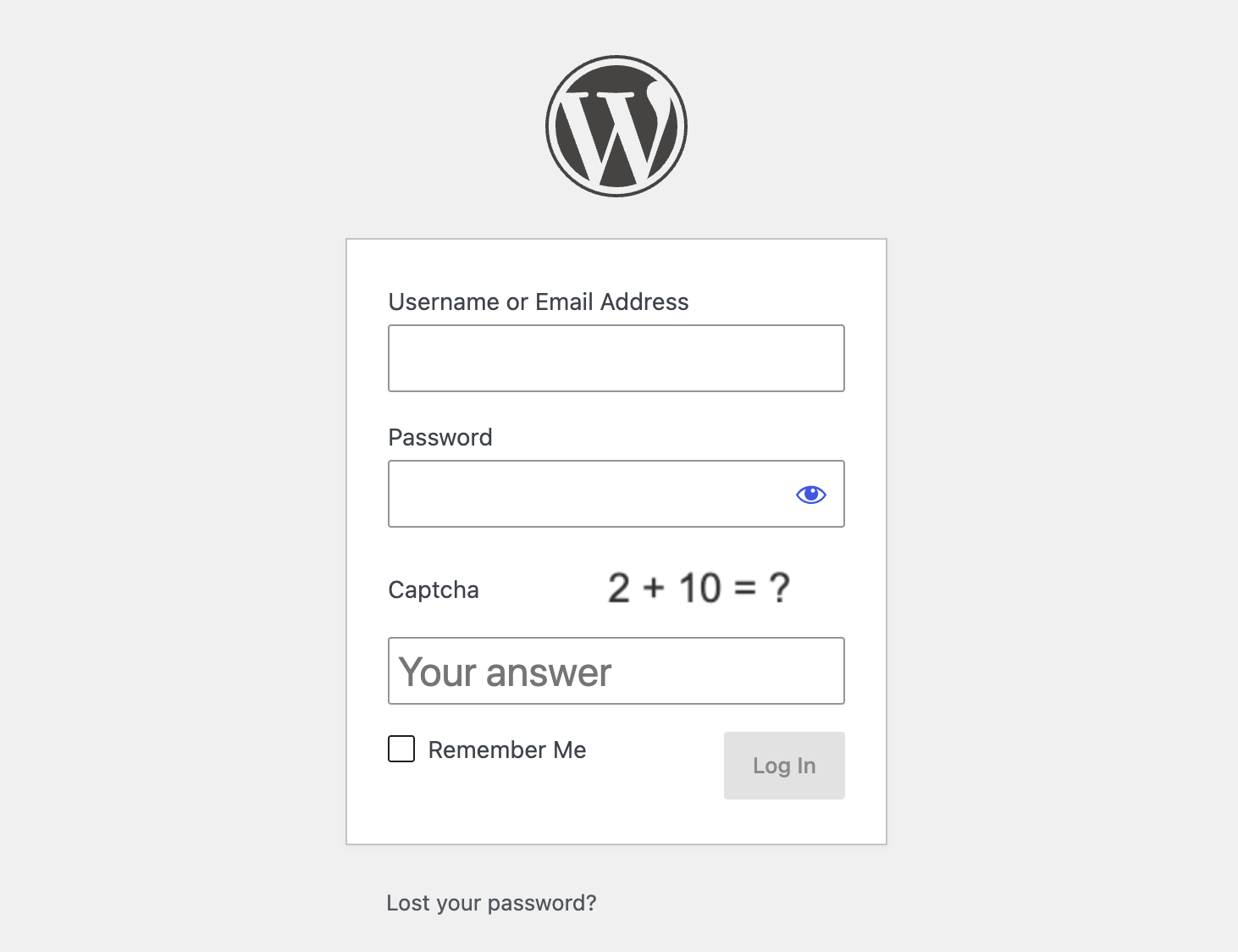
Visit the login page. You should see the math captcha with a “Your answer” field, and the submit button stays disabled until you enter a correct answer.
Configure Options
The feature is a single toggle with four form-scope options. All four are on by default, so you do not need to touch them unless you want to limit where the captcha appears.
| Option | Description | Default |
|---|---|---|
| Enable Math Captcha | Master toggle for the whole feature | Off |
| WordPress Login Forms | Login, registration, and password reset forms | On |
| WooCommerce Forms | WooCommerce login, registration, and lost-password forms | On |
| Comment Forms | WordPress comment forms for non-logged-in users | On |
| Frontend Post Submission | Classic Monks Frontend Post Submission forms | On |
To narrow the scope, disable the forms you do not want protected. For example, turn off Comment Forms if you only want to protect login.
Verify It Works
- Login page: open
wp-login.phpand confirm the math captcha renders above the submit button. - Wrong answer: enter a wrong number and submit. The form rejects it with an “Incorrect or empty math captcha” error.
- Correct answer: enter the right number and confirm the form submits normally.
- Comment form: on a logged-out browser, open a post and confirm the captcha appears before the comment can be posted.
- WooCommerce: if enabled, confirm the captcha shows on the WooCommerce login and registration forms.
Advanced Options (Developers)
The feature registers hooks only when the master toggle is on. The number range is 1 to 20 and the operation is addition or subtraction, chosen randomly per form load.
WordPress login forms (when math_captcha_wp_forms is on):
login_form,register_form,lostpassword_formrender the captchaauthenticate(priority 30) validates the captcha on loginregistration_errorsvalidates it on registrationlostpassword_post_errorsvalidates it on password reset
WooCommerce forms (when math_captcha_wc_forms is on):
woocommerce_login_form,woocommerce_register_form,woocommerce_lostpassword_formrender the captcha
Comment forms (when math_captcha_comments is on):
comment_form_field_commentappends the captcha to the comment formpreprocess_commentvalidates it before the comment is saved
The captcha answer is stored in a transient keyed to the challenge token and expires after 15 minutes. Frontend Post Submission uses a separate renderer and validator in the Bricks Frontend Post Submission element.
// Example: the login form hook
add_action( 'login_form', 'CM_Math_Captcha::render_captcha' );
Disabling the master toggle removes these hooks and WordPress returns to its default behavior.

Add your first comment to this post