




What Is the Auto Logout feature?
By default, WordPress keeps users logged in indefinitely (until they explicitly log out or their session cookie expires, which is typically 48 hours or 2 weeks depending on the “Remember Me” setting). The Auto Logout feature adds a configurable idle timeout: after a set period of inactivity, the user is automatically logged out.
This is a critical security feature for any WordPress site with admin users logging in from shared, public, or unattended computers.
Why You Need It
WordPress’s default behavior assumes the user controls the device:
- An admin walks away from a logged-in computer
- A public library computer stays logged in after the user leaves
- A shared device in an office or co-working space remains accessible
- A laptop is stolen while still logged in
Auto Logout reduces these risks by enforcing a session timeout.
How to Use Auto Logout in WordPress
Step 1: Navigate to Settings
Click into the Classic Monks plugin settings in your WordPress dashboard.
Step 2: Go to the Security Tab
Click on the Security menu, then click the WP Protection subtab.
Step 3: Enable Auto Logout
Scroll to Enable Auto Logout and toggle on. Nested options expand.
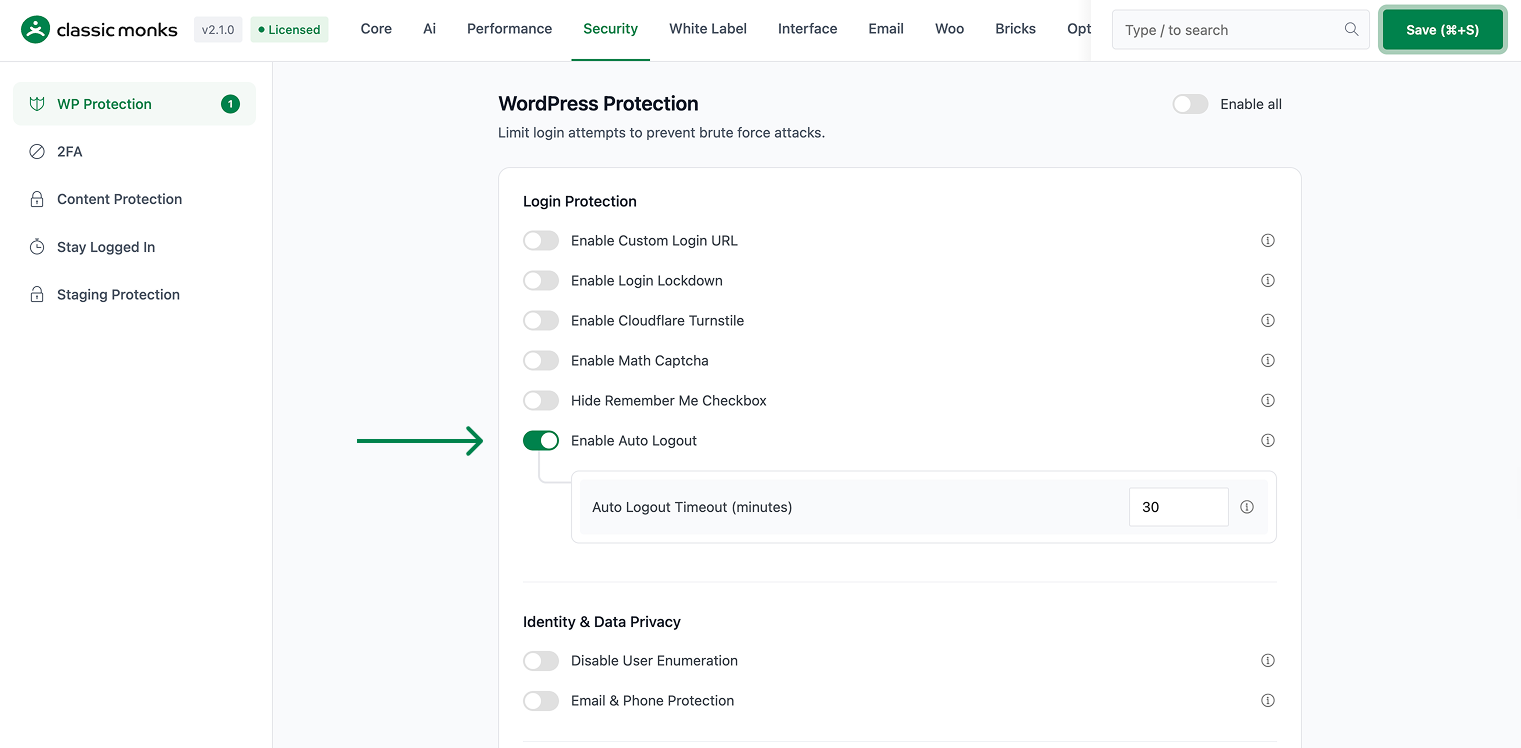
Step 4: Set the Timeout
Set the Auto Logout Timeout in minutes. Common values:
- 15 minutes: For high-security sites (banking, healthcare)
- 30 minutes: For most business sites
- 60 minutes: For low-risk internal sites
- 120 minutes: For very low-risk sites where convenience matters
Step 5: Save Changes
Click Save Changes.
Step 6: Test
Log in as a user. Wait for the configured timeout. You should be automatically logged out.
Configuration Options
| Option | Description | Default |
|---|---|---|
| Enable Auto Logout | Master toggle. | Off |
| Auto Logout Timeout | Timeout in minutes. | 30 |
The timeout is reset on any user activity (clicking, typing, scrolling).
What Gets Affected
- The user’s session: expires after the timeout
- The user’s cookies: cleared on auto-logout
- The WordPress admin: redirects to the login page after timeout
- The user’s unsaved changes: may be lost (this is expected)
What Does NOT Get Affected
- The user’s saved preferences: preserved (in user meta)
- The user’s posts or content: not affected
- The customizer or editor drafts: preserved (auto-saved before the timeout)
- API tokens: not affected (use a different auth flow)
Advanced Options (Developers)
This feature registers 2 WordPress hooks in auto-logout.php:
Actions:
wp_enqueue_scriptscallscm_auto_logout_enqueue_scripts()(Enqueues auto-logout countdown timer JS)initcallscm_auto_logout_check_timeout()(Checks session timeout on each page load)
// Hooked in auto-logout.php
add_action( 'wp_enqueue_scripts', 'cm_auto_logout_enqueue_scripts' );
The feature modifies WordPress behavior by registering or removing hooks. Disabling it reverses those changes and WordPress returns to its default behavior.

Add your first comment to this post