




What Is Hide WP Version
Hide WP Version is a white-label option in the Classic Monks White Label tab that removes the WordPress version number from the frontend HTML source. WordPress adds a generator meta tag that reveals the version, such as <meta name="generator" content="WordPress 6.5">. Hiding it is a security best practice because attackers can use the version to find known vulnerabilities.
Hide the WordPress Version
Step 1: Open the Branding Settings
In your WordPress dashboard, go to Classic Monks, open the White Label tab, then the Branding subtab.
Step 2: Turn On Hide WP Version
In the Branding subtab, toggle on Hide WP Version.
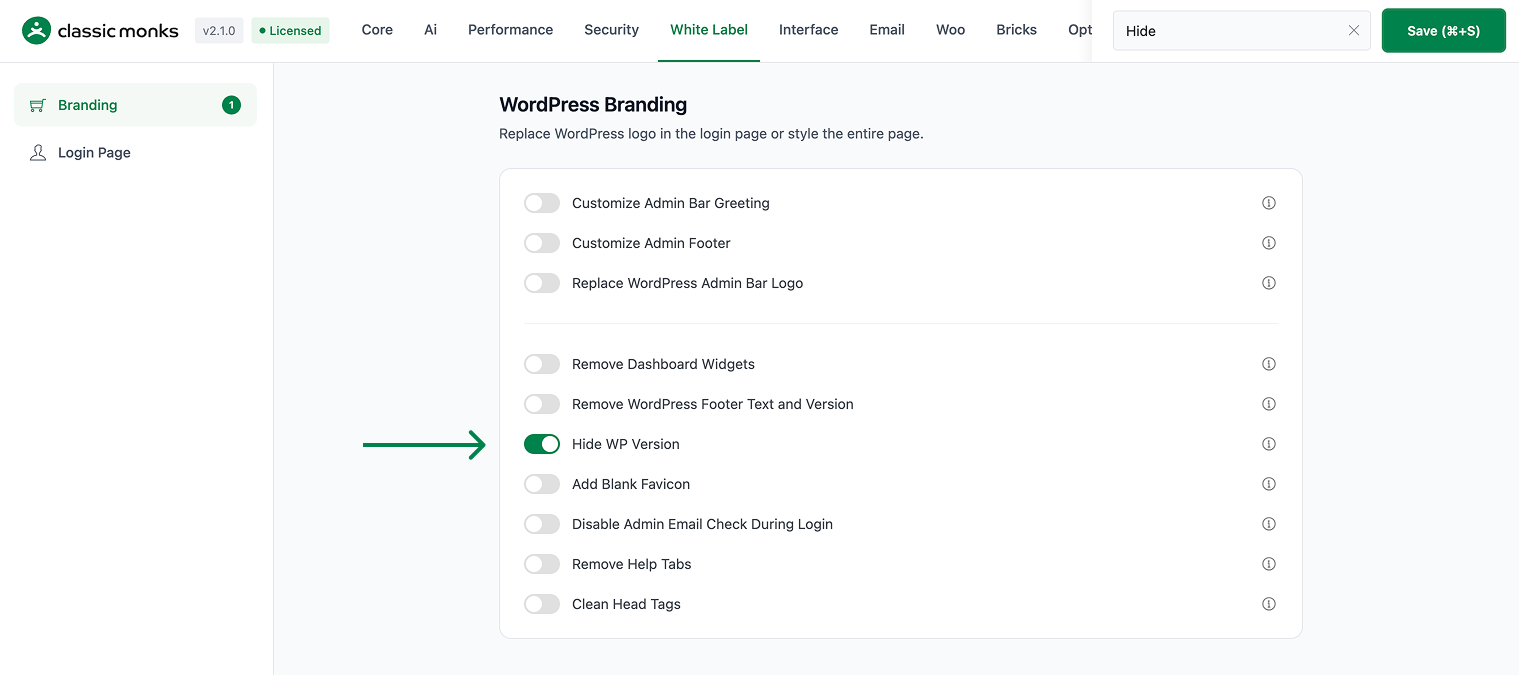
Step 3: Save and Test
Click Save (⌘+S). Open your site’s frontend and view the page source to confirm the version is gone.
Verify It Works
After saving, open your site’s frontend and inspect the page source:
- The
<meta name="generator" content="WordPress ...">tag is gone. - The WordPress version number no longer appears in the source.
If the version still shows, confirm the toggle is on and the changes were saved. Clear any page cache.
Examples
Example 1: Hide the Version for Security
A site wants to reduce its attack surface. Toggle on Hide WP Version. Attackers can no longer see the WordPress version in the source to target known vulnerabilities.
Example 2: A Cleaner Source
A developer wants a cleaner page source. Toggle on Hide WP Version. The generator meta tag is removed, leaving a cleaner document head.
Example 3: Combine With Other Cleanup
A site uses Clean Head Tags and Hide WP Version together. Toggle on Hide WP Version to remove the version tag, and Clean Head Tags to remove other head meta tags.
A security-conscious approach
A site that handles sensitive data may want to reduce the information it exposes. Hiding the WordPress version removes a detail that could be used to target known vulnerabilities, so this is a common step in a security cleanup.
A professional-looking source
For a developer or agency that wants a clean, professional document head, hiding the version removes the generic WordPress generator tag. The source looks more polished and less like a stock WordPress install.
Recommendations Before Enabling
- Combine with Clean Head Tags. Use Hide WP Version with Clean Head Tags to remove the version tag and other head meta tags in one pass.
- Remember the admin. This option hides the version from the frontend source; use Remove WordPress Footer Text and Version to hide it from the admin footer.
- Clear the cache. A caching plugin may serve the old page, so clear it after enabling.
Common Use Cases
Reduce the attack surface
The WordPress version in the page source lets attackers target known vulnerabilities for that version. Hiding it removes a piece of information that can be used against your site.
Cleaner page source for developers
A developer who wants a clean document head can remove the generator meta tag. This makes the source easier to read and slightly smaller.
Combine with other cleanup
Use Hide WP Version with Clean Head Tags to remove the version tag and other unnecessary head meta tags. This gives a lean, clean document head.

Add your first comment to this post