




What Is Remove Help Tabs
Remove Help Tabs is a white-label option in the Classic Monks White Label tab that removes the Help tab from the top right of every WordPress admin screen. The Help tab contains contextual help for the current screen. Removing it creates a cleaner interface, which is useful when white-labeling the admin for a client.
Remove the Help Tabs
Step 1: Open the Branding Settings
In your WordPress dashboard, go to Classic Monks, open the White Label tab, then the Branding subtab.
Step 2: Turn On Remove Help Tabs
In the Branding subtab, toggle on Remove Help Tabs.
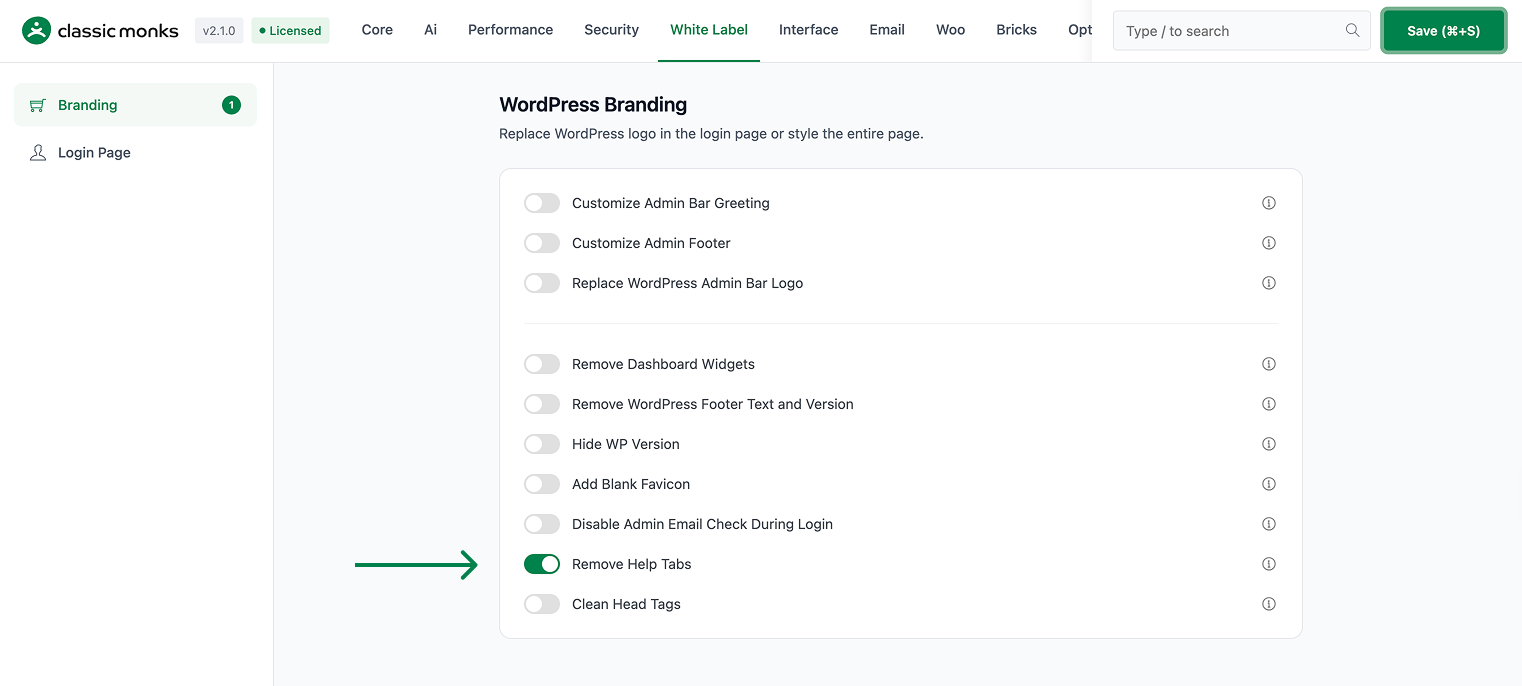
Step 3: Save and Test
Click Save (⌘+S). Open a few admin pages and confirm the Help tab is gone from the top right.
Verify It Works
After saving, open several admin pages and confirm:
- The Help tab is no longer visible at the top right.
- The removal applies across admin screens.
If the Help tab still shows, confirm the toggle is on and the changes were saved.
Examples
Example 1: A Cleaner Admin for Clients
An agency wants a clean admin for a client. Toggle on Remove Help Tabs. The Help tab disappears from all admin screens, reducing clutter.
Example 2: Reduce Admin Distractions
A team wants a focused admin. Toggle on Remove Help Tabs to remove the contextual help from every screen. The admin is cleaner and more focused.
A clean admin for a managed site
A managed site where the team uses its own documentation can remove the WordPress Help tab. The admin is cleaner and the team relies on its own support resources instead.
A consistent admin across a plugin set
When a site uses several plugins that each add their own help, the Help tab area can get cluttered. Removing the default WordPress help tab keeps the top of the admin consistent and clean.
A cleaner admin for a monitored site
For a site that is monitored and maintained by an agency, the WordPress help is not needed. Removing the Help tab gives a cleaner admin that the agency presents to the client as part of the managed service.
A focused admin for a content team
A content team that writes posts and pages does not need the WordPress contextual help. Removing the Help tab gives a cleaner, more focused admin that reduces distraction for the content team.
Recommendations Before Enabling
- Confirm your team does not use the built-in help. The Help tab contains contextual help for each screen. Only remove it if your team does not rely on it.
- Test on a few screens. The removal applies to all admin pages, so check a few different screens to confirm.
- Consider a staging site. Removing help is a visible change, so verify it on a test environment first.
Common Use Cases
White-label the admin for clients
The Help tab looks like a WordPress feature. Removing it from all admin screens creates a cleaner, more branded admin for clients.
Reduce admin clutter
The Help tab adds visual clutter to every admin screen. Removing it gives a cleaner, more focused interface, especially for users who do not use the built-in help.
A focused admin for a team
A team that does not need the default WordPress help can remove the Help tab. This keeps the admin focused on the tasks that matter.

Add your first comment to this post