




What Is the REST API Access Restriction feature?
The WordPress REST API is enabled by default. It exposes site data and user information at wp-json/, and WordPress also advertises it in the page head with a discovery link:
<link rel="https://api.w.org/" href="https://example.com/wp-json/">Classic Monks gives you two controls under Security > WP Protection:
- Remove REST API Links strips the discovery link from the page head, HTTP response headers, and the RSD endpoint. The API still works, but automatic discovery disappears.
- REST API Access restricts who can actually call the API. You can disable it for all non-admins, or for everyone who is logged out.
Together they reduce what attackers can see and reach without breaking integrations you whitelist.
Why You Need It
You should consider disabling or restricting the WordPress REST API because leaving it open for unauthenticated visitors creates real risks:
- Username leaks: A single unauthenticated request to
wp-json/wp/v2/userscan list every username on the site. Attackers use this list to launch targeted brute-force attacks against the login page. - DDoS attacks: Public API endpoints give attackers more surface to hammer with junk requests. Restricting the API removes an easy amplification target.
- Content scraping: Unauthenticated users can pull your posts, pages, and media through the API at scale, bypassing your normal site structure and any content protection.
- Plugin and theme discovery: The API can reveal installed plugins and versions, which attackers then use to find known vulnerabilities.
- Version disclosure: API responses can include the WordPress version, another clue for targeted exploits.
Restricting REST API access is a reconnaissance-defense move, the same class as hiding the login URL, disabling XML-RPC, and blocking user enumeration. Combined, these measures force attackers to work blind.
The trade-off: the block editor and many plugins depend on the REST API. The feature handles this with per-namespace exclusions, so you can restrict the API broadly and still allowlist the routes your site needs.
Recommendations Before Enabling
- Audit your REST API dependencies. The block editor uses
wp/v2, WooCommerce stores usewc/namespaces, and Bricks Builder usesbricks/v1. If you restrict access, add exclusions for the namespaces your stack needs. - Do not restrict before testing. Set the dropdown, save, and test the frontend, admin editor, and any API-driven features before you rely on it.
- Keep the core user route open only if you need it.
wp/v2powers the block editor. If you excludewp/v2, logged-out visitors can still call core routes like user enumeration, so think about whether you want that route excluded at all.
How to Restrict REST API Access in WordPress
Step 1: Open the Security Tab
Click Classic Monks in your WordPress admin sidebar, then click Security.
Step 2: Open the WP Protection Subtab
Click the WP Protection subtab.
Step 3: Remove the Discovery Links (optional)
Scroll to Remove REST API Links and toggle it on. This strips the api.w.org link tag from the page head, the HTTP Link header, and the RSD endpoint. The API itself stays accessible.
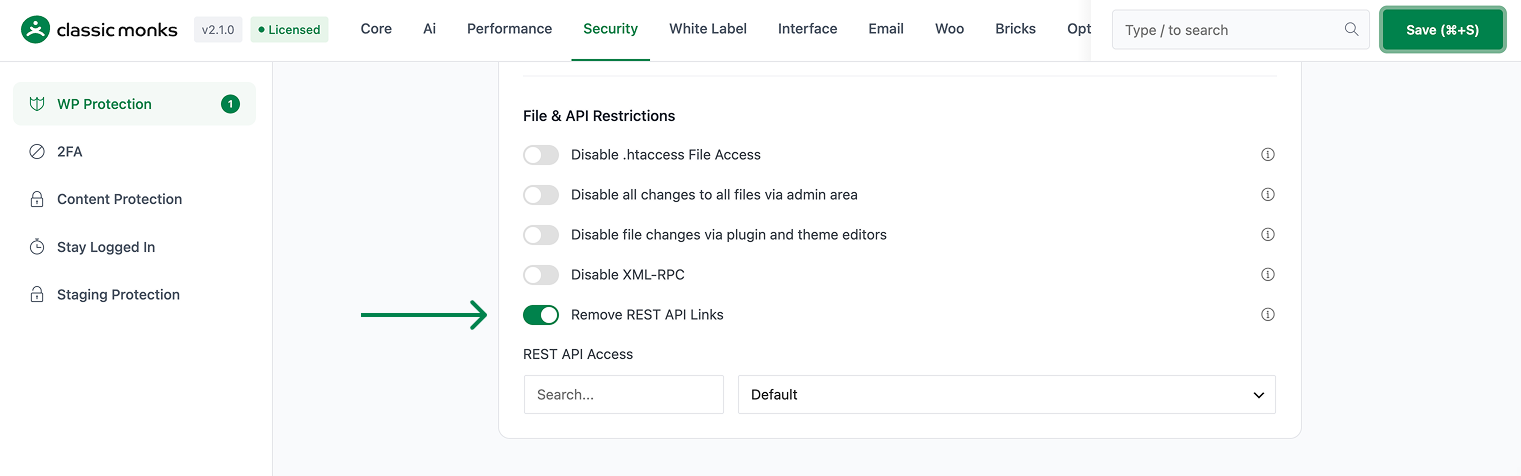
Step 4: Choose a REST API Access Level
Next to REST API Access, choose one of:
- Default: no restriction, the current WordPress behavior
- Disable for Non-Admins: admins can use the API, everyone else is blocked
- Disable When Logged Out: any logged-in user can use the API, visitors are blocked

Step 5: Add Exclusions (when restricting access)
When the access level is not Default, the REST API Exclusions section appears. Check the third-party namespaces you want to keep working, such as Bricks Builder, WooCommerce, Contact Form 7, or WPForms. You can also type custom namespaces into Custom Namespaces / Routes Whitelist, one per line.
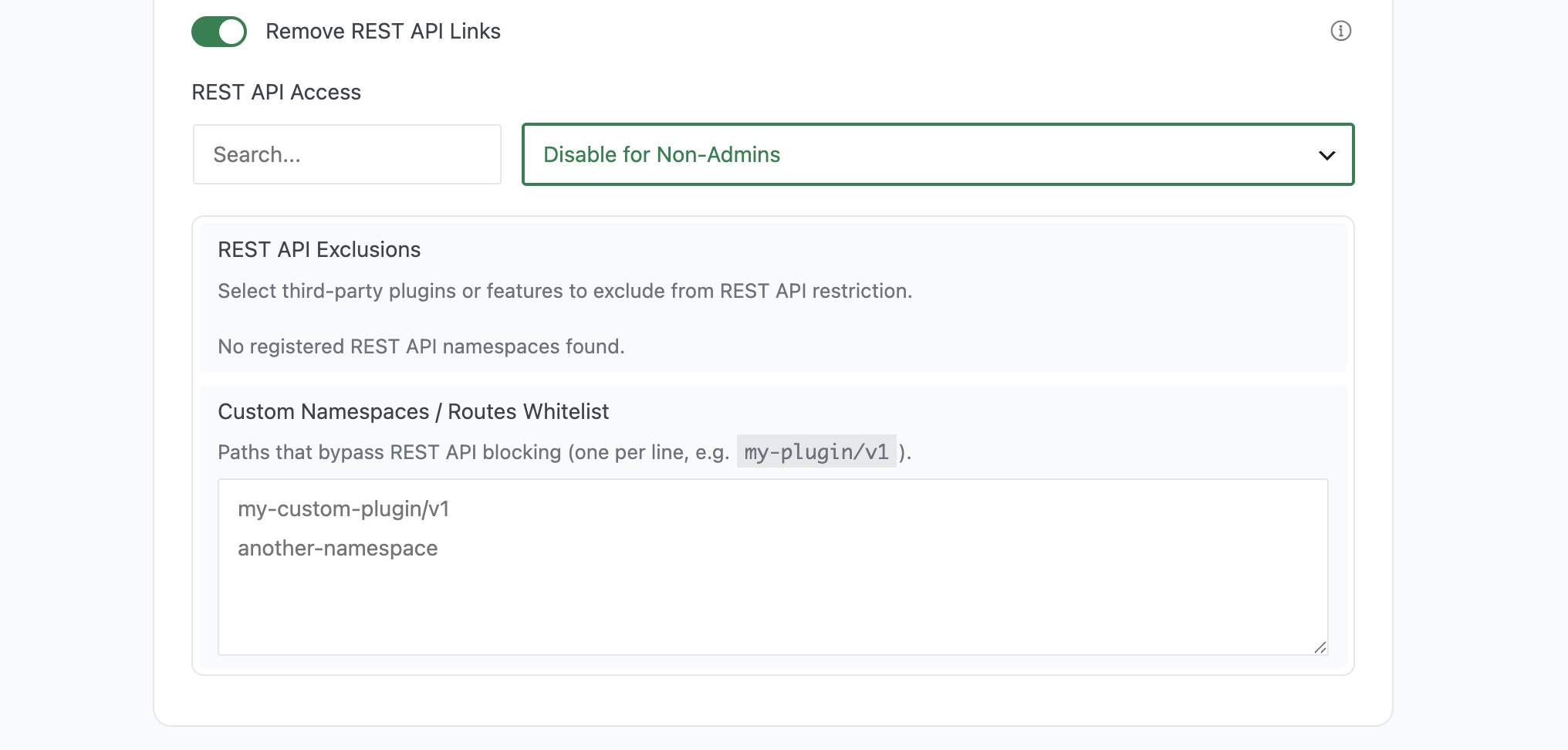
Step 6: Save Changes
Click Save Changes.
Configure Options
| Option | Values | Default | Description |
|---|---|---|---|
| Remove REST API Links | On / Off | Off | Removes the api.w.org discovery link from the head, HTTP headers, and RSD |
| REST API Access | Default, Disable for Non-Admins, Disable When Logged Out | Default | Who is allowed to call the REST API |
| REST API Exclusions | Checkbox list of registered namespaces | Bricks v1 auto-checked if Bricks is active | Namespaces that bypass the restriction |
| Custom Namespaces / Routes Whitelist | One namespace per line | Empty | Custom routes that bypass the restriction |
How Exclusions Work
Exclusions match a namespace by prefix. If the current route equals the excluded value, or starts with the excluded value followed by a slash, the request bypasses the restriction. For example, excluding wc/v3 keeps every WooCommerce route under wc/v3/ accessible.
The preset list is generated from the namespaces actually registered on your site, so it reflects your installed plugins. Presets include:
- Bricks Builder (
bricks/v1) - WooCommerce v1, v2, v3, and Store (
wc/v1,wc/v2,wc/v3,wc/store/v1) - Contact Form 7 (
contact-form-7/v1) - Fluent Forms (
fluent-form) - WPForms (
wpforms/v1) - Mailchimp for WordPress (
mc4wp/v1) - WordPress Core (
wp/v2) - WordPress Site Health (
wp-site-health/v1) - WordPress oEmbed (
oembed/1.0)
On first load, bricks/v1 is auto-checked when Bricks is active, so the builder keeps working out of the box.
Verify It Works
- Link removal: view the page source of any page. The
<link rel="https://api.w.org/">tag should be gone. - Access block: open a private or incognito window while logged out and visit
your-site.com/wp-json/wp/v2/users. With Disable When Logged Out, you should get a REST authentication error instead of a user list. - Admin access: with Disable for Non-Admins, open the same URL in a logged-in admin tab. It should return data normally.
- Exclusions: with a whitelisted namespace (for example
wc/v3), confirm the WooCommerce storefront routes still work for visitors.
Advanced Options (Developers)
The feature lives in functions/performance/optimizations/rest-api.php and registers these hooks:
Actions:
initcallscm_disable_rest_api(), which adds the restriction filter when the access level is not Defaultxmlrpc_rsd_apisremoval:rest_output_rsdis removed when links are strippedwp_headremoval:rest_output_link_wp_headis removed when links are strippedtemplate_redirectremoval:rest_output_link_headeris removed when links are stripped
Filters:
rest_authentication_errorscallscm_restrict_rest_api(), which returns arest_api_disablederror for unauthorized requests
// Hooked in rest-api.php
add_action( 'init', 'cm_disable_rest_api' );
The restriction returns a WP_Error with the REST authorization-required code (401) when the route is not excluded. Disabling the feature removes these hooks and WordPress returns to its default behavior.

Add your first comment to this post