




What Is the Spam Comment Protection feature?
Spam comments and reviews are a constant problem for public WordPress sites. Bots scan the web for comment forms and submit spam links, often at scale. The Spam Comment Protection feature uses multiple techniques to identify and block spam:
- Honeypot fields: Hidden form fields that bots fill but humans don’t
- Time-trap: Submissions faster than 3 seconds are flagged as spam
- Content analysis: Links, BBCode, and other spam indicators are detected
- User-agent analysis: Known bad user agents are blocked
- Rate limiting: Too many submissions in a short time are blocked
Why You Need It
Spam is more than an annoyance:
- Time waste: Moderating spam comments is a daily chore
- SEO damage: Spam comments with bad links can hurt your search rankings
- User trust: A blog full of spam comments looks unmaintained
- Server load: Spam bots can hit your site thousands of times per minute
- Database bloat: Spam comments fill up your WordPress database
The Spam Comment Protection feature eliminates most spam before it reaches your moderation queue.
How It Works
The Spam Comment Protection feature works by adding invisible checks to the comment form:
- Honeypot field: A hidden
emailfield. Bots fill it; humans don’t. If filled, the comment is flagged. - Time-trap: The form records the time it was rendered. Submissions faster than 3 seconds are flagged (humans need at least 3 seconds to read and write a comment).
- Content analysis: The comment text is checked for known spam indicators (multiple links, certain keywords, BBCode, etc.).
- User-agent check: Known bad user agents (e.g., scrapers, bots) are blocked.
- Rate limiting: Too many submissions from the same IP in a short time are throttled.
If any of these checks fail, the comment is marked as spam or rejected outright.
How to Enable Spam Comment Protection in WordPress
Step 1: Navigate to Settings
Click into the Classic Monks plugin settings in your WordPress dashboard.
Step 2: Go to the Security Tab
Click on the Security menu, then click the Content Protection subtab.
Step 3: Enable Spam Comment Protection
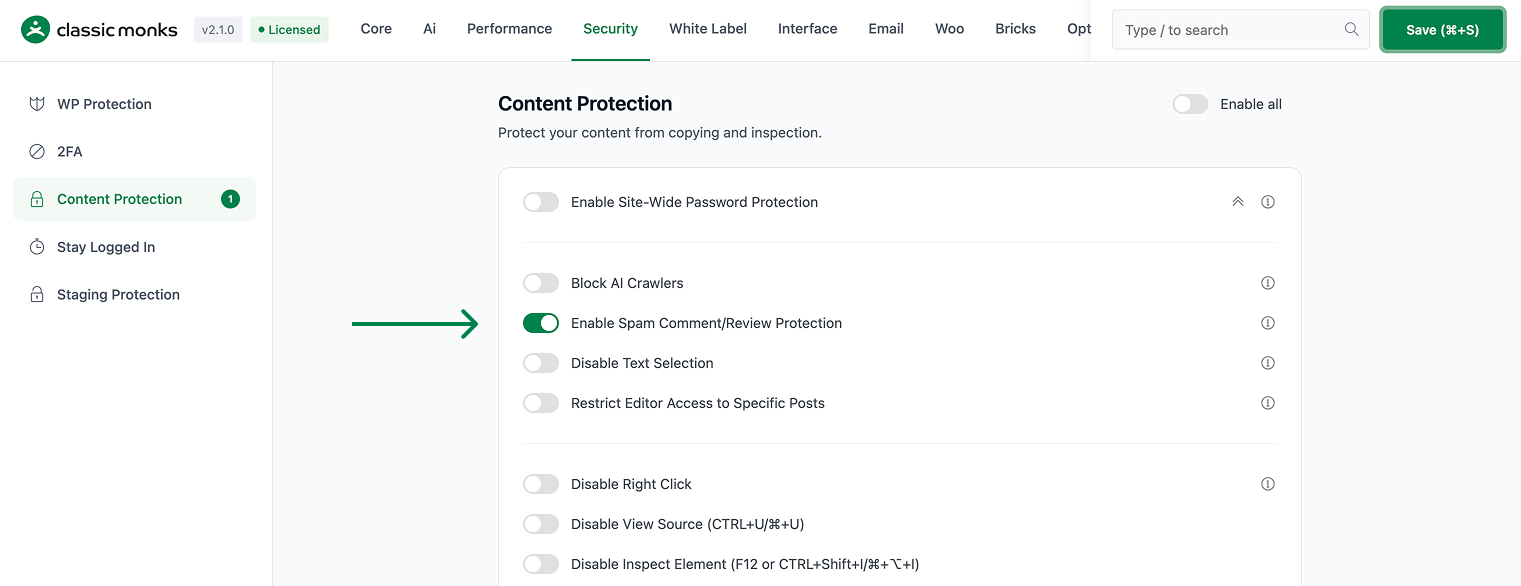
Scroll to Enable Spam Comment and Review Protection and toggle on.
Step 4: Save Changes
Click Save Changes.
Step 5: Test
Submit a test comment on a post. The comment should appear in the moderation queue. Submit another comment within 3 seconds (time-trap). The second comment should be marked as spam.
Configuration Options
| Option | Description | Default |
|---|---|---|
| Enable Spam Comment and Review Protection | Master toggle. | Off |
No nested options. The detection techniques are configured via filters (see Advanced Options).
What Gets Affected
- The WordPress comment form: protected by the spam detection techniques
- The WooCommerce review form: also protected
- The comment moderation queue: receives less spam
- The comment submission: legitimate comments are unaffected (low false positive rate)
- The Akismet integration: works alongside (Akismet is the final filter)
What Does NOT Get Affected
- The comment form fields: not changed (the hidden honeypot is added, not visible)
- The user experience: legitimate users don’t notice anything
- The comment display: not affected
- The Akismet integration: still works (runs after the spam protection)
- The discussion settings: not changed (still works the same way)
Advanced Options (Developers)
This feature registers 4 WordPress hooks in spam-comment-protection.php:
Actions:
wp_footercallscm_forget_spam_comment_add_action_url()(Injects action URL via JS (priority 99))initcallscm_forget_spam_comment_validate_submission()(Validates comment submission (priority 1))woocommerce_before_single_productcallscm_forget_spam_review_remove_action_url()(Removes action URL from review form)
Filters:
comment_form_defaultscallscm_forget_spam_comment_remove_action_url()(Removes action URL from comment form)
// Hooked in spam-comment-protection.php
add_filter( 'comment_form_defaults', 'cm_forget_spam_comment_remove_action_url' );
The feature modifies WordPress behavior by registering or removing hooks. Disabling it reverses those changes and WordPress returns to its default behavior.

Add your first comment to this post