




What Is the Disable Core Auto-Update Emails feature?
WordPress has a background update system that automatically updates the core software, plugins, and themes (when enabled). For core updates, the system sends a notification email to the site admin after the update completes. The email looks like “WordPress X.Y.Z is available” or “Your site has been updated to WordPress X.Y.Z”.
The Disable Core Auto-Update Emails feature suppresses this email. The auto-update still happens; only the email notification is removed.
Why You Need It
For sites with frequent background updates, the email becomes noise:
- A site that auto-updates weekly receives 50+ emails per year from core updates alone
- The admin already has other ways to see core updates (the WordPress dashboard widget, the Updates admin page)
- The email doesn’t require action; the update is already done
The trade-off: if a core update introduces a bug or security issue, the email is the admin’s signal to check the site. Disabling the email removes that signal. For high-stakes sites, leave it enabled.
How to Use Disable Core Auto-Update Emails in Classic Monks
Step 1: Navigate to Settings
Click into the Classic Monks plugin settings in your WordPress dashboard.
Step 2: Go to the Email Tab
Click on the Email menu, then click the Notifications subtab.
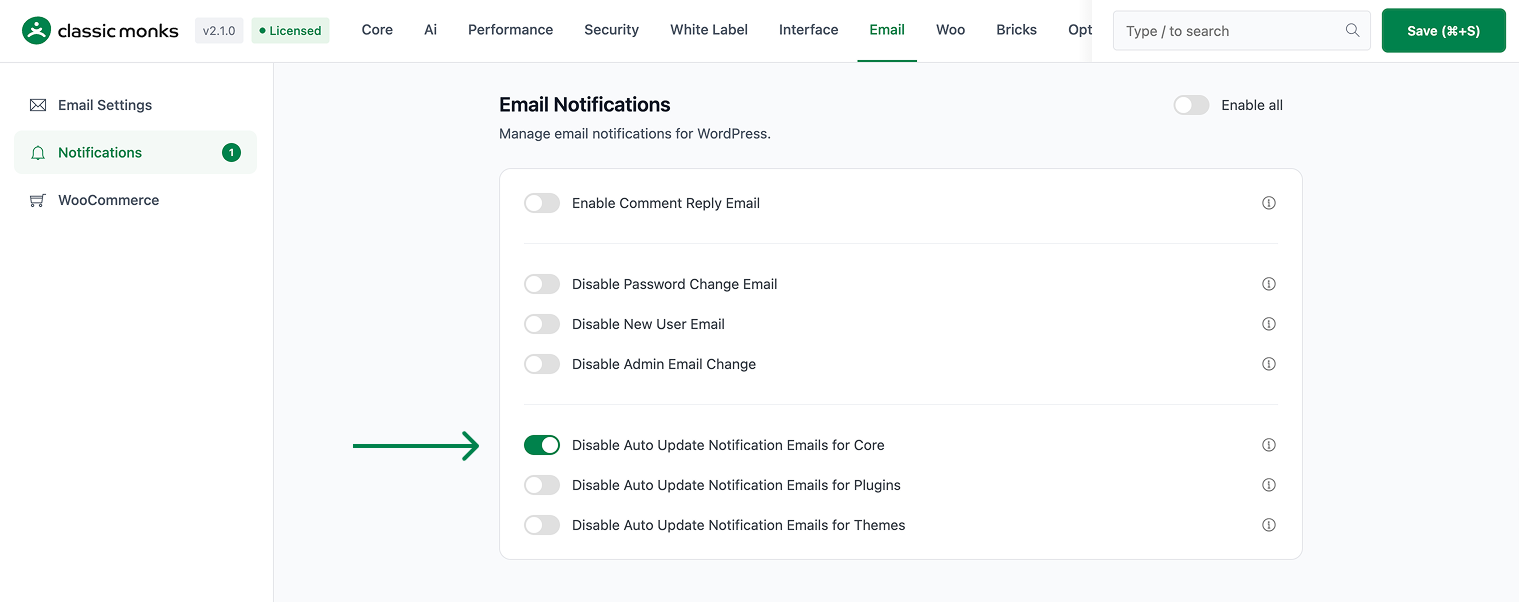
Step 3: Enable Disable Core Auto-Update Emails
Scroll to the Email Notifications section and toggle on Disable Auto Update Notification Emails for Core.
Step 4: Save Changes
Click Save Changes.
Configuration Options
| Option | Description | Default |
|---|---|---|
| Disable Auto Update Notification Emails for Core | Master toggle. | Off |
No nested options.
What Gets Suppressed
| Sent when feature off | Sent when feature on | |
|---|---|---|
| “WordPress X.Y.Z is now available” (pre-update) | Yes | Yes (if auto-update is enabled) |
| “Your site has been updated to WordPress X.Y.Z” (post-update) | Yes | No |
The pre-update availability email is part of WordPress’s standard update notification flow and is independent of the auto-update email. This feature only suppresses the post-update confirmation.
What Does NOT Get Affected
- WordPress core auto-update itself: Still happens (controlled by
WP_AUTO_UPDATE_COREin wp-config.php) - Plugin auto-update emails: Separate feature (Disable Auto Update Emails for Plugins)
- Theme auto-update emails: Separate feature (Disable Auto Update Emails for Themes)
- Pre-update availability notifications: The “WordPress X.Y.Z is available” email that arrives before the update
- Plugin/theme manual update emails: Emails sent when you manually click “Update” on a plugin/theme in the admin
Advanced Options (Developers)
This feature registers 2 WordPress hooks in disable-update-emails.php:
Filters:
auto_core_update_emailcallsdisable_auto_update_emails()(Disables core auto-update notification emails (priority 10))auto_core_update_send_emailcallsapply_filters()(Customizable filter)
// Hooked in disable-update-emails.php
add_filter( 'auto_core_update_email', 'disable_auto_update_emails' );
The feature modifies WordPress behavior by registering or removing hooks. Disabling it reverses those changes.

Add your first comment to this post