




What Is the Disable Plugin Auto-Update Emails feature?
WordPress’s background update system can auto-update individual plugins (when enabled via the auto_update_plugin filter or the “Enable auto-updates” link on each plugin’s row in the Plugins page). When multiple plugins update in the same background run, WordPress sends a single consolidated email to the site admin listing all the updated plugins.
The Disable Plugin Auto-Update Emails feature suppresses this consolidated email. The auto-updates still happen; only the notification is removed.
Why You Need It
For sites with many plugins and auto-updates enabled, the email becomes a constant stream:
- A site with 30 plugins and auto-updates enabled might receive 5-10 plugin update emails per week
- The admin already has other ways to see plugin updates (the Plugins page, the dashboard widget, the Updates admin page)
- The email doesn’t require action; the updates are already done
The trade-off: if a plugin auto-update introduces a bug or breaks compatibility, the email is the admin’s signal to test the site. Disabling the email removes that signal. For high-stakes sites, leave it enabled.
How to Use Disable Plugin Auto-Update Emails in Classic Monks
Step 1: Navigate to Settings
Click into the Classic Monks plugin settings in your WordPress dashboard.
Step 2: Go to the Email Tab
Click on the Email menu, then click the Notifications subtab.
Step 3: Enable Disable Plugin Auto-Update Emails
Scroll to the Email Notifications section and toggle on Disable Auto Update Notification Emails for Plugins.
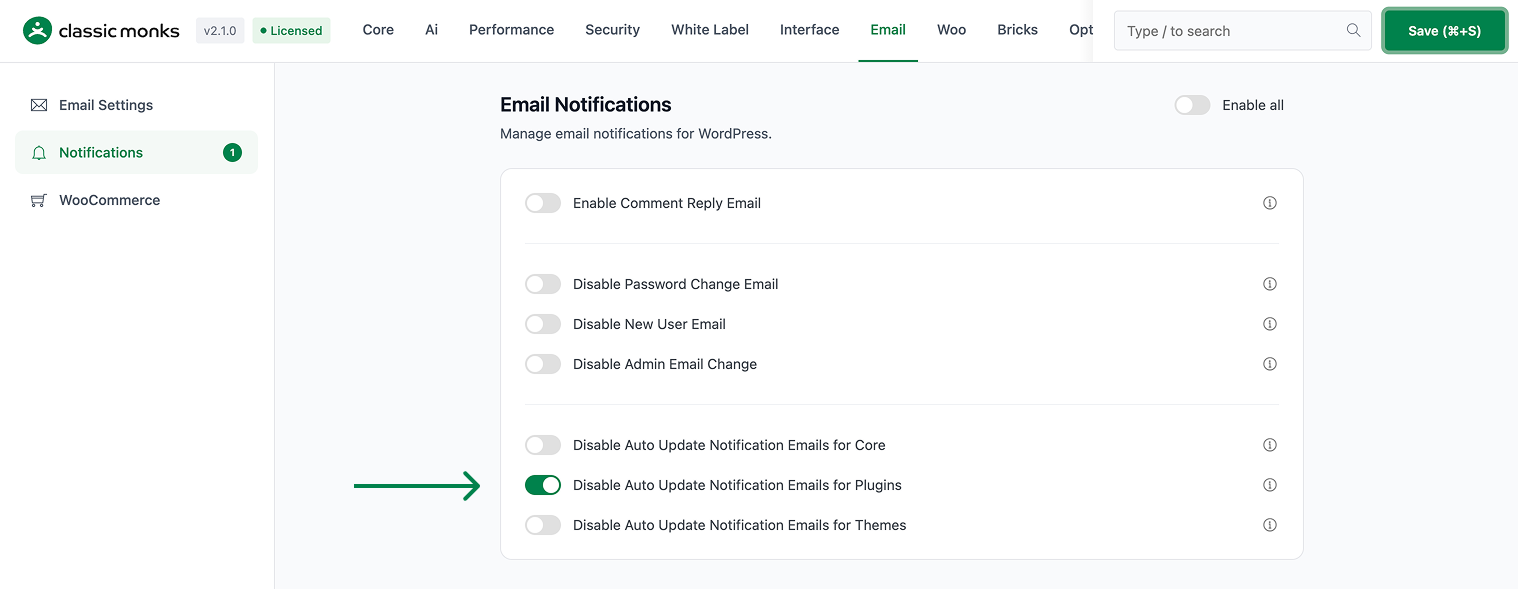
Step 4: Save Changes
Click Save Changes.
Configuration Options
| Option | Description | Default |
|---|---|---|
| Disable Auto Update Notification Emails for Plugins | Master toggle. | Off |
No nested options.
What Gets Suppressed
| Sent when feature off | Sent when feature on | |
|---|---|---|
| “Some plugins have been updated” (after auto-update) | Yes | No |
| Manual plugin update email (from clicking “Update”) | Yes | Yes (separate flow) |
| Plugin activation/deactivation emails | Yes | Yes (separate flow) |
The feature only suppresses the auto-update-specific email. Manual updates and activation/deactivation notifications are unaffected.
What Does NOT Get Affected
- Plugin auto-update itself: Still happens (controlled by each plugin’s “auto-update” setting)
- WordPress core auto-update emails: Separate feature (Disable Core Auto-Update Emails)
- Theme auto-update emails: Separate feature (Disable Theme Auto-Update Emails)
- Manual plugin update emails: Sent when an admin clicks “Update” on a plugin
- Plugin activation/deactivation emails: Different email flow
Advanced Options (Developers)
This feature registers 2 WordPress hooks in disable-update-emails.php:
Filters:
auto_plugin_update_send_emailcallsdisable_plugin_update_emails()(Disables plugin auto-update notification emails (priority 10))auto_plugin_update_send_emailcallsapply_filters()(Customizable filter)
// Hooked in disable-update-emails.php
add_filter( 'auto_plugin_update_send_email', 'disable_plugin_update_emails' );
The feature modifies WordPress behavior by registering or removing hooks. Disabling it reverses those changes.

Add your first comment to this post