




What Is the HTML5 Comment Support feature?
WordPress’s default comment form uses HTML4 input types: type="text" for the name, email, and URL fields, with no validation attributes. The form works, but modern browsers can do better if you give them the right hints.
HTML5 Comment Support updates the comment form’s input types to use the HTML5 equivalents:
- Name field:
type="text"(unchanged, no HTML5-specific type) - Email field:
type="email"(triggers email keyboard on mobile, email validation on submit) - Website field:
type="url"(triggers URL keyboard on mobile, URL format validation) - All required fields: adds the
requiredattribute for native browser validation
The change is a progressive enhancement. Browsers that support HTML5 use the new types; browsers that don’t ignore the new attributes and fall back to the default type="text" behavior.
Why You Need It
- Mobile usability: When a mobile user taps the email field, they get the email-optimized keyboard (with @ and .com keys). Without HTML5, they get the standard text keyboard, which is harder for entering email addresses
- Native validation: Browsers validate the input format before the form submits. If the user enters an invalid email, the browser shows a tooltip before the form is even sent
- Better accessibility: Screen readers announce email and URL fields correctly when the input type is set
- No breaking changes: HTML5 is backward-compatible. If a browser doesn’t support the new types, it falls back to the default text behavior
The trade-off is essentially zero. The change adds semantic information that modern browsers can use, with no impact on older browsers or on the server-side comment processing.
How to Use HTML5 Comment Support in Classic Monks
Step 1: Navigate to Settings
Click into the Classic Monks plugin settings in your WordPress dashboard.
Step 2: Go to the Content Subtab
Click on the Core menu, then click the Content subtab.
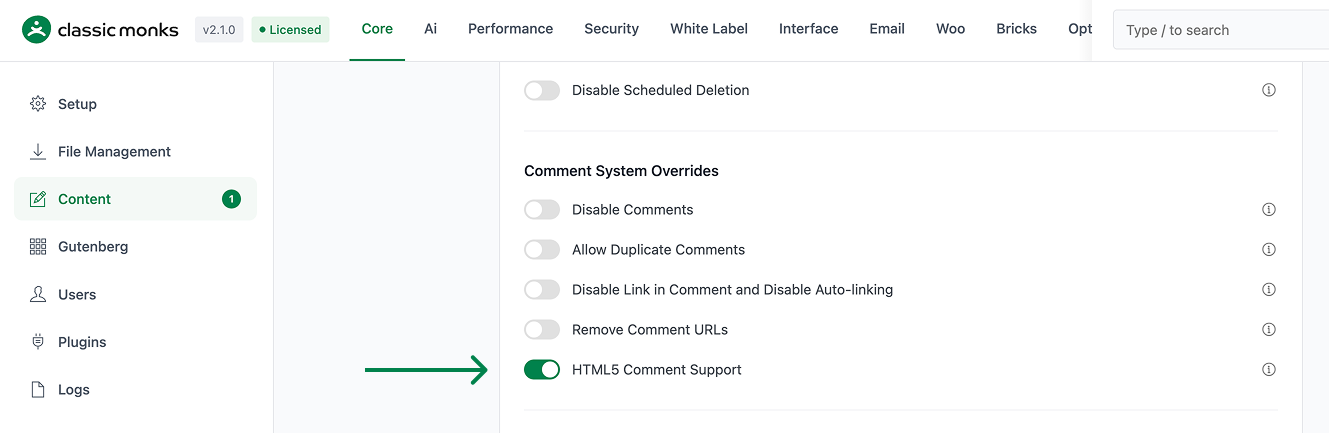
Step 3: Enable HTML5 Comment Support
Scroll to the Comment System Overrides section and toggle on HTML5 Comment Support.
Step 4: Save Changes
Click Save Changes.
Step 5: Test
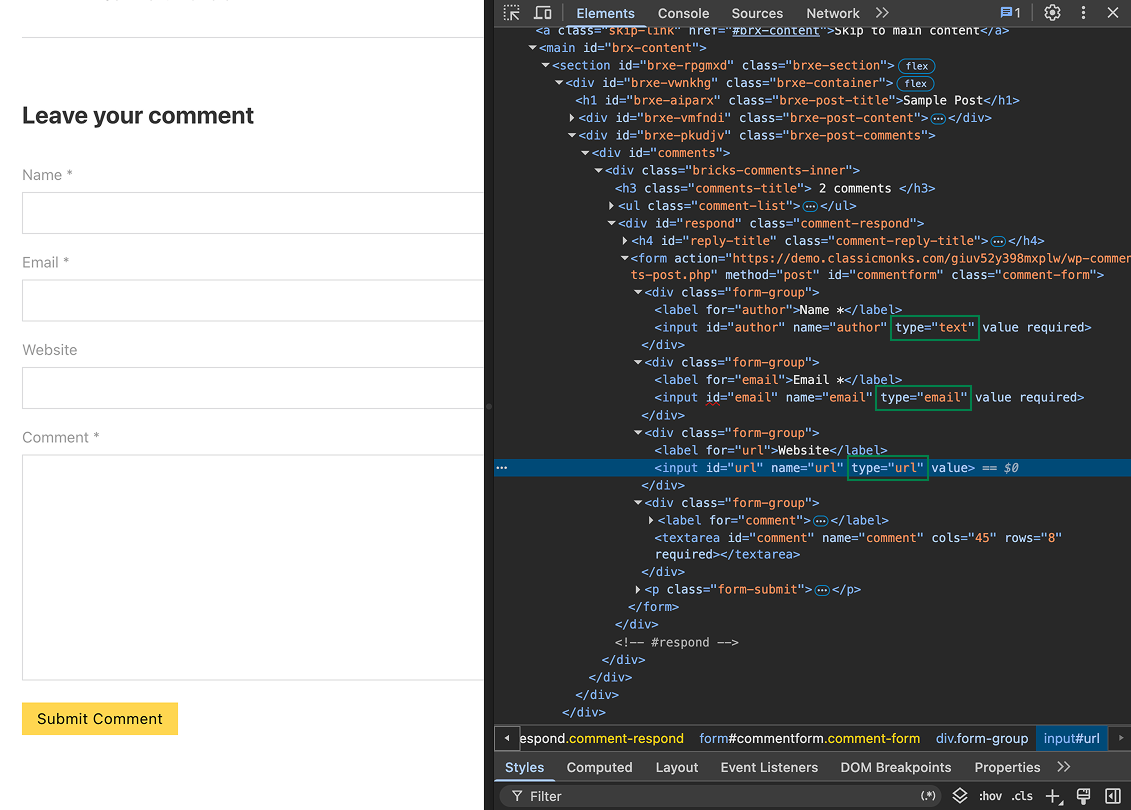
Open any post with comments on the front-end. View the page source and check the comment form: the email field should be <input type="email"> (not type="text"), the website field should be type="url", and the required fields should have the required attribute.
On a mobile device (or with mobile device emulation in browser dev tools), tap the email field. The mobile keyboard should show the @ and .com keys.
Configuration Options
| Option | Description | Default |
|---|---|---|
| HTML5 Comment Support | Master toggle. | Off |
No nested options.
What Gets Updated
| Field | Before | After |
|---|---|---|
| Name | <input type="text" name="author"> |
<input type="text" name="author" required> (required attribute added) |
<input type="text" name="email"> |
<input type="email" name="email" required> |
|
| Website | <input type="text" name="url"> |
<input type="url" name="url"> (still optional) |
| Comment textarea | <textarea name="comment" rows="..."> |
<textarea name="comment" rows="..." required> (required attribute added) |
| Submit button | <input type="submit"> |
Unchanged |
Advanced Options (Developers)
// Add custom pattern validation to the comment textarea (e.g., minimum length)
add_filter( 'comment_form_defaults', function( $defaults ) {
    $defaults['comment_field'] = '<p class="comment-form-comment"><label for="comment">Comment</label><textarea id="comment" name="comment" cols="45" rows="8" minlength="10" required></textarea></p>';
    return $defaults;
} );

// Customize the placeholder text for the new fields
add_filter( 'comment_form_default_fields', function( $fields ) {
    if ( isset( $fields['email'] ) ) {
        $fields['email'] = str_replace( '<input', '<input placeholder="[email protected]"', $fields['email'] );
    }
    return $fields;
} );

// Add a custom data attribute for analytics
add_filter( 'comment_form_field_email', function( $field ) {
    return str_replace( 'type="email"', 'type="email" data-track="comment-email"', $field );
} );
The comment_form_defaults filter is the standard WordPress hook for customizing the comment form. The data-track attribute is a simple way to add analytics tracking without a separate plugin.

Add your first comment to this post