




What Is the Enable Nofollow for Post Types feature?
The feature adds a <meta name="robots"> tag to the <head> of posts in selected post types. The tag’s content can be set to noindex, nofollow (search engines ignore the post entirely), nofollow (search engines index the post but don’t follow its links), or other combinations.
Unlike Add Nofollow to External Links, which adds nofollow to specific links within a post, this feature affects the entire post type. A nofollow post type tells search engines to treat all links in those posts as untrusted.
Why You Need It
Some post types are higher-risk for SEO:
- User-generated content: Forum posts, comments-as-posts, or reviews where the author can include arbitrary links
- Low-quality content: Tag pages, archive pages, or auto-generated content
- Internal-only content: Documentation, internal knowledge bases, or staging-style content
- Sponsored content: Paid posts that require Google-compliant nofollow treatment
Marking these post types as nofollow at the post-type level is more efficient than marking each post individually. Search engines understand the post-type signal and treat the entire post type accordingly.
How to Use Enable Nofollow for Post Types in Classic Monks
Step 1: Navigate to Settings
Click into the Classic Monks plugin settings in your WordPress dashboard.
Step 2: Go to the Content Subtab
Click on the Core menu, then click the Content subtab.
Step 3: Enable Nofollow for Post Types
Scroll to the SEO and Visibility section and toggle on Enable Nofollow for Post Types. Nested options expand below the toggle.
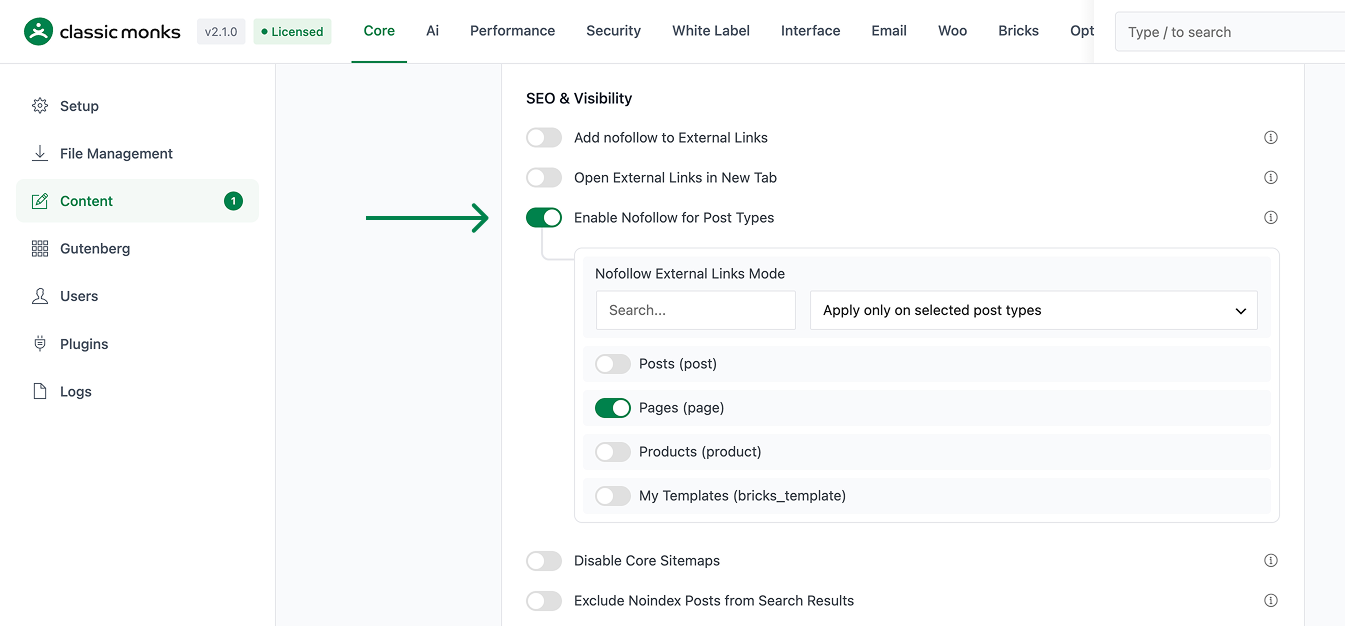
Step 4: Choose a Mode
Pick the Nofollow External Links Mode from the dropdown:
- Apply only on selected post types: Nofollow tag is added only on checked post types
- Apply except on selected post types: Nofollow tag is added on all post types except checked ones
- Apply on all post types: Nofollow tag is added on every public post type
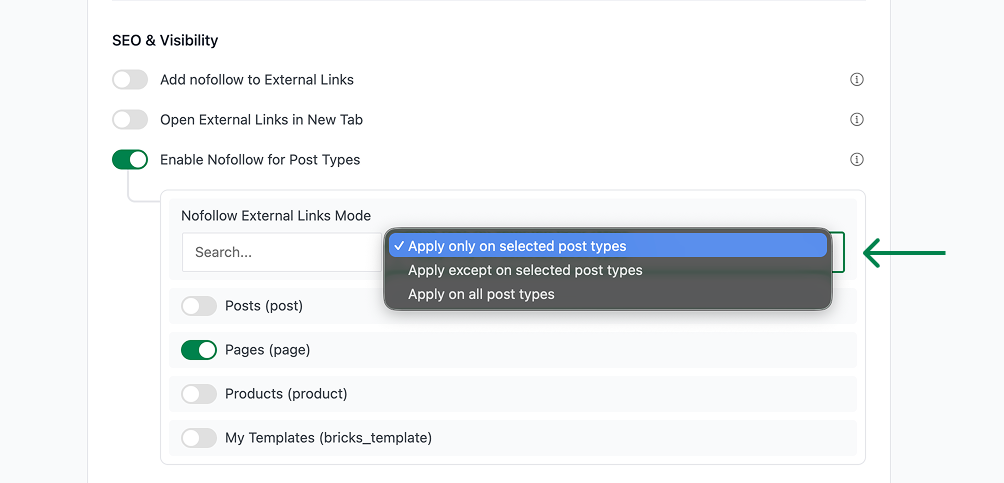
Step 5: Select the Post Types
A list of every public post type appears. Check the ones you want to nofollow. Common candidates: forum posts, reviews, user-generated content, internal documentation.
Step 6: Save Changes
Click Save Changes.
Step 7: Verify
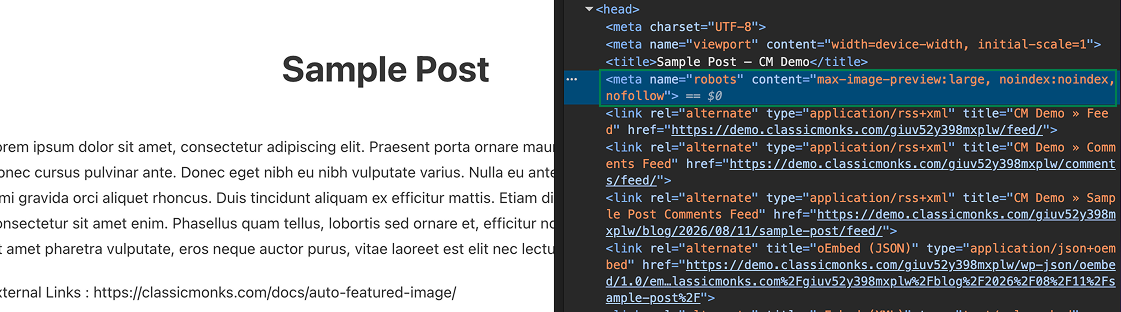
Open any post in a selected post type. View the page source. The <head> should now contain a <meta name="robots" content="..."> tag with the nofollow value.
Configuration Options
| Option | Description | Default |
|---|---|---|
| Enable Nofollow for Post Types | Master toggle. | Off |
| Nofollow External Links Mode | only-on, except-on, or all-post-types. |
only-on |
| Post Type Checkboxes | Per-post-type control. | None checked |
The meta tag content itself is not configurable; it uses a standard noindex, nofollow combination. To customize the robots meta content, use the cm_nofollow_robots_content filter.
What Gets Added to Posts
When a post in a selected post type is rendered, the following is added to the <head>:
<meta name="robots" content="noindex, nofollow">This tells search engines:
noindex: Do not include this post in the search indexnofollow: Do not follow the links in this post (don’t pass link equity to the linked pages)
The meta tag is added via WordPress’s wp_head action, which is the standard hook for adding meta tags to the page head. The tag is added before the page renders, so caching plugins that serve cached HTML will need to be cleared.
Difference from Add Nofollow to External Links
| Feature | Scope | What it does |
|---|---|---|
| Add Nofollow to External Links | Per-link within any post | Adds rel="nofollow" to individual external links |
| Enable Nofollow for Post Types | Entire post type | Adds <meta name="robots" content="noindex, nofollow"> to the post’s <head> |
These features are complementary. You can use both:
- Enable Nofollow for Post Types marks the entire post type as low-trust
- Add Nofollow to External Links adds the rel attribute to every link in every post (regardless of post type)
For most sites, Add Nofollow to External Links alone is sufficient. Enable Nofollow for Post Types is for sites that want to mark specific post types as entirely low-value (e.g., user-submitted content that should not be indexed or have its outbound links followed).
Developer Notes
This feature is a single toggle with no developer hooks currently exposed. The feature-specific logic is loaded conditionally when the toggle is enabled.
Options used:
| Option | Type | Default |
|---|---|---|
| Feature toggle | Boolean | false |

Add your first comment to this post