




What Is the Custom Login URL feature?
The default WordPress login URL is /wp-login.php. Every bot, scanner, and brute force attacker knows this. The Custom Login URL feature changes the login URL to a custom slug of your choice, so the standard /wp-login.php is no longer accessible.
This is a stealth security measure: bots continue to hit /wp-login.php and fail, while your real users access the custom URL.
Why You Need It
/wp-login.php is one of the most attacked URLs on the internet:
- 90%+ of WordPress brute force attacks target
/wp-login.php - Login lockdown plugins still process the failed attempts (server load)
- The standard URL appears in leaked databases, password dumps, and botnet lists
- Even if the attack fails, the IP is logged and your server processes the request
Changing the URL eliminates the most common attack surface entirely.
How to Use a Custom Login URL in WordPress
Step 1: Navigate to Settings
Click into the Classic Monks plugin settings in your WordPress dashboard.
Step 2: Go to the Security Tab
Click on the Security menu, then click the WP Protection subtab.
Step 3: Enable Custom Login URL
Scroll to Enable Custom Login URL and toggle on. Nested options expand.
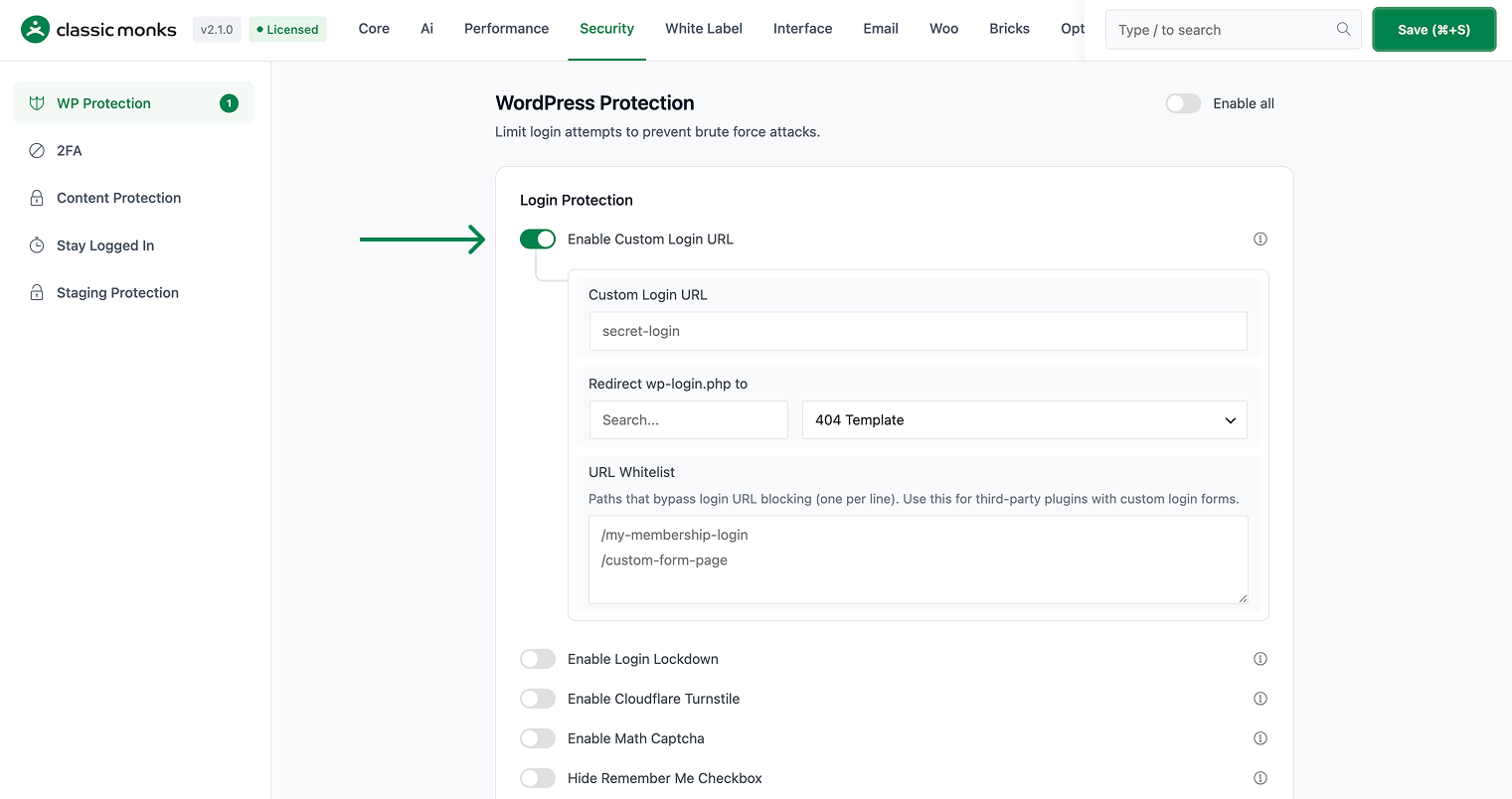
Step 4: Configure the Custom URL
Set the Custom Login URL field to your desired slug. The slug is appended to your site URL:
sign-in→https://yoursite.com/sign-inmy-account→https://yoursite.com/my-accountportal→https://yoursite.com/portal
Avoid common terms like “login”, “admin”, or “wp” which bots may also try.
Step 5: Configure the Redirect
Set the Redirect wp-login.php to field. When a user visits the default /wp-login.php, they will be redirected to this URL:
home_url('/')→ Site homepage (recommended)404→ 404 page- Custom URL → Any URL of your choice

Step 6: Configure the Whitelist (Optional)
If you want certain user roles or IPs to still access /wp-login.php, add them to the URL Whitelist field (one per line). Useful for:
- Development environments
- Specific admin users who prefer the standard URL
- Trusted IP addresses
Step 7: Save Changes
Click Save Changes.
Step 8: Test
Log out. Try to access /wp-login.php. You should be redirected (per the redirect setting). Then access your custom URL. The login form should appear.
Configuration Options
| Option | Description | Default |
|---|---|---|
| Enable Custom Login URL | Master toggle. | Off |
| Custom Login URL | The custom slug. | (empty) |
| Redirect wp-login.php to | Where the default URL redirects. | (empty) |
| URL Whitelist | IPs and roles that can still use the default URL. | (empty) |
What Gets Affected
- The login form: accessible at the custom URL, not at
/wp-login.php - The default URL: redirects to the configured URL
- The password reset flow: uses the custom URL
- The wp-admin login: still uses the same flow (you’ll be redirected to the custom URL)
- The REST API: not affected (this is a frontend URL change, not an API change)
What Does NOT Get Affected
- The WordPress admin (after login): works normally
- The REST API endpoints: still accessible at
/wp-json/ - Cron jobs: not affected
- The user’s saved credentials: not affected
- Other plugins that reference the login URL: may need updating
Advanced Options (Developers)
This feature registers 6 WordPress hooks in custom-login-url.php:
Actions:
initcallsCM_Custom_Login_URL::handle_custom_login_url()(Intercepts login URL requests)template_redirectcallsCM_Custom_Login_URL::block_login_aliases()(Blocks access to default login URLs (priority 9))wp_login_failedcallsCM_Custom_Login_URL::handle_login_failed()(Handles failed login attempts (priority 999))
Filters:
site_urlcallsCM_Custom_Login_URL::filter_login_urls()(Rewrites login-related site URLs)login_urlcallsCM_Custom_Login_URL::filter_wp_login_url()(Filters the wp_login_url() return value)logout_redirectcallsapply_filters()(Customizable filter)
// Hooked in custom-login-url.php
add_action( 'init', 'CM_Custom_Login_URL::handle_custom_login_url' );
The feature modifies WordPress behavior by registering or removing hooks. Disabling it reverses those changes and WordPress returns to its default behavior.

Add your first comment to this post