




What Is the Disable Right Click feature?
The the right-click context menu behavior is a common browser feature. The Disable Right Click feature disables it on your WordPress site, preventing users from right-clicking on the page.
This is a soft deterrent, not a security feature. Determined users can still right-click via the browser’s developer tools or by disabling JavaScript.
Why You Need It
For some types of sites, preventing casual right-clicking is useful:
- Premium content sites: Where the content itself is the product
- Image-heavy sites: Where images are the unique value
- Course sites: Where the lessons are paid
- Recipe sites: Where recipes are the unique value
For most sites, this is unnecessary. The content is already protected by copyright.
Trade-offs vs allowing right-clicking
Disabling right-clicking has trade-offs:
- Accessibility: Users with disabilities who rely on right-clicking are affected
- User experience: Sharing and quoting become harder
- Real protection: Doesn’t actually protect the content (anyone with dev tools can right-click)
For most sites, the trade-offs are not worth it.
How to Disable Right Click in WordPress
Step 1: Navigate to Settings
Click into the Classic Monks plugin settings in your WordPress dashboard.
Step 2: Go to the Security Tab
Click on the Security menu, then click the Content Protection subtab.
Step 3: Enable the Feature
Scroll to Disable Right Click and toggle on.
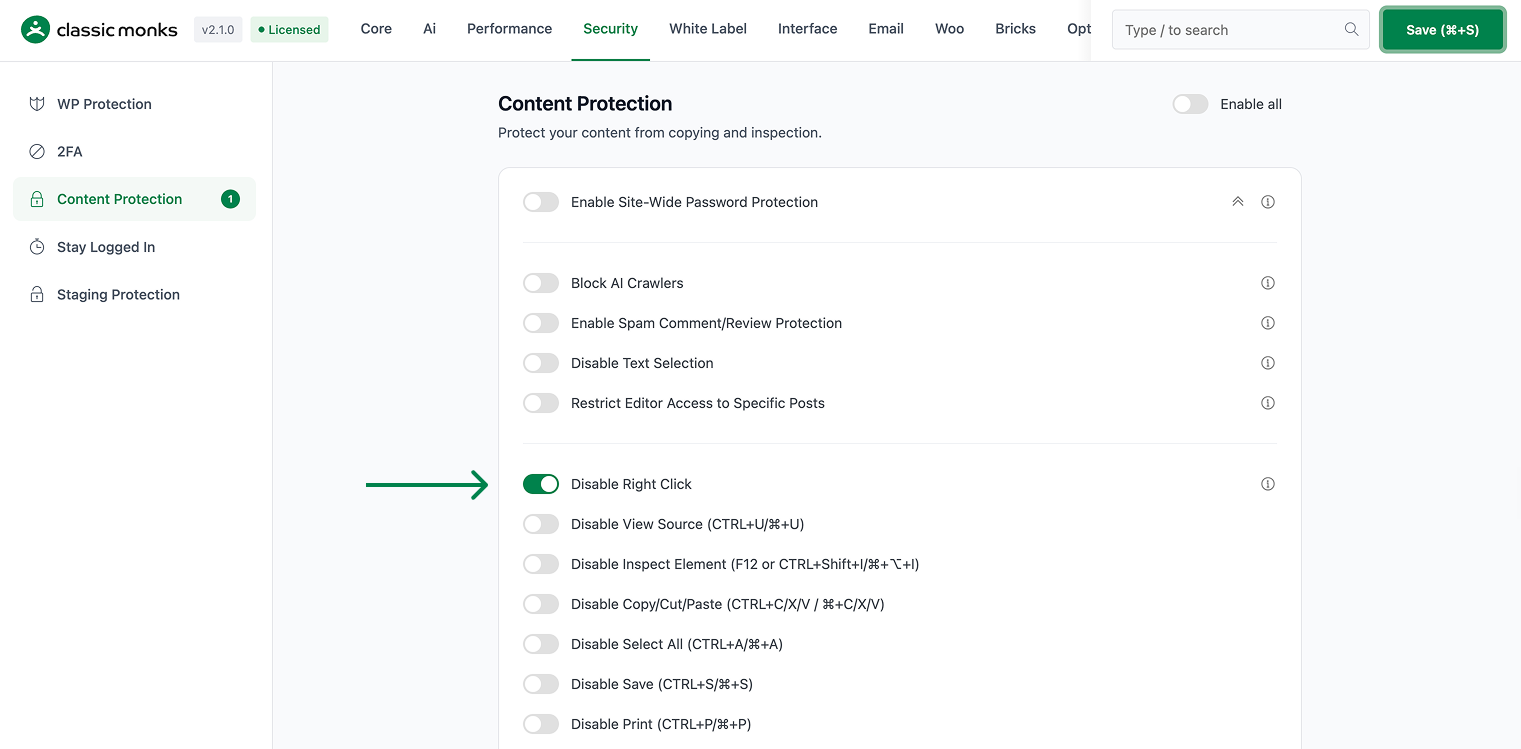
Step 4: Save Changes
Click Save Changes.
Step 5: Test
Visit the frontend. Try to right-click. The context menu should not the right-click context menu.
Configuration Options
| Option | Description | Default |
|---|---|---|
| Disable Right Click | Master toggle. | Off |
| Apply to Administrators | Admins can still right-click. | On |
What Gets Affected
- The frontend: the right-click context menu via JavaScript is disabled
- The admins: can still right-click (if “Apply to Administrators” is on)
- The accessibility: may affect users who rely on right-clicking
What Does NOT Get Affected
- The admin: admins can still right-click
- The browser’s developer tools: still allow bypassing
- The keyboard shortcuts (other than the disabled one): still work
- The screen readers: usually not affected
Advanced Options (Developers)
This feature registers 1 WordPress hook in disable-right-click.php:
Actions:
wp_headcallscm_disable_right_click_script()(Injects right-click disable script (priority 1))
// Hooked in disable-right-click.php
add_action( 'wp_head', 'cm_disable_right_click_script' );
The feature modifies WordPress behavior by registering or removing hooks. Disabling it reverses those changes and WordPress returns to its default behavior.

Add your first comment to this post