




What Is Disable Scheduled Deletion?
WordPress automatically empties the trash after 30 days. Posts that have been in the trash for 30+ days are permanently deleted by a scheduled cron event (wp_scheduled_delete). Disable Scheduled Deletion prevents that cron from running on Classic Monks-managed posts, so the trash never auto-empties.
Why You Need It
The default 30-day auto-empty is fine for most sites, but some scenarios call for a longer recovery window:
- Multi-author sites: An editor might trash a post by accident, not realize it for weeks, and then need to restore it
- High-stakes content: Pages or posts that represent significant work, where accidental permanent deletion is a real risk
- Compliance: Some industries require a longer audit trail of deleted content
Disable Scheduled Deletion is a single toggle that removes the auto-empty behavior. The trash still works normally (trash, restore, permanently delete); only the automatic cleanup is disabled.
How to Use Disable Scheduled Deletion in Classic Monks
Step 1: Navigate to Settings
Click into the Classic Monks plugin settings in your WordPress dashboard.
Step 2: Go to the Content Subtab
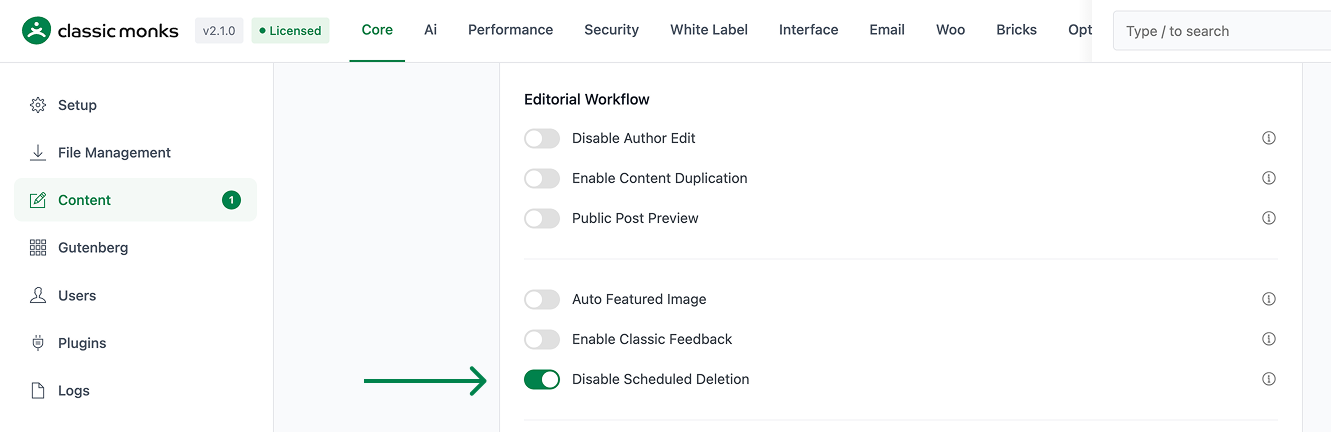
Click on the Core menu, then click the Content subtab.
Step 3: Enable Disable Scheduled Deletion
Scroll to the Editorial Workflow section and toggle on Disable Scheduled Deletion.
Step 4: Save Changes
Click Save Changes.
Step 5: Verify
Go to Posts > All Posts and click the Trash link at the top of the list. Note any posts in the trash. After 30 days, check again. With Disable Scheduled Deletion on, those posts will still be in the trash.
Configuration Options
| Option | Description | Default |
|---|---|---|
| Disable Scheduled Deletion | Master toggle. Prevents the auto-empty cron. | Off |
No nested options. The feature is site-wide.
Manual Cleanup
With Disable Scheduled Deletion on, the trash grows over time. Periodically clean it manually:
- Go to Posts > All Posts and click Trash
- Review the trashed posts (sort by date deleted)
- For each one: click Restore (if it was a mistake) or Delete Permanently (if it’s truly unwanted)
For bulk operations, use WordPress CLI:
# Delete all posts in trash that are more than 90 days old
wp post delete $(wp post list --post_status=trash --format=ids) --force
Or use the standard WordPress bulk action: select posts, choose Delete Permanently from Bulk Actions, click Apply.
Developer Notes
Disable Scheduled Deletion prevents WordPress from auto-deleting trashed posts after 30 days. No developer hooks are currently exposed.
Options used:
| Option | Type | Default |
|---|---|---|
disable_scheduled_deletion |
Boolean | false |

Add your first comment to this post