




What Does the Feature Do?
The default WooCommerce admin gives you order row actions for viewing, editing, and so on, but no quick way to see the customer-facing order confirmation. The Enable Thank You Page Link in Orders feature adds two admin shortcuts:
- An action button on each row of the orders list
- An entry in the edit-order actions dropdown
Both open the order’s thank you (order received) page, so you can see exactly what the customer sees after checkout. When the order belongs to a registered customer, the link is built to let an admin with edit_shop_orders capability preview the page in the customer’s context.
When to Enable It
Enable it when you need to see the customer-facing order confirmation regularly:
- Support staff checking what a customer saw at checkout
- Confirming an order resolved correctly after payment
- Reviewing the order details and download links on the public page
- Onboarding staff to the customer’s checkout experience
Keep it off if you never need the customer-facing page from the order screen.
How to View the WooCommerce Thank You Page from the Order Admin
Step 1: Enable the Feature
- In WordPress admin, open Classic Monks > WooCommerce.
- Open the Orders settings area.
- Toggle on Enable Thank You Page Link in Orders.
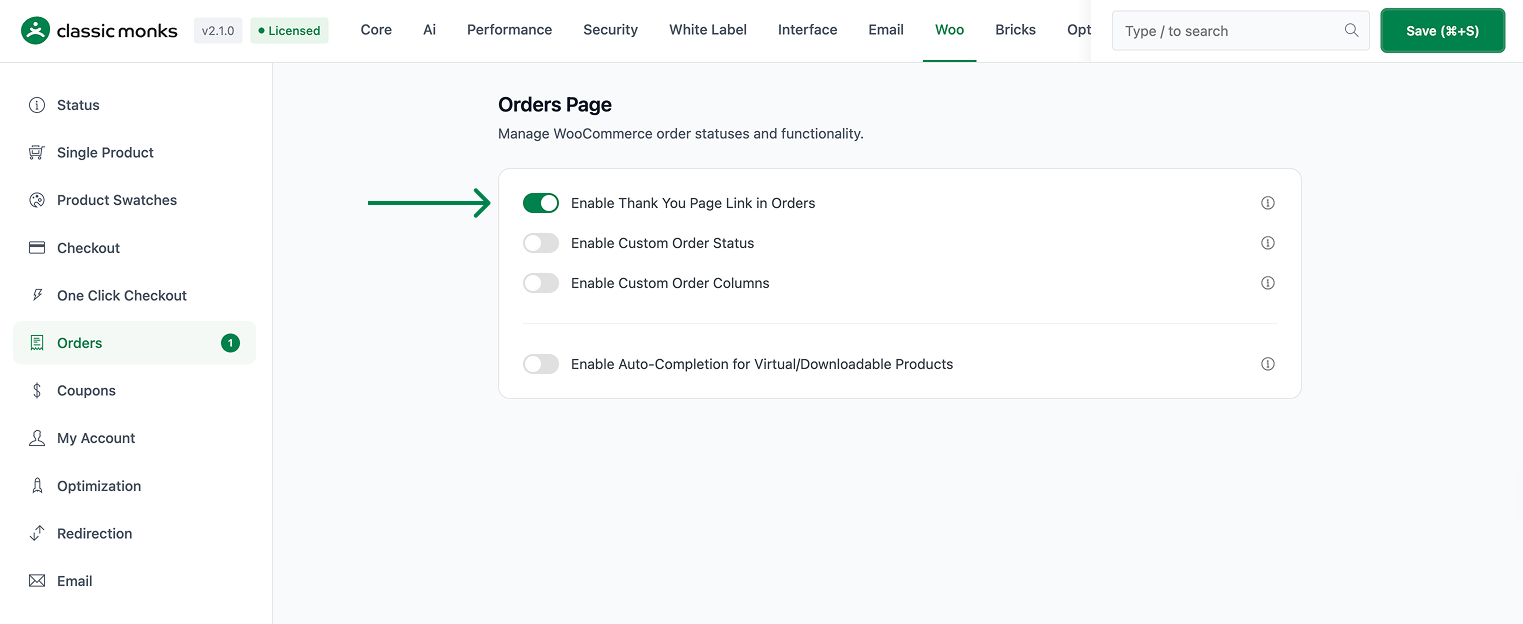
Step 2: Save and Open an Order
Click Save Changes, then go to WooCommerce > Orders.
Step 3: Use the Row Action
Hover over any order row and click the Thank You Page action. The order received page opens in a new tab.
Step 4: Use the Edit-Order Dropdown
Open an order in the editor, use its Order actions dropdown, select Thank You Page, and apply it. The page opens for that order.
The preview runs in the customer’s context for registered users, so you see the page the way the buyer would.
Configuration Options
| Option | Default |
|---|---|
| Enable Thank You Page Link in Orders | Off |
There are no nested options. The feature’s behavior is determined by the capability check and the excluded-status list.
| Applied rule | Behavior |
|---|---|
| Capability | Only users who can edit shop orders see working preview links. |
| Excluded statuses | Cancelled, failed, and trashed orders do not show the thank you link. |
What Gets Affected
- The orders list: a Thank You Page row action is added
- The order editor: a Thank You Page action appears in the Order actions dropdown
- The preview: for registered customers, an admin can view the order received page in the customer’s context
What Does NOT Get Affected
- The customer-facing checkout and order received pages: these are unchanged
- Regular order row actions: view, edit, and the default actions stay in place
- Orders in cancelled, failed, or trashed status: no thank you link is added for them
- Non-admins: the customer preview logic only engages for users who can edit shop orders
Advanced Options (Developers)
The feature registers its hooks in functions/woocommerce/thank-you-page-link.php, gated on the Enable Thank You Page Link in Orders option:
add_filter( 'woocommerce_admin_order_actions', 'cm_add_thank_you_page_action_button', 10, 2 );
add_filter( 'woocommerce_order_actions', 'cm_add_thank_you_order_action_dropdown', 9999, 2 );
add_action( 'woocommerce_order_action_view_thankyou', 'cm_redirect_to_thank_you_from_order_action' );
add_filter( 'determine_current_user', 'cm_admin_becomes_customer_for_thank_you_page', 20 );
add_filter( 'woocommerce_order_received_verify_known_shoppers', '__return_false' );woocommerce_admin_order_actionsadds the row-action button, andwoocommerce_order_actions(priority 9999) adds the dropdown entry. Both exclude orders in the cancelled, failed, or trash status.woocommerce_order_action_view_thankyouhandles the dropdown selection and redirects to the order received page.determine_current_userdrives the customer-context preview: when anadmparameter matches the order’s customer and the user can edit shop orders, it temporarily switches the running user so the page renders as the customer sees it. This runs only on frontend order-received requests.woocommerce_order_received_verify_known_shoppersreturns false so the preview does not get blocked by WooCommerce’s shopper-verification check.- The built URL uses the
order-receivedendpoint plus the order key, and appendsadm,t, andoidfor the customer preview. Filterscm_thank_you_page_url,cm_customer_view_thank_you_url, andcm_thank_you_page_excluded_statusesallow customization. The excluded-statuses filter defaults toarray('cancelled', 'failed', 'trash').

Add your first comment to this post