




What Are WooCommerce User Role Coupon Restrictions?
WooCommerce coupons apply to everyone by default. The Classic Monks Enable User Role Coupon Restrictions feature lets you confine a coupon to specific user roles, so only a logged-in user with the required role can redeem it. This powers B2B, wholesale, VIP, employee, and membership-tier pricing.
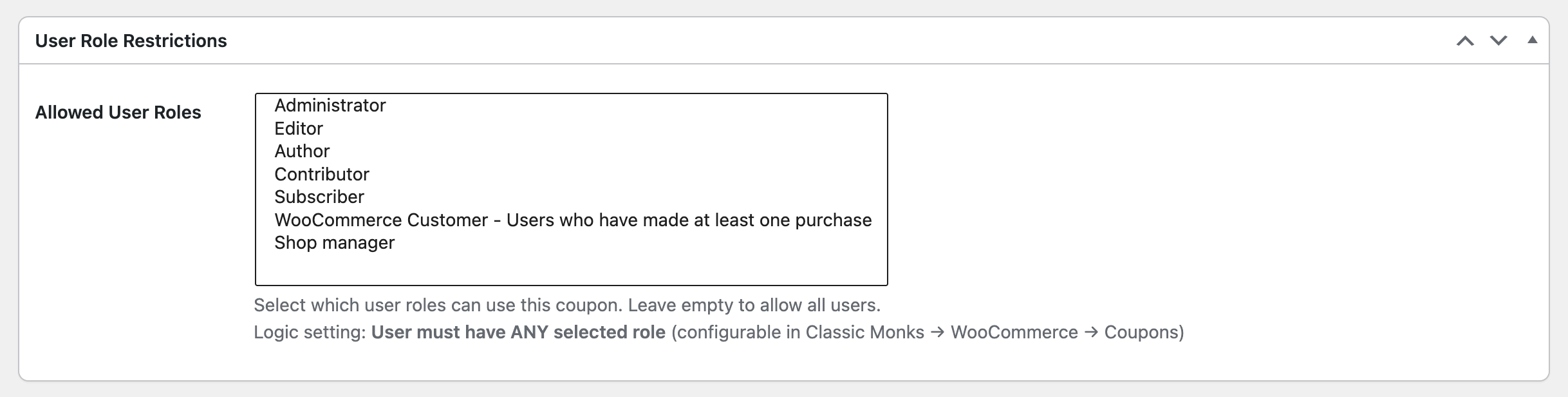
When you enable the feature, the coupon editor gains a User Role Restrictions section where you select which roles may use the coupon.
Why You Need It
Role-restricted coupons enforce audience targeting at checkout:
- B2B and wholesale. Offer wholesale pricing only to wholesale-customer roles, keeping public pricing intact for retail buyers.
- Membership tiers. Give premium members exclusive codes that casual visitors cannot redeem.
- VIP and loyalty. Restrict elite offers to your best customers’ roles.
- Employee and partner offers. Issue internal discounts that are unusable by outsiders.
- Segment cleanup. Prevent a broad public coupon from being reused by audiences it was not meant for.
How to Restrict WooCommerce Coupons by User Role in WordPress
Step 1: Enable the Feature
- Open Classic Monks in your WordPress admin sidebar.
- Open the WooCommerce tab.
- Open the Coupons subtab.
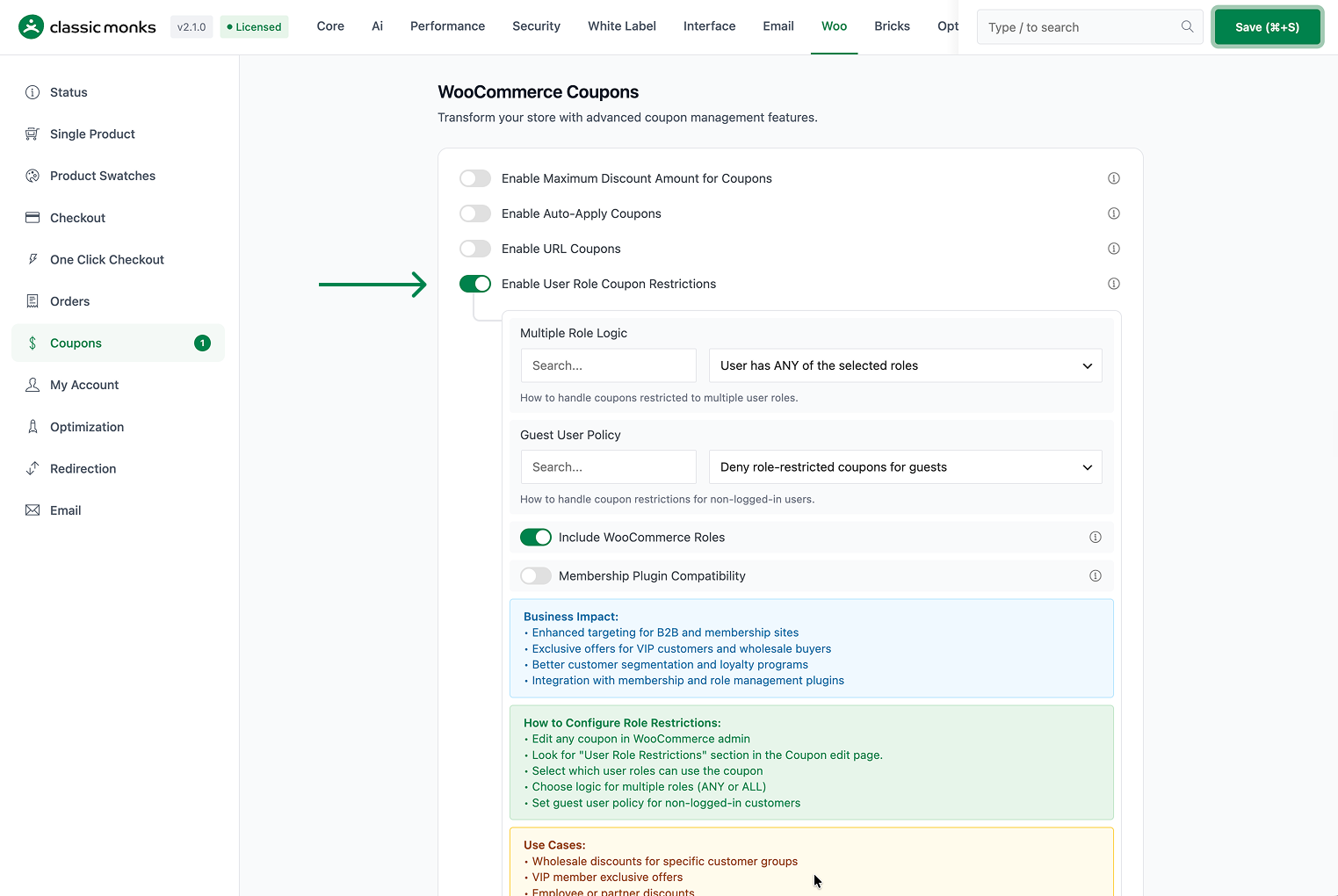
- Toggle on Enable User Role Coupon Restrictions. The nested options expand below the toggle.
Step 2: Configure the Role Logic
- Multiple Role Logic controls how coupons restricted to several roles behave:
- User has ANY of the selected roles (default): the customer only needs to belong to one of the selected roles.
- User has ALL of the selected roles: the customer must belong to every selected role.

Step 3: Configure the Guest Policy
- Guest User Policy decides what happens for non-logged-in users:
- Deny role-restricted coupons for guests (default): guests cannot use coupons that have a role restriction.
- Allow unrestricted coupons only for guests: guests may still use coupons that have no role restriction.
- Treat guests as Customer role: guests are treated as if they hold the default Customer role.

Step 4: Include Extra Roles
- Include WooCommerce Roles (On by default) automatically adds WooCommerce-specific roles (Customer, Shop Manager) to the role-selection list alongside the default WordPress roles.
- Membership Plugin Compatibility (Off by default) adds support for popular membership plugins such as WooCommerce Memberships and Paid Memberships Pro, exposing their membership levels in the role list.

Step 5: Assign Roles to a Coupon
- Go to WooCommerce > Coupons and open the coupon.
- In the User Role Restrictions section, select which roles may use the coupon.
- Save the coupon.
Step 6: Save Changes and Test
Click Save Changes in the Classic Monks settings. Log in as a user in one of the allowed roles and confirm the coupon applies; log out (or log in as a disallowed role) and confirm it does not.
Configuration Options
| Option | Behavior | Default |
|---|---|---|
| Enable User Role Coupon Restrictions | Master toggle for the feature. | Off |
| Multiple Role Logic | ANY of the selected roles, or ALL of the selected roles. | ANY |
| Guest User Policy | Deny role-restricted coupons for guests, allow unrestricted only, or treat guests as Customer. | Deny role-restricted coupons for guests |
| Include WooCommerce Roles | Add Customer, Shop Manager, and other WooCommerce roles to the role list. | On |
| Membership Plugin Compatibility | Expose membership levels from supported plugins in the role list. | Off |
Per-coupon, the User Role Restrictions section lists which roles can redeem that coupon.
What Gets Affected
- Coupon validity: a coupon only applies for users holding an allowed role
- Cart validation: users without the required role get a coupon error at application
- Order processing: the discount is preserved as long as the user keeps the qualifying role
- Guest behavior: controlled by the guest policy setting, ranging from deny to treat-as-customer
What Does NOT Get Affected
- The coupon’s other restrictions: minimum spend, product, category, and usage limits still apply
- Coupons with no role selected: such coupons behave as before
- Existing orders: changing a role later does not retroactively alter a past order’s discount
- Manual code entry mechanics: the role check happens when the coupon is validated, regardless of how it was entered
Advanced Options (Developers)
The feature registers its hooks in functions/woocommerce/coupons/user-role-coupon-restrictions.php:
add_filter( 'woocommerce_coupon_is_valid', 'cm_validate_coupon_user_role', 10, 2 );
add_action( 'woocommerce_coupon_validate_usage_restrictions', 'cm_validate_coupon_user_role_usage', 10, 2 );
add_filter( 'woocommerce_coupon_error', 'cm_custom_user_role_error_message', 10, 3 );

add_action( 'add_meta_boxes', 'cm_add_user_role_restriction_meta_box' );
add_action( 'save_post', 'cm_save_user_role_restriction_meta_box' );woocommerce_coupon_is_validrunscm_validate_coupon_user_role()to enforce the role check when a coupon is validated.woocommerce_coupon_validate_usage_restrictionsruns a parallel usage restriction check.woocommerce_coupon_errorcustomizes the error message shown to users who lack the required role.- When membership compatibility is on,
initsets upcm_setup_membership_compatibility()(priority 20), and hooks onwc_memberships_user_membership_status_changedandpmpro_after_change_membership_levelclear the role cache when a membership changes. woocommerce_new_orderandwoocommerce_order_status_completedclear the customer status cache.
Common Use Cases
Wholesale-only pricing. Restrict a wholesale coupon to the wholesale_customer role so trade buyers get their rate while retail customers see standard prices. Use Include WooCommerce Roles to make sure custom wholesale roles register in the list.
VIP and loyalty tiers. Issue role-restricted coupons for a vip_customer role, so only your highest-value members redeem elite offers. Use ANY logic if a VIP might hold multiple qualifying roles.
Employee and partner discounts. Give staff and partners a dedicated role and a coupon restricted to it, so the discount is unusable outside the team.
Membership gating. With Membership Plugin Compatibility on, tie a coupon to a paid membership level so only active members redeem it, and depend on the membership-change hooks to keep access current.
Guest control. If your B2B coupons should never reach anonymous visitors, keep the default Deny role-restricted coupons for guests policy so a shared link cannot be redeemed by a non-logged-in shopper.

Add your first comment to this post