




What Does the Feature Do?
WooCommerce leaves paid orders in a processing or similar status until an admin marks them completed. For digital stores that sell virtual or downloadable products, that manual step is wasted effort, because fulfillment is automatic and there is nothing to ship.
The Enable Auto-Completion for Virtual/Downloadable Products feature marks eligible orders as completed automatically when payment is confirmed. Only orders whose items all match the configured product type logic are completed, so physical-product orders still move through your normal workflow.
When to Enable It
Enable it for stores that sell digital goods where manual completion is unnecessary:
- Ebooks, software, and license keys delivered by download
- Courses and memberships accessed after purchase
- Services that are fulfilled without shipping
- Any catalog where fulfillment is instant after payment
Keep it off (or selective) when orders mix in physical items, because those still need fulfillment before completion.
How to Automatically Complete Virtual and Downloadable Orders
Step 1: Enable the Feature
- In WordPress admin, open Classic Monks > WooCommerce.
- Open the Orders settings area.
- Toggle on Enable Auto-Completion for Virtual/Downloadable Products. The nested options expand below the toggle.
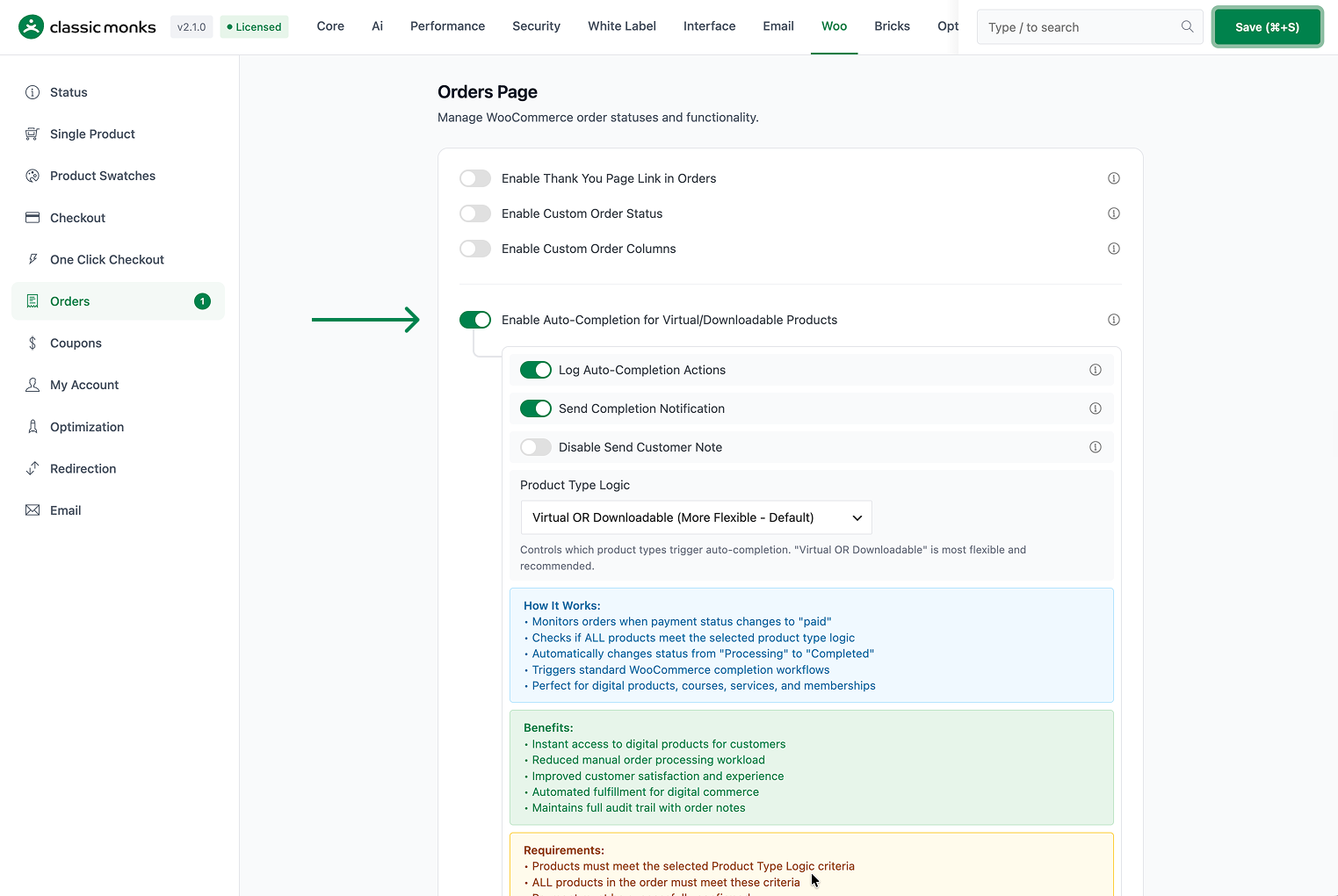
Step 2: Set the Product Type Logic
Use Product Type Logic to decide which products qualify:
- Virtual OR Downloadable (More Flexible, Default): an order qualifies when every item is virtual or downloadable.
- Virtual AND Downloadable (Safest): an order qualifies only when every item is both virtual and downloadable.
- Virtual Only (Services, Memberships): an order qualifies when every item is virtual.
- Downloadable Only: an order qualifies when every item is downloadable.

Compare the first two carefully. Virtual OR Downloadable is the default and the more permissive choice; Virtual AND Downloadable is the strictest and avoids auto-completing products that are only one or the other.
Step 3: Configure Logging and Notes
- Log Auto-Completion Actions (on by default) writes an order note explaining that the order was auto-completed, along with the logic used, and logs a debug line.
- Disable Send Customer Note (off by default) controls whether that auto-completion order note is sent to the customer. Leave it off to share the note with the customer, or turn it on to keep the note admin-only.
- Send Completion Notification (on by default) appears in the settings. The completed-order email itself is sent by WooCommerce’s standard transition when the order becomes completed; this setting reflects the intent to notify the customer.

Step 4: Save and Test
Click Save Changes, then place a test order containing only products that match your logic. Confirm the order moves to completed automatically and that the order note and email behave as configured.
Configuration Options
| Option | Behavior | Default |
|---|---|---|
| Enable Auto-Completion for Virtual/Downloadable Products | Master toggle. | Off |
| Product Type Logic | Virtual OR Downloadable, Virtual AND Downloadable, Virtual Only, or Downloadable Only. | Virtual OR Downloadable |
| Log Auto-Completion Actions | Add an order note and debug log for each auto-completion. | On |
| Send Completion Notification | Intended completion notification to the customer. | On |
| Disable Send Customer Note | Keep the auto-completion order note admin-only, not shared with the customer. | Off |
What Gets Affected
- Eligible orders: marked completed automatically once payment is confirmed
- Order status reporting: qualifying orders show the correct status from payment onward
- Order notes: a note explains the auto-completion when logging is on
- Admin tracking: a running count of auto-completed orders is stored and shown in the admin notice
What Does NOT Get Affected
- Orders that contain any item failing the product type logic: these keep your normal workflow
- Physical-product orders: not auto-completed
- The customer-facing checkout and cart: unchanged
- The WooCommerce REST API order data: unchanged by the feature
Advanced Options (Developers)
The feature registers three hooks in functions/woocommerce/auto-completion.php:
add_action( 'woocommerce_payment_complete', 'cm_auto_complete_virtual_orders' );
add_action( 'woocommerce_order_status_processing', 'cm_auto_complete_virtual_orders' );
add_action( 'woocommerce_payment_complete_order_status_processing', 'cm_auto_complete_virtual_orders' );woocommerce_payment_completeandwoocommerce_order_status_processingruncm_auto_complete_virtual_orders()when payment is confirmed or the order moves to processing.woocommerce_payment_complete_order_status_processingcovers payment-gateway confirmations that set the processing status.
Inside cm_auto_complete_virtual_orders():
- The order is skipped if it is already completed or if any item fails the configured Product Type Logic (
cm_order_contains_only_virtual_downloadable()checks every item against the logic). - If Log Auto-Completion Actions is on, an order note is added recording the logic used. The note is a customer note unless Disable Send Customer Note is on, in which case it is admin-only.
- The order is updated to completed via
update_status(), which is what lets WooCommerce send its standard completed-order email. - A running count is stored in
cm_auto_completed_orders_countand surfaced in the admin notice viacm_get_auto_completion_admin_notice().

Add your first comment to this post