




What Is WooCommerce Direct Checkout Links?
By default, clicking Add to Cart leaves customers on the product page or the cart page, and a “Buy Now” flow usually still requires landing on the product page first. The Classic Monks Enable WooCommerce Direct Checkout Links feature removes those intermediate steps. Each published product gets a generated checkout URL in its edit screen. When a customer clicks it, their cart is cleared and the product is added with the specified quantity, then they are redirected straight to the checkout page, so the entire purchase is a “skip cart” buy-now flow.
A direct checkout URL uses the checkout page with three parameters:
https://yoursite.com/checkout/?direct=1&product_id=456&quantity=3direct=1signals Classic Monks to process the linkproduct_id=456is the product to addquantity=3is how many to add (defaults to 1)
You do not hand-write these URLs. The plugin generates them for you in a Direct Checkout Link metabox on each product’s edit screen, with a Copy Link button for convenience.
Why You Need It
Direct checkout links remove an entire step from the purchasing journey:
- Email campaigns. A newsletter “Buy Now” button that lands on a product page needs a second click to add to cart. A direct checkout link skips both.
- Affiliate and influencer links. Affiliates can send traffic straight to checkout with the right product pre-added, lifting conversion rates on shared links.
- Landing pages. Campaign-specific landing pages can deep-link to checkout so the visitor never has to search for the product.
- QR codes. Business cards, flyers, and packaging QR codes can point to a direct checkout link.
- Coupon and campaign tracking. Any coupon codes, UTM parameters, or affiliate IDs appended to the link are forwarded to the checkout page, so tracking still works.
For stores running email and paid-social campaigns, this is a measurable conversion improvement: every skipped page is a skipped chance to abandon.
How to Enable WooCommerce Direct Checkout Links in WordPress
Step 1: Enable the Feature
- Open Classic Monks in your WordPress admin sidebar.
- Open the WooCommerce tab.
- Open the One Click Checkout subtab.
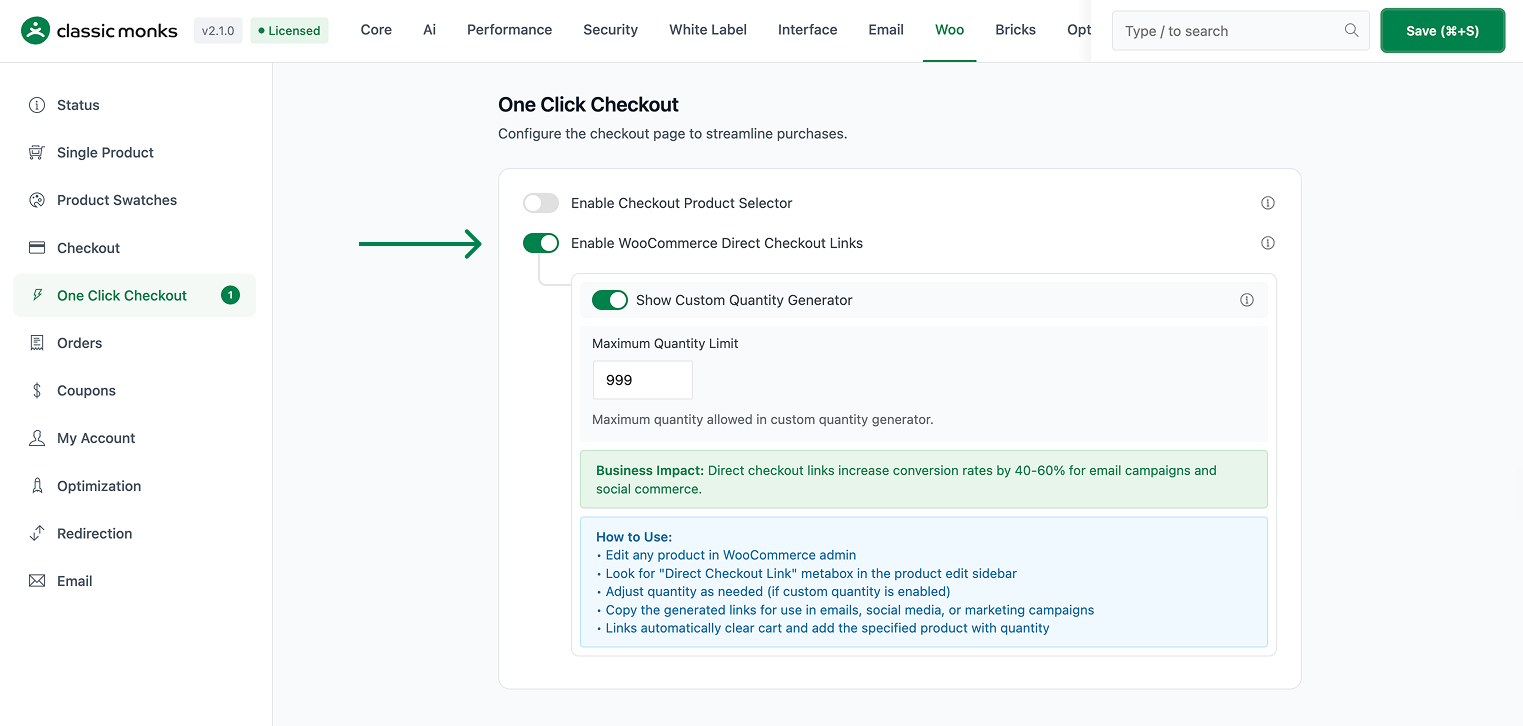
- Toggle on Enable WooCommerce Direct Checkout Links. The nested options expand below the toggle.
Step 2: Set the Quantity Options
- Show Custom Quantity Generator (On by default) shows a quantity box in the product’s Direct Checkout Link metabox so you can generate links for quantities other than 1. Turn it off to always generate links for a quantity of 1.
- Maximum Quantity Limit sets the global cap for custom-quantity links. The effective limit for any product is the lower of this global value and the product’s own maximum purchase quantity.
Step 3: Save Changes
Click Save Changes in the Classic Monks settings toolbar.
Step 4: Generate a Direct Checkout Link
- Edit a published product in WooCommerce > Products.
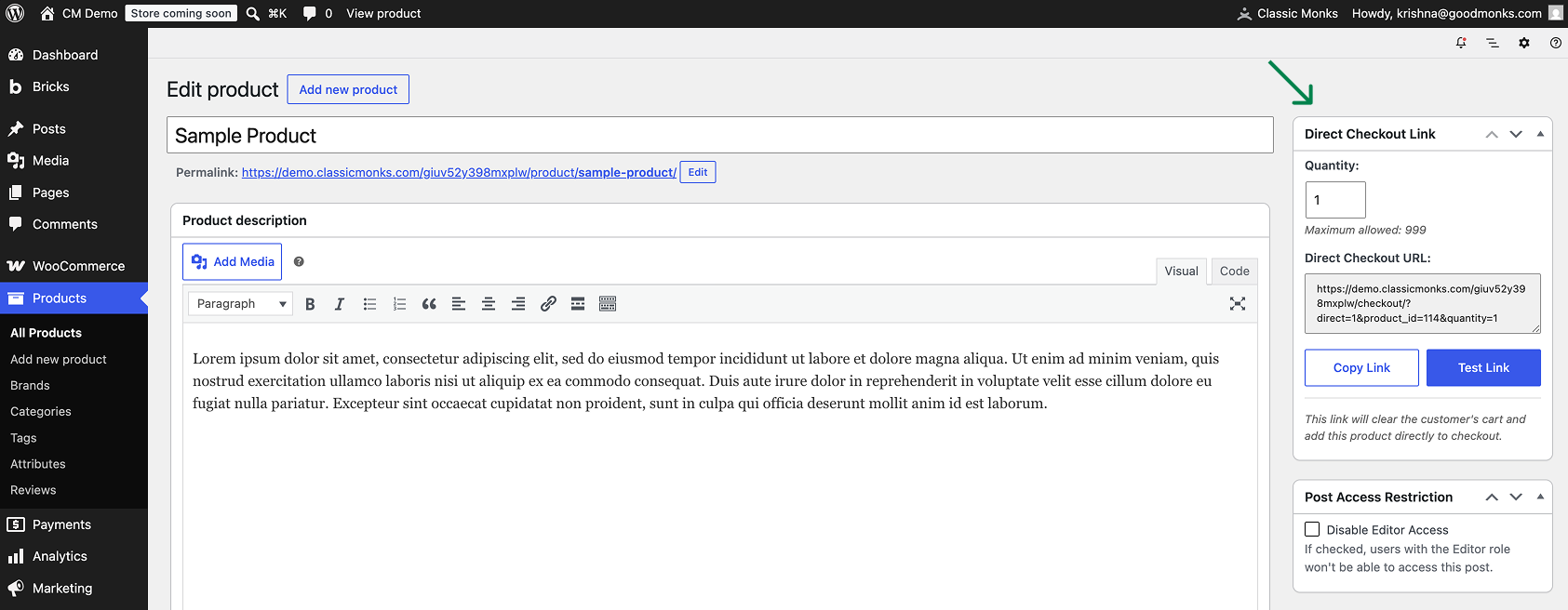
- In the sidebar, find the Direct Checkout Link metabox. Direct checkout links are only available for published, purchasable products, so the metabox shows a note for drafts or unpurchasable items.
- If Show Custom Quantity Generator is on, enter the quantity you want (capped at Maximum Quantity Limit).
- The URL is generated automatically in the metabox text area.
- Click Copy Link to copy it to your clipboard, or Test Link to open it in a new tab.
Step 5: Use the Link
Paste the link into your email campaign, affiliate dashboard, social post, or QR code. When a customer clicks it, the link clears any existing cart contents, adds the product, and redirects to checkout.
Configuration Options
| Option | Behavior | Default |
|---|---|---|
| Enable WooCommerce Direct Checkout Links | Master toggle for the whole feature. | Off |
| Show Custom Quantity Generator | Shows a quantity input in the product metabox for generating links with a custom quantity; off forces quantity 1. | On |
| Maximum Quantity Limit | Global cap on the quantity used in generated links (1-9999). The effective limit is the lower of this value and the product’s max-purchase quantity. | 999 |
What Gets Affected
- The product edit screen: a Direct Checkout Link sidebar metabox appears on published products
- Checkout behavior: a URL with
direct=1clears the cart, adds the product, and redirects to checkout - Query parameters:
direct,product_id, andquantityare consumed; all other parameters (coupons, UTM, affiliate IDs) are forwarded to checkout - The cart: existing contents are cleared before the direct-checkout product is added
What Does NOT Get Affected
- The standard Add to Cart button on product and archive pages (unchanged)
- The cart and checkout pages for normal shopping (a direct checkout only triggers when
direct=1is in the URL) - Product stock and inventory rules (standard WooCommerce limits and stock status still apply)
- The SKU (the feature uses product ID, not SKU, as its identifier)
Advanced Options (Developers)
The feature registers three hooks in functions/woocommerce/one-click-checkout/direct-checkout-link.php:
add_action( 'wp_loaded', array( $this, 'process_direct_checkout' ), 5 );
add_action( 'add_meta_boxes', array( $this, 'add_direct_checkout_metabox' ) );
add_action( 'admin_enqueue_scripts', array( $this, 'enqueue_admin_assets' ) );wp_loaded(priority 5) runsprocess_direct_checkout(), which reads thedirect,product_id, andquantityparameters, validates the product and quantity limits, clears the cart, adds the product, and safely redirects to checkout.add_meta_boxesregisters the Direct Checkout Link metabox on the product edit sidebar.admin_enqueue_scriptsloads the metabox CSS and JS only on product edit screens for users who can edit products.
There is also a public helper for theme and plugin developers:
// Generate a direct checkout URL for product 456 with a quantity of 3
$url = cm_get_direct_checkout_url( 456, 3 );
This returns wc_get_checkout_url() with the direct, product_id, and quantity parameters appended. It is a shortcut to CM_Direct_Checkout_Link::generate_checkout_url().
Common Use Cases
Email and newsletter campaigns. Put a direct checkout link behind every “Buy Now” call-to-action in your campaigns. Users land on checkout with the featured product pre-added, eliminating clicks and drop-off between the email and the order.
Affiliate and influencer programs. Hand affiliates a stable direct checkout link per product. Because the quantity and product are baked into the URL, you can trust that every click converts the intended item without manual cart work.
QR codes on packaging and print. Link a printed QR code straight to checkout for a product. A shopper scans, lands on checkout with the item ready, and completes the order on their phone.
Flash sales and hot drops. When you need to sell a specific SKU fast, share a direct checkout link on social channels. Every visitor who taps the link is one click away from paying.
Replenishment and subscription-style purchases. Use a fixed-quantity direct checkout link (for example, quantity 6) so repeat buyers can restock a standard quantity in one tap.

Add your first comment to this post