




What Is the Exclude Noindex from Search feature?
WordPress has two separate search systems:
- External search (Google, Bing, etc.): Uses the
noindexmeta tag in the page’s<head>. When the tag is present, search engines exclude the page from their index. - Internal search (the search box on your site): Uses WordPress’s
WP_Querywith thesparameter. By default, this returns ALL matching posts, including those marked withnoindex.
These can get out of sync. A page that’s marked noindex (so Google ignores it) can still appear in your site’s internal search results, where visitors can find and click it.
Exclude Noindex from Search bridges this gap. When a post has a noindex meta tag (set by your SEO plugin or by Enable Nofollow for Post Types), the feature excludes it from internal search results. The noindex tag is preserved (search engines still see it), but the post is hidden from your site’s own search.
Why You Need It
Internal site search is often the user’s first stop when they can’t find something in the navigation. If the search returns noindexed posts (which the user might click only to be told “this page is not for you”), the experience is broken.
Common use cases for excluding noindexed posts from search:
- Staging content: Posts published for review but not meant for public consumption
- Low-quality pages: Tag pages, archive pages, or auto-generated content that you noindex but still exist
- Internal-only content: Documentation or knowledge-base posts that are noindex (for Google) but should still be findable internally
- Sponsored content: Posts that are noindex per Google’s paid content guidelines but shouldn’t appear in site search
The feature ensures internal search results are consistent with external search expectations.
How to Use Exclude Noindex from Search in Classic Monks
Step 1: Navigate to Settings
Click into the Classic Monks plugin settings in your WordPress dashboard.
Step 2: Go to the Content Subtab
Click on the Core menu, then click the Content subtab.
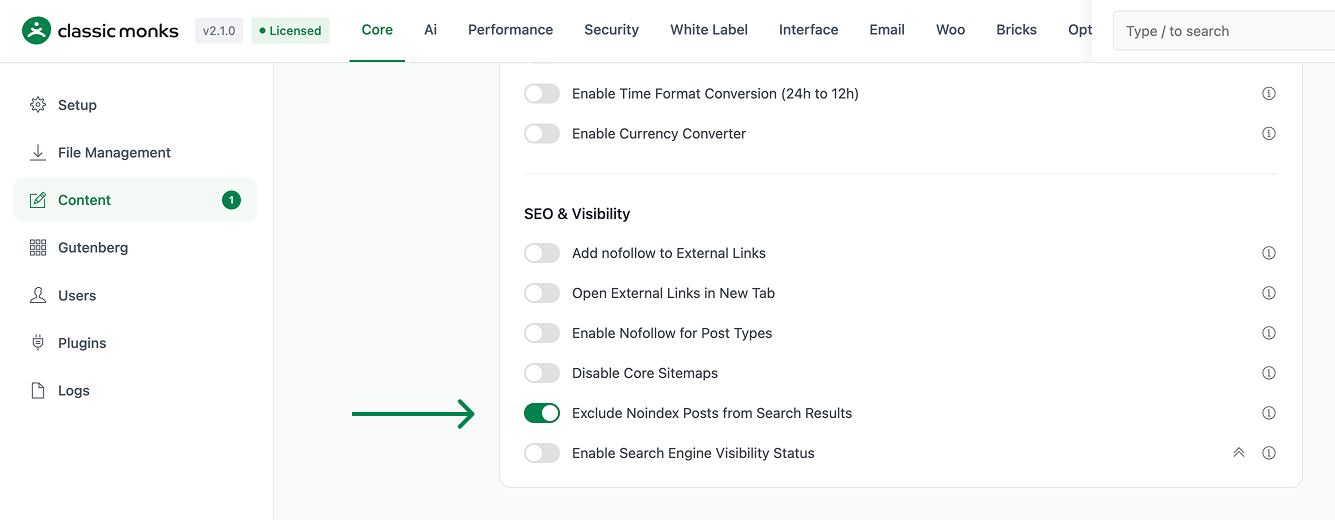
Step 3: Enable Exclude Noindex from Search
Scroll to the SEO and Visibility section and toggle on Exclude Noindex Posts from Search Results.
Step 4: Save Changes
Click Save Changes.
Step 5: Verify
Search for a noindexed post using your site’s search box. The post should not appear in the results. Compare to the same search with the toggle off (the post should appear).
Configuration Options
| Option | Description | Default |
|---|---|---|
| Exclude Noindex Posts from Search Results | Master toggle. | Off |
No nested options.
How “Noindex” Is Detected
The feature uses WordPress’s standard wp_robots filter to determine whether a post has a noindex directive. Posts with any of the following are considered noindexed and excluded from search:
| Source | Detection method |
|---|---|
| Classic Monks (Nofollow for Post Types feature) | Posts in selected post types are tagged with noindex, nofollow |
| Yoast SEO | Yoast sets the noindex meta based on post settings |
| RankMath | RankMath sets the noindex meta based on post settings |
| AIOSEO | AIOSEO sets the noindex meta based on post settings |
Manual wp_robots filter |
Custom code that filters wp_robots to add noindex |
The feature is SEO-plugin-agnostic. It uses the resulting wp_robots directive, not a specific plugin’s custom meta key.
What Gets Affected
| Search context | Affected? | Notes |
|---|---|---|
Default WordPress search (?s=) |
Yes | Most common use case |
| Custom search plugins (SearchWP, Relevanssi) | Depends on plugin | The default WP_Query is affected; custom search engines may need their own integration |
WP_Query with s parameter |
Yes | Any code that runs a search via WP_Query |
REST API search endpoint (/wp-json/wp/v2/search) |
Yes | Same WP_Query under the hood |
| Block editor post search | No | Block editor searches are server-side admin queries; the filter is scoped to front-end searches |
| Admin post list search | No | Same as above; admin queries are not filtered |
| Search widget results | Yes | Uses the default search query |
Developer Notes
This feature is a single toggle with no developer hooks currently exposed. The feature-specific logic is loaded conditionally when the toggle is enabled.
Options used:
| Option | Type | Default |
|---|---|---|
| Feature toggle | Boolean | false |

Add your first comment to this post