




What Does the Feature Do?
When a logged-in user visits the WordPress login page, they see a login form they do not need. The Redirect Logged-in Users from Login Page feature sends them to a useful destination instead, such as the My Account page or a custom URL.
The destination is configurable, and a custom URL lets you send users anywhere you choose.
Why You Need It
Showing a login form to an authenticated user is poor UX:
- Users may wonder why they are asked to log in again
- The login form is a dead end for someone already signed in
- Redirecting provides a logical next step for authenticated users
- A custom URL lets you control the exact destination
How to Redirect Logged-in Users from the Login Page
Step 1: Enable the Feature
- In WordPress admin, open Classic Monks > WooCommerce.
- Open the Redirection settings area.
- Toggle on Redirect Logged-in Users from Login Page.
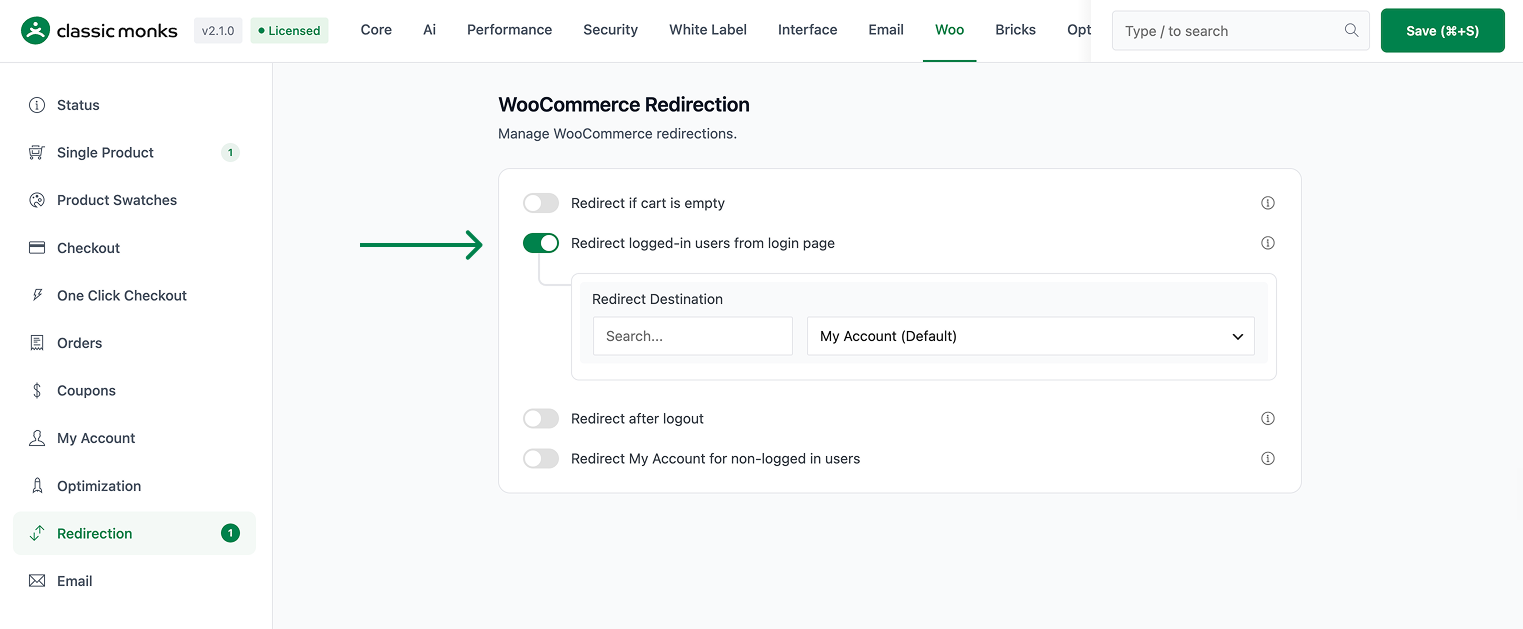
Step 2: Choose the Destination
- Redirect Page: pick the My Account page, a specific page, or Custom.
- If you choose Custom, enter a Custom URL.
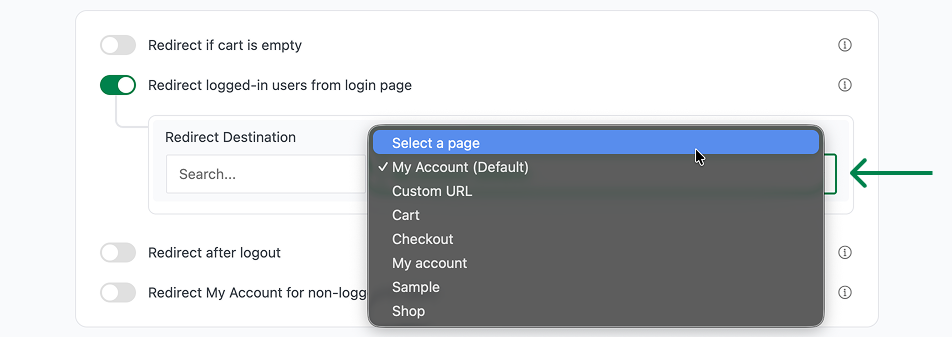
Step 3: Save and Test
Click Save Changes. Log in, open the login page, and confirm you are redirected to your chosen destination.
Configuration Options
| Option | Behavior | Default |
|---|---|---|
| Redirect Logged-in Users from Login Page | Master toggle. | Off |
| Redirect Page | My Account, a selected page, or Custom. | My Account |
| Custom URL | Destination when Redirect Page is set to Custom. | Blank |
What Gets Affected
- The login page for logged-in users: they are redirected away from it
- The destination page: receives the redirected user
What Does NOT Get Affected
- The login process for guests: users who are not logged in still see the login form
- Logout: works normally
- Password reset: separate from this redirect
- The account dashboard: it is a redirect target, not altered
Advanced Options (Developers)
The feature registers one hook in functions/woocommerce/woocommerce-functions.php:
add_action( 'template_redirect', 'cm_redirect_logged_in_users_from_login' );template_redirect calls cm_redirect_logged_in_users_from_login() to detect the login page and redirect authenticated users to the configured destination.
Common Use Cases
Frequent users. Authenticated customers get sent to their account instead of a login form.
Membership stores. Members who are always logged in avoid the redundant login screen.
B2B and wholesale. Wholesale accounts land directly on their account or dashboard.
Keeping It Set Up
Set the toggle once and it stays active across the site. To change behavior, return to the WooCommerce settings, adjust the option, and save again. The store continues to run normally throughout, and you can turn the feature off at any time to restore the previous default behavior. For teams managing multiple environments, confirm the setting on staging first, then apply it to production and verify a real page load before treating it as live.

Add your first comment to this post