




What Does the Feature Do?
After a user logs out, WordPress usually leaves them where they were or returns to a default location. The Redirect After Logout feature sends them to a chosen destination immediately on logout, such as the login page or a custom URL.
The destination is configurable, and a custom URL lets you send users anywhere you choose.
Why You Need It
A clear logout destination improves the flow:
- Users get clear confirmation that they logged out
- They are not left on a page that requires authentication
- A login destination lets them sign back in cleanly
- A custom URL allows a specific next step
How to Redirect After Logout
Step 1: Enable the Feature
- In WordPress admin, open Classic Monks > WooCommerce.
- Open the Redirection settings area.
- Toggle on Redirect After Logout.
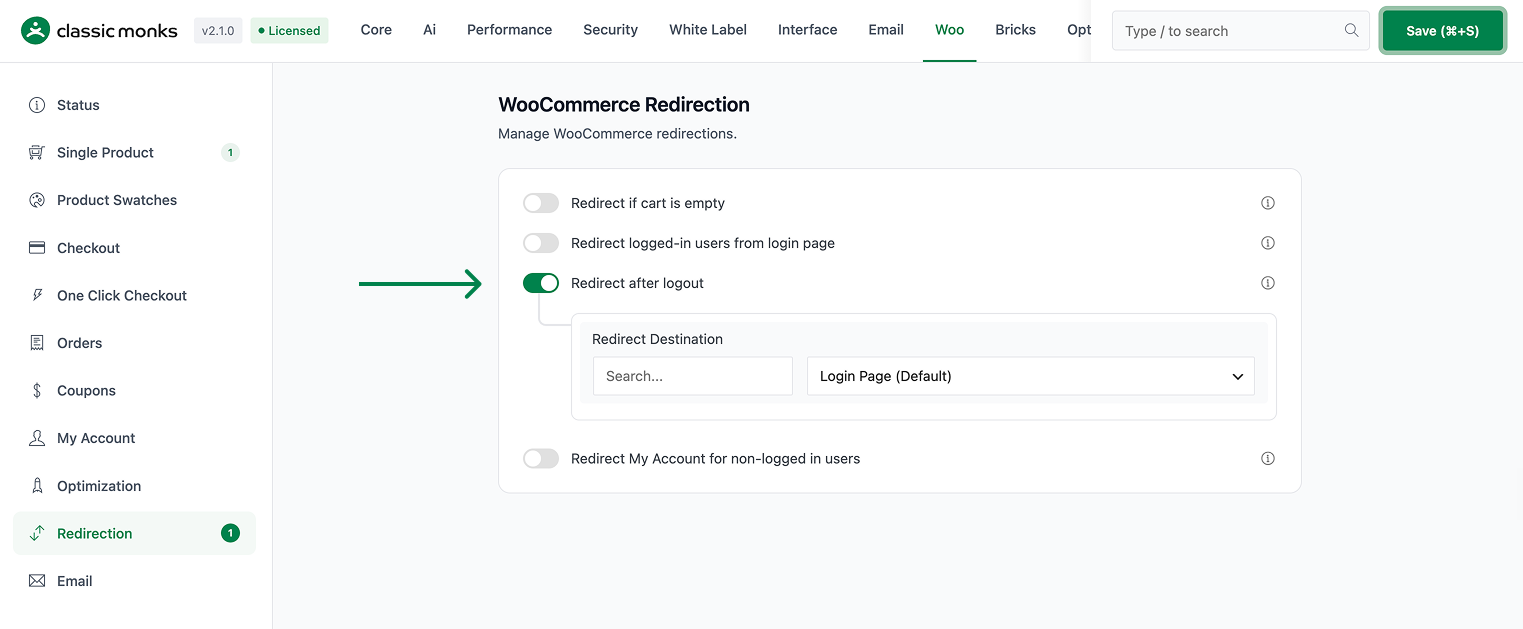
Step 2: Choose the Destination
- Redirect Page: pick the login page, a specific page, or Custom.
- If you choose Custom, enter a Custom URL.
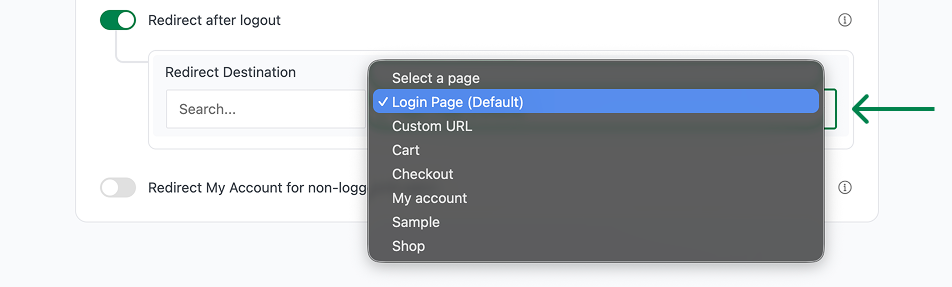
Step 3: Save and Test
Click Save Changes. Log in, log out, and confirm you land on the destination you chose.
Configuration Options
| Option | Behavior | Default |
|---|---|---|
| Redirect After Logout | Master toggle. | Off |
| Redirect Page | Login, a selected page, or Custom. | Login |
| Custom URL | Destination when Redirect Page is set to Custom. | Blank |
What Gets Affected
- The logout flow: users are redirected to the chosen destination on logout
What Does NOT Get Affected
- The login process: unchanged
- The account dashboard: it is not the default target unless you select it
- Browser cookies and sessions: cleared normally on logout
Advanced Options (Developers)
The feature registers one hook in functions/woocommerce/woocommerce-functions.php:
add_action( 'wp_logout', 'cm_redirect_after_logout_action' );wp_logout calls cm_redirect_after_logout_action(), which reads the configured destination (login or custom URL) and performs a safe redirect after the user logs out.
Common Use Cases
Shared devices. Sending users back to the login page on shared computers encourages a clean hand-off.
Clear confirmation. A login destination tells users the logout worked.
Specific next steps. A custom URL can route logged-out users to a landing page or promotion.
Keeping It Set Up
Set the toggle once and it stays active across the site. To change behavior, return to the WooCommerce settings, adjust the option, and save again. The store continues to run normally throughout, and you can turn the feature off at any time to restore the previous default behavior. For teams managing multiple environments, confirm the setting on staging first, then apply it to production and verify a real page load before treating it as live.

Add your first comment to this post