




What Does the Feature Do?
WooCommerce shows a “clear” or reset link next to variation dropdowns that lets a customer remove their selection. The Remove Clear Variation Link feature hides that link, so the selected variation is not cleared by the customer.
The feature removes the reset link markup and hides the element that WooCommerce renders for it, keeping the selected variation in place.
Why You Need It
The clear link can be an unwanted control:
- It lets customers clear the variation, which can break the add-to-cart selection
- The link adds clutter next to the dropdown
- Some stores prefer that customers change to a different option rather than reset
- Removing it keeps the current selection stable on the product page
How to Remove the Clear Variation Link in WooCommerce
Step 1: Enable the Feature
- In WordPress admin, open Classic Monks > WooCommerce.
- Open the Single Product settings area.
- Toggle on Remove Clear Variation Link.
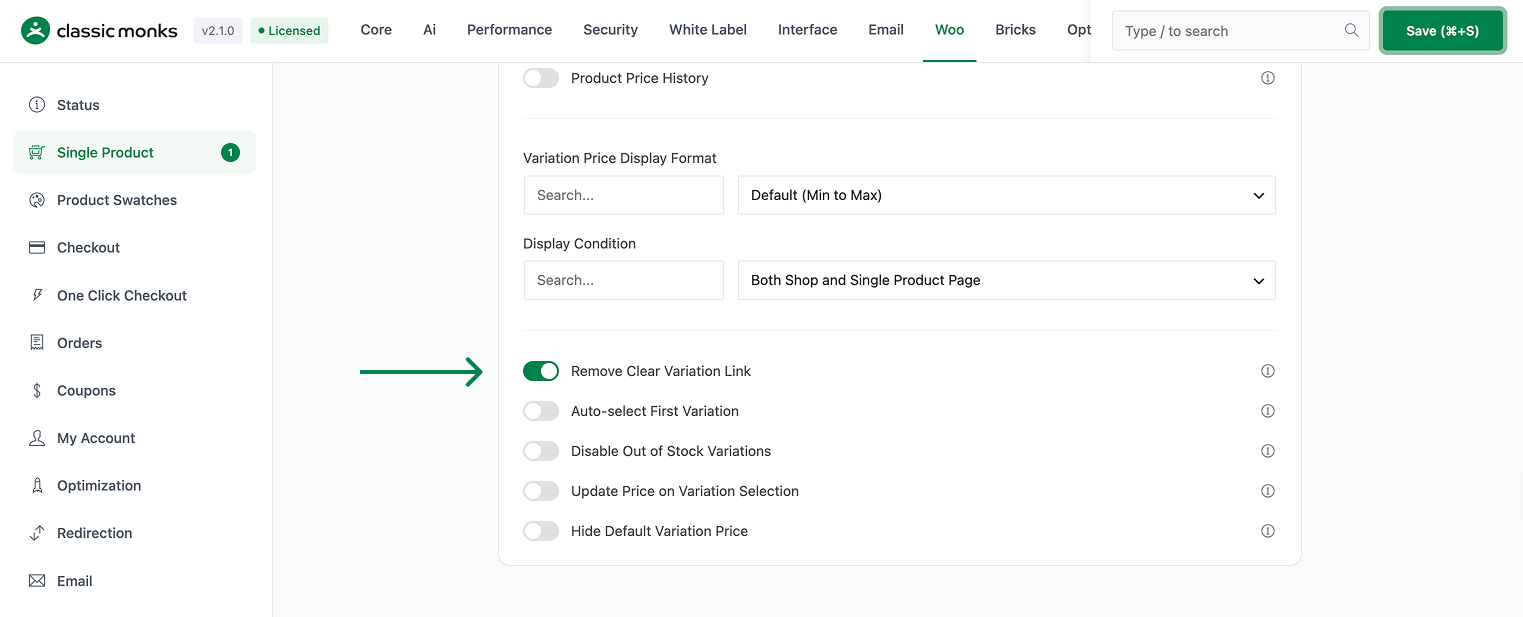
Step 2: Save and Test
Click Save Changes. Open a variable product and confirm the clear/reset variation link no longer appears next to the dropdowns, while the dropdowns still let customers pick a different option.
Configuration Options
| Option | Default |
|---|---|
| Remove Clear Variation Link | Off |
There are no nested options. The feature is a single on/off control.
What Gets Affected
- Variable product pages: the clear/reset variations link is removed
- The reset-variations element: hidden
What Does NOT Get Affected
- The variation dropdowns: unchanged and still selectable
- The variation data and prices: unchanged
- The ability to change variation: customers can still pick a different option
- The product page layout beyond the removed link
Advanced Options (Developers)
The feature registers its logic in functions/woocommerce/variation-display.php:
add_filter( 'woocommerce_reset_variations_link', '__return_empty_string' );
add_action( 'wp_head', function() {
    echo '<style>.reset_variations { display: none !important; }</style>';
} );woocommerce_reset_variations_linkreturns an empty string so WooCommerce does not render the reset link.wp_headinjects CSS that hides the.reset_variationselement for added safety.
Common Use Cases
Stable selections. Stores that want the chosen variation to stay fixed on the product page.
Cleaner dropdowns. Removing the extra link keeps the variation controls tidy.
Conversion flow. Some themes place the reset link awkwardly, and removing it cleans the product page.
Changing Versus Clearing
Removing the clear link does not stop customers from changing to a different variation. The dropdowns still list every option, and selecting another one updates the selection and price normally. The feature only removes the reset action, so a chosen variation stays put until the customer picks something else. This is useful where the reset link appears beside a dropdown and gets tapped by mistake, clearing the selection the customer intended to keep.

Add your first comment to this post