




What Is the AI Features Master Toggle?
The AI Features master toggle is a single switch in the Classic Monks AI tab that controls whether any AI-powered functionality runs on your site. When it is on, Classic Monks loads the AI Provider configuration, the Vision / Image Provider, AI Tools, AI Agent, and Bricks AI Builder. When it is off, all of those features are hidden and disabled, regardless of their individual toggle states.
This is the gate that decides whether the plugin talks to an AI provider at all. Turn it on once and you can selectively enable the sub-features you actually need.
Why You Need It
Without a master toggle, leaving AI features on by default would mean every site ships with API calls, secret keys, and provider connections active. That creates surprise costs and unwanted data flowing to third-party services.
The master toggle gives you one place to:
- Turn off all AI processing during client work or compliance reviews
- Stop the AI Agent from appearing in the admin bar without losing the configuration
- Bulk-disable AI when migrating to a new provider or testing performance
- Comply with privacy policies that require AI to be opt-in
How to Enable AI Features in Classic Monks
Step 1: Navigate to Settings
Click into the Classic Monks plugin settings in your WordPress dashboard.
Step 2: Go to the AI Tab
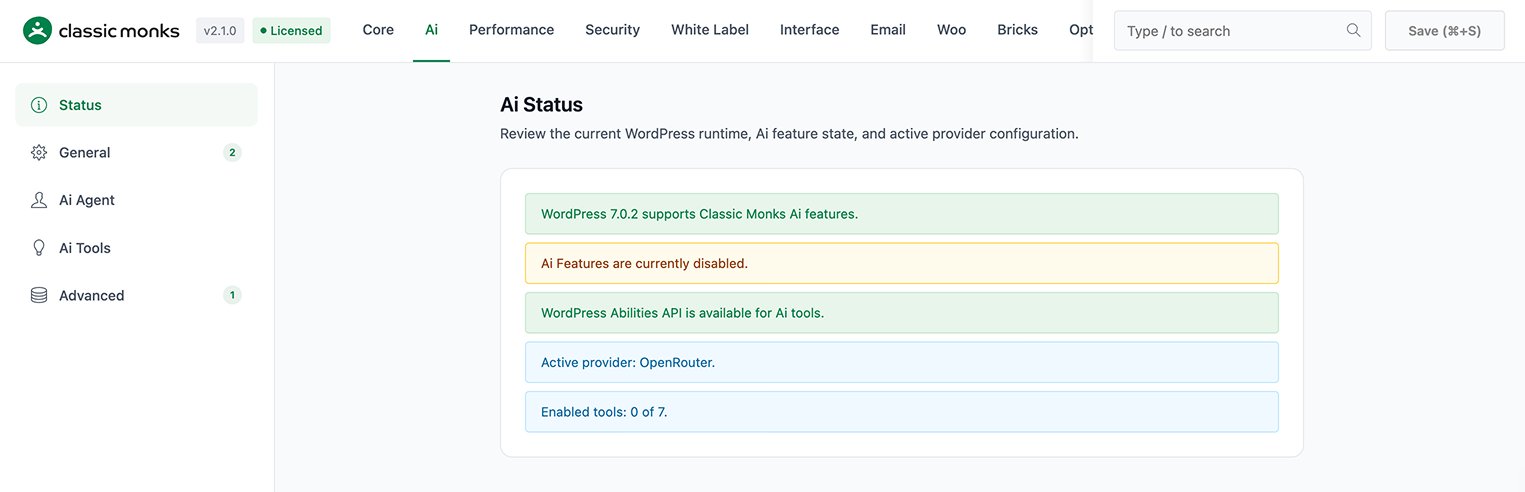
Click on the AI menu. The Status subtab opens first.
Step 3: Confirm WordPress Version
The Status subtab shows whether your site meets the WordPress 6.9 requirement. If you see a green “Ai Features are enabled” notice after toggling, you are good to go. If you see a red notice, the WordPress version on the site is too old and AI features cannot run regardless of the toggle state.
Step 4: Toggle On “Enable AI Features”
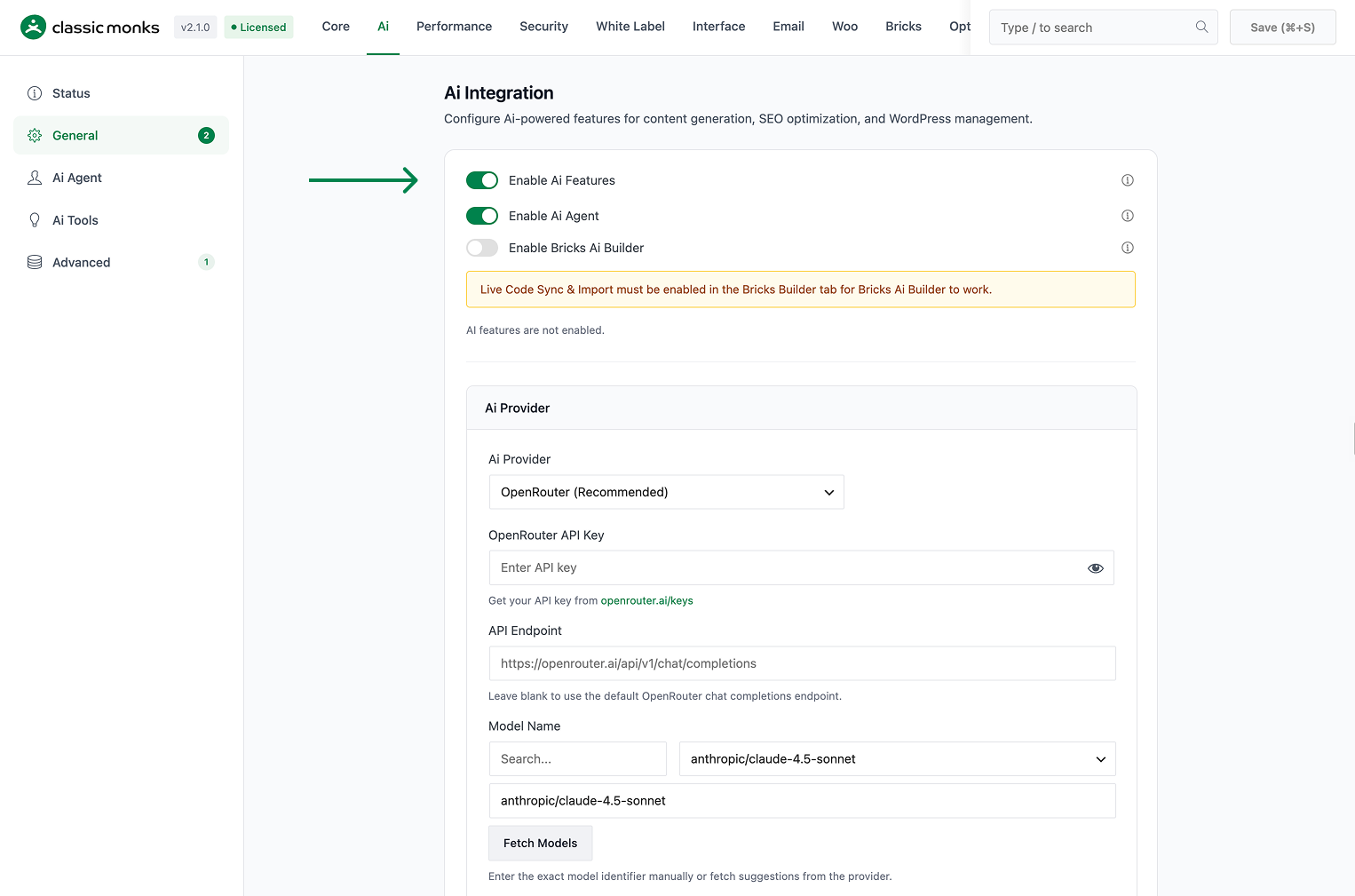
Under the General subtab, flip the Enable AI Features switch. The configuration panel below it expands to show the AI Agent toggle, Bricks AI Builder toggle, AI Provider selector, and Vision / Image Provider.
Step 5: Save Changes
Click Save Changes. The save action persists the toggle and loads the rest of the AI tab UI.
Configuration Options
| Option | Description | Default |
|---|---|---|
| Enable AI Features | Master switch for all AI functionality in Classic Monks. Required for AI Agent, Bricks AI Builder, AI Tools, AI Provider, and Vision / Image Provider. | Off |
| WordPress Version Check | The Status subtab reports whether the running WordPress version (must be 6.9+) supports the Abilities API. | informational only |
| Abilities API Check | The Status subtab reports whether the WordPress Abilities API is available. Required for AI Tools. | informational only |
What Happens When You Turn It On
Enabling Enable AI Features reveals the following features and their configuration panels:
- AI Agent toggle (and its sub-options: system prompt, max tokens, chat width on the Agent subtab)
- Bricks AI Builder toggle (and its dependency warning if Live Code Sync is off)
- AI Provider selector with 8 supported providers
- Vision / Image Provider selector with 2 supported providers
- AI Tools subtab with 7 individual tools and a shared system prompt
- Advanced subtab with debug mode, max retries, and chat history limit
Each of these has its own dedicated doc linked in the Related Articles section.
What Happens When You Turn It Off
Flipping the master toggle off:
- Hides the AI Agent chat icon from the WordPress admin bar
- Disables Bricks AI Builder even if its own toggle is on
- Hides all AI Tools toggles and disables the tools
- Stops all AI Provider API calls
- Stops all Vision / Image Provider API calls
- Preserves your API keys, model selections, and system prompts so re-enabling is instant
You do not lose your configuration. The provider keys and system prompts stay saved.
Developer Notes
The master toggle controls whether AI features are available site-wide. The function cm_is_ai_enabled() returns true only when the master toggle is on and the site is running WordPress 6.9 or newer.
Options used:
| Option | Type | Default |
|---|---|---|
enable_cm_ai |
Boolean | false |

Add your first comment to this post