




What Is Bricks Optimization
Bricks Optimization is a group of options in the Classic Monks Bricks tab, Optimization subtab, that reduce the Bricks Builder frontend asset load. When you use Bricks for a landing page or a few templates but not the whole site, Bricks still enqueues its CSS and JavaScript on every page. These options stop that, so pages that do not use Bricks load lighter.
Recommendations Before Enabling
- Confirm which pages use Bricks. These options disable Bricks assets on pages that do not use Bricks, so verify your Bricks pages still load their styles.
- Test both Bricks and non-Bricks pages. After enabling, check that Bricks pages look correct and non-Bricks pages load faster.
- Enable one at a time. Turn on each option and test, so you can isolate any issue.
Optimize Bricks Asset Loading
Step 1: Open the Bricks Tab
In your WordPress dashboard, go to Classic Monks, then open the Bricks tab.
Step 2: Open the Optimization Subtab
Click the Optimization subtab.
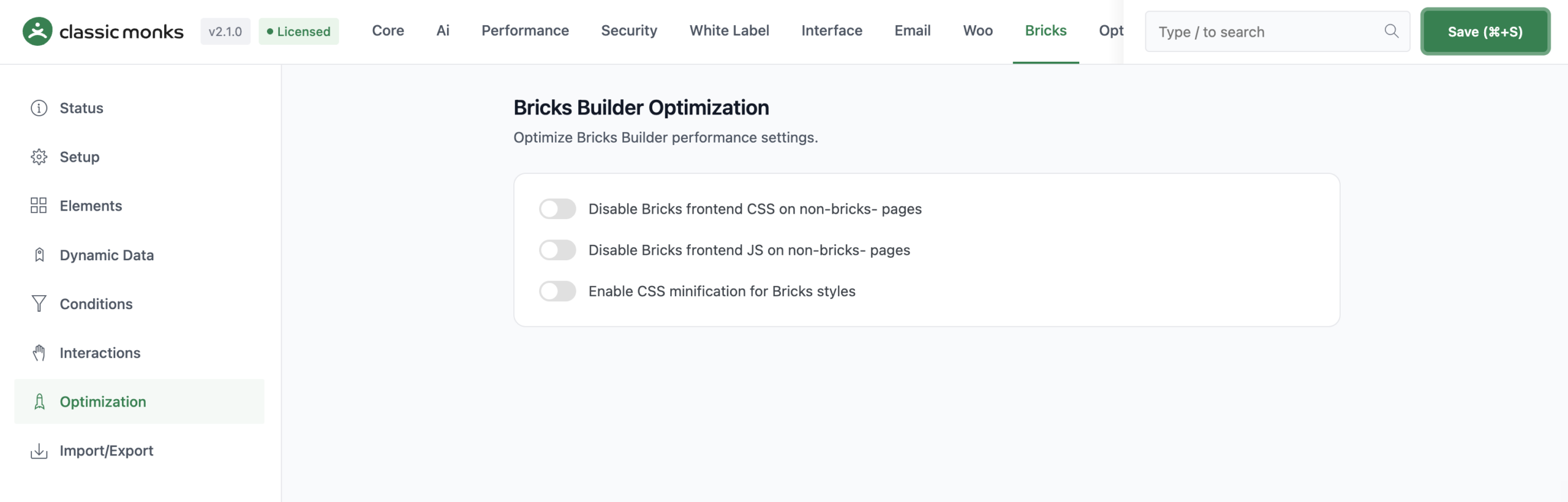
Step 3: Disable Bricks Frontend CSS
Toggle on Disable Bricks frontend CSS on non-bricks pages. This prevents the Bricks frontend stylesheet from loading on pages that do not use Bricks.
Step 4: Disable Bricks Frontend JS
Toggle on Disable Bricks frontend JS on non-bricks pages. This prevents the Bricks frontend JavaScript from loading on pages that do not use Bricks.
Step 5: Enable CSS Minification
Toggle on Enable CSS minification for Bricks styles. This minifies the Bricks CSS that does load, reducing its size.
Step 6: Save and Test
Click Save (⌘+S). Open both a Bricks page and a non-Bricks page to confirm the Bricks page still looks correct and the non-Bricks page loads without the extra assets.
Verify It Works
After saving, verify the optimization:
- A Bricks page still renders its styles and layouts correctly.
- A non-Bricks page no longer loads the Bricks frontend CSS and JavaScript.
- The page size and HTTP requests on non-Bricks pages are reduced.
You can check the page source or use the browser’s Network panel to confirm the Bricks assets are not enqueued on non-Bricks pages.
Examples
Example 1: Bricks Only on the Homepage
A site builds only its homepage with Bricks and uses another theme for the rest. Toggle on Disable Bricks frontend CSS on non-bricks pages and Disable Bricks frontend JS on non-bricks pages. Blog posts and other pages load without the Bricks assets, making them faster.
Example 2: Minify Bricks Styles Site-Wide
A site uses Bricks throughout and wants the CSS smaller. Toggle on Enable CSS minification for Bricks styles. The Bricks CSS that loads is minified, reducing its transferred size.
Example 3: A Mixed Bricks Site
A site uses Bricks for a few templates but not all pages. Toggle on all three optimization options. Bricks pages keep their styles, and non-Bricks pages load lighter and faster.

Add your first comment to this post